Having some issues adding public holiday entitlements to part time employee’s leave balances. The absence type settings includes public holidays however these do not appear on the part time employee’s leave balance. Not exactly sure how to include the pro-rated public holiday hours.
Could you please assist?
Thanks for your help!
Beste Antwort von International Support Team
Hi @Steph,
Thanks for sharing more information with us! Public holidays in Personio are not included in the absence entitlement. Currently, in the Available balances, just the one related to the Absence types are showed in the Employee profile. For example, for the absence type Holidays, you can see everything related to vacation days, the Entitlement, the Planned days or the Taken days. Another absence type with an Accrual policy assigned, same situation. But the Public holidays are not part of them.
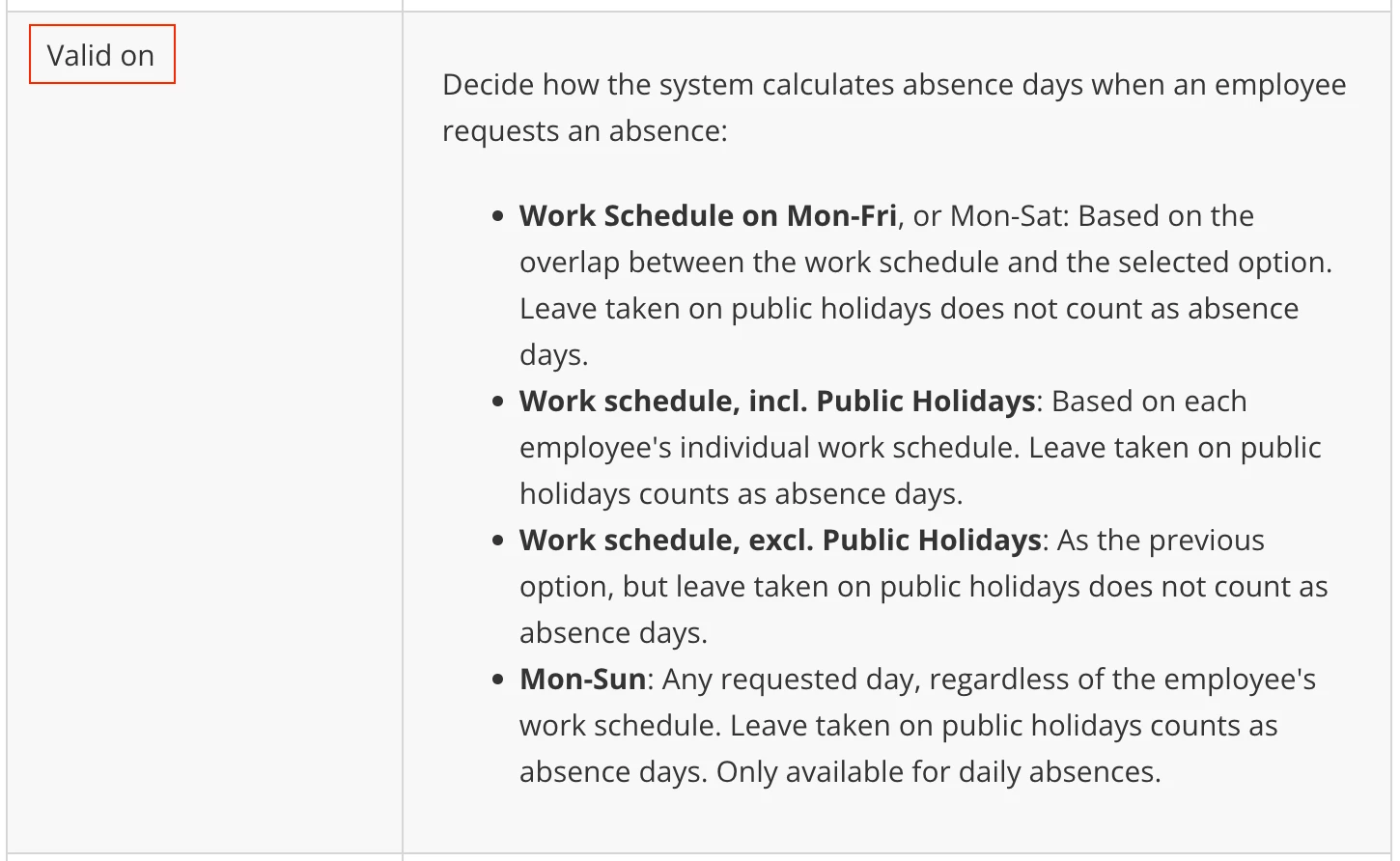
I think there might be some misunderstanding, when selecting in the Absence type settings the Validity on option Work schedule, incl. Public Holidays, this is based on each employee's individual work schedule and leave taken on public holidays counts as absence days (it’d be deducted from the absence entitlement). Having this into consideration, if the employees can take those days as absence days because they can also work during them, you have to add more days to the entitlement if you want them to have more days. If you want the employees not to work during Public holidays, you will need to select a different settings in Validity on for it in the absence type, depending on your needs:
For more information about this topic, you can visit our Help Center article: Create absence types.
I hope this is clearer now and I could address your concern! 😊 If not, please share more information with me, some example would be great, but do not forget not to share personal data as this is a private channel! 😃
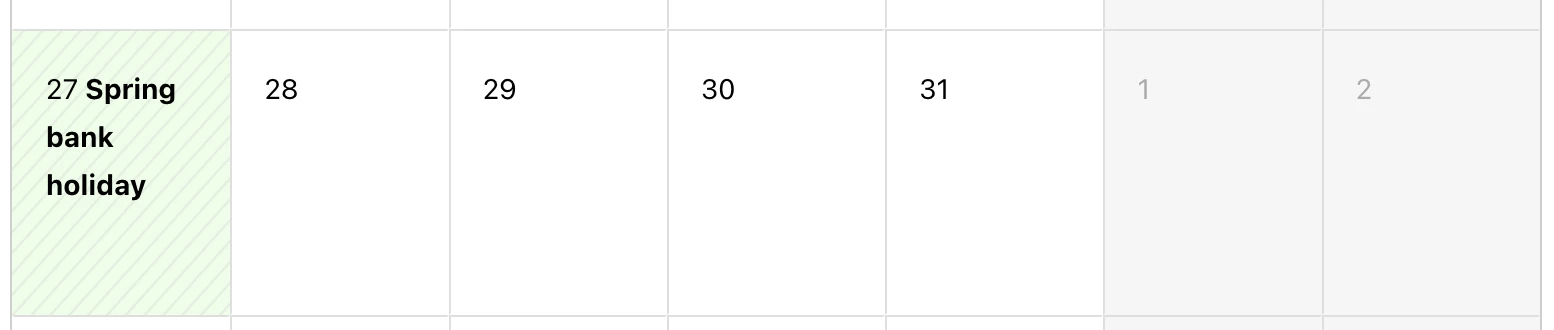
Public holidays depend directly on the Office the employee is part of. When an employee join the company, you have to assign an Office to make sure they have the right Public holiday calendar assigned. This is something we cannot do by adding days in the vacation balances. To see the Public holidays calendars each Office has, you can navigate to Settings > Organisation > Offices. If you want also to see the public holidays for each employee, you can also go to their Employee role > Absence and you will be able to see for each month the public holidays:
I hope this helps to understand better how the Public holidays calendars work! If this does not answer your question, please share with me some more information and I’ll have another look into it! 😃
Thanks for the information! We have quite a few part time employees who are allocated the correct office and correct public/bank holiday calendar however the bank holidays and public holidays are not included in the leave balance. We have selected in the absence that these holidays are included however they are not which is causing confusion for employees.
Thanks for sharing more information with us! Public holidays in Personio are not included in the absence entitlement. Currently, in the Available balances, just the one related to the Absence types are showed in the Employee profile. For example, for the absence type Holidays, you can see everything related to vacation days, the Entitlement, the Planned days or the Taken days. Another absence type with an Accrual policy assigned, same situation. But the Public holidays are not part of them.
I think there might be some misunderstanding, when selecting in the Absence type settings the Validity on option Work schedule, incl. Public Holidays, this is based on each employee's individual work schedule and leave taken on public holidays counts as absence days (it’d be deducted from the absence entitlement). Having this into consideration, if the employees can take those days as absence days because they can also work during them, you have to add more days to the entitlement if you want them to have more days. If you want the employees not to work during Public holidays, you will need to select a different settings in Validity on for it in the absence type, depending on your needs:
For more information about this topic, you can visit our Help Center article: Create absence types.
I hope this is clearer now and I could address your concern! 😊 If not, please share more information with me, some example would be great, but do not forget not to share personal data as this is a private channel! 😃
Wishing you a good day! 🙌🏼
Best,
Zulema
⚠️Achtung! Dieses Thema könnte veraltet sein
Dieses Thema wurde vor mehr als erstellt. Unser Produkt entwickelt sich schnell weiter — stelle gerne eine neue Frage, um die aktuellsten Infos zu bekommen.
Werde Teil der Personio Voyager Community!
Bitte benutze für die Registrierung die gleiche E-Mail-Adresse, die Du auch zum Login in Deinem Personio Account benutzt. Dies erleichtert es uns, Dir effektiv und effizient zu helfen, wenn wir z.B. etwas in Deinem Account überprüfen müssen. Bereits registriert? > Anmelden
Achtung: Dein öffentlicher Benutzername darf keine persönlichen Informationen wie E-Mail oder andere private Daten enthalten!
Herzlich willkommen in der Personio Voyager Community.
Die Service und Networking Community für alle Personio Kund*innen und HRler*innen. Solltest Du Dich noch nicht registriert haben, klicke bitte unten auf "Benutzerkonto erstellen". Benutzerkonto erstellen
Enter your E-mail address. We'll send you an e-mail with instructions to reset your password.