I’m encountering a problem while changing the number of vacation days granted. My case:
We had a 25 days vacation policy in 2022
We have now changed to 35 days
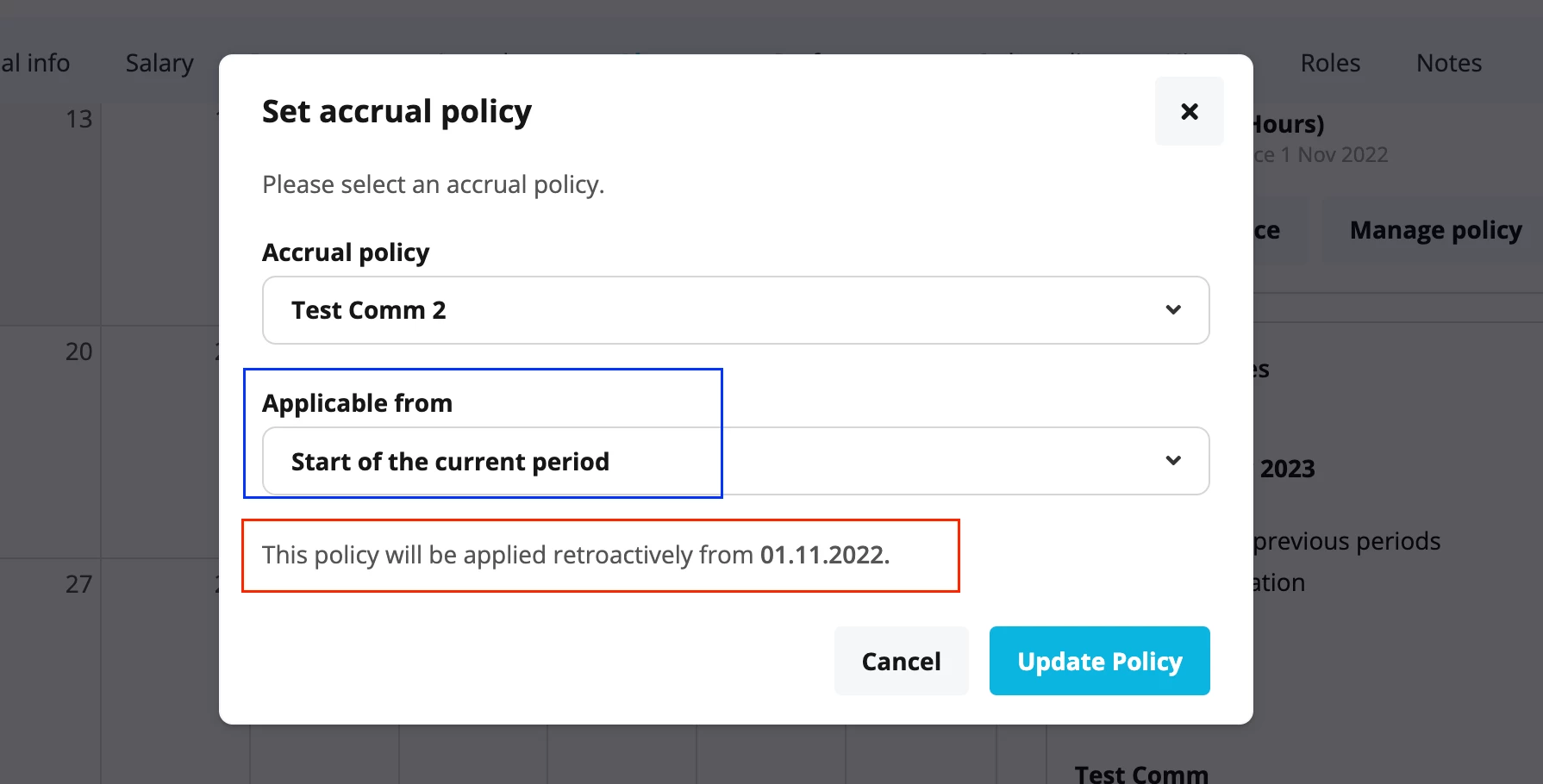
I assigned the new accrual policy via the employee list to all employees by selecting “start of the current period”
Problem is: For the employees who started in 2022 but with probation ending in 2023, the start of the current period = hire date and not beginning of the year.
How can I solve this?
Thank you :)
Beste Antwort von mruscito
Hi @Hellohere !
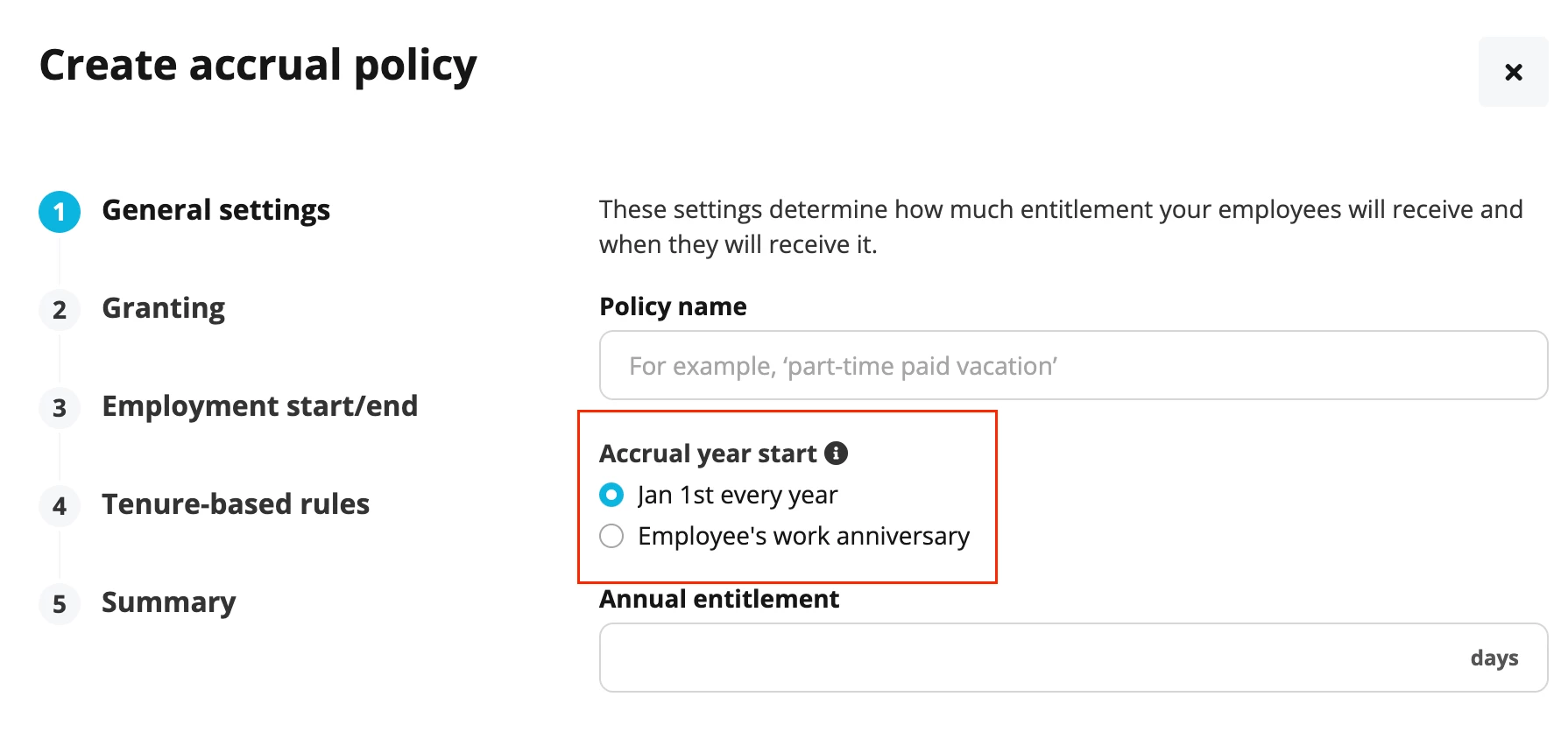
The Start of the current period option is determined by the settings of your accrual policy. ⬇
First step of the accrual policy setup
I assume that you are using the granting method Yearly for your accrual policies. If you choose Jan 1st every year under the section Accrual year start, then the Start of the current period will always refer to January 1st of the current year.
However, if you choose Employee’s work anniversary, then the start of any period will refer to the employee’s hire date or hire date anniversary (whichever is applicable). In the case of your employees who started in 2022 and whose probations periods have not yet ended, if you select Start of the current period then the system will refer to their hire date as the start of the current period. ⬇
🚨 However, be careful. 🚨
If you have already assigned them an accrual policy as of hire date, and the Accrual year start for that policy is January 1st, then the system will still assign the new updated policy as of 01.01.23, regardless this policy’s settings.
My suggestion: create a new absence type, and any accrual policy that you create under this absence type will have Employee’s work anniversary as the selected option for the Accrual year start. That way, any new policy assigned, for any entitlement period, will be based on the employee’s hire date (anniversary). You can always make a manual adjustment in the vacation time balance of the former absence type to reflect this change.
You can check out this article from our Helpcentre for more information on accrual policy options.
Please do let me know if you have any further questions!
The Start of the current period option is determined by the settings of your accrual policy. ⬇
First step of the accrual policy setup
I assume that you are using the granting method Yearly for your accrual policies. If you choose Jan 1st every year under the section Accrual year start, then the Start of the current period will always refer to January 1st of the current year.
However, if you choose Employee’s work anniversary, then the start of any period will refer to the employee’s hire date or hire date anniversary (whichever is applicable). In the case of your employees who started in 2022 and whose probations periods have not yet ended, if you select Start of the current period then the system will refer to their hire date as the start of the current period. ⬇
🚨 However, be careful. 🚨
If you have already assigned them an accrual policy as of hire date, and the Accrual year start for that policy is January 1st, then the system will still assign the new updated policy as of 01.01.23, regardless this policy’s settings.
My suggestion: create a new absence type, and any accrual policy that you create under this absence type will have Employee’s work anniversary as the selected option for the Accrual year start. That way, any new policy assigned, for any entitlement period, will be based on the employee’s hire date (anniversary). You can always make a manual adjustment in the vacation time balance of the former absence type to reflect this change.
You can check out this article from our Helpcentre for more information on accrual policy options.
Please do let me know if you have any further questions!
Megan
Übersetzen
⚠️Achtung! Dieses Thema könnte veraltet sein
Dieses Thema wurde vor mehr als erstellt. Unser Produkt entwickelt sich schnell weiter — stelle gerne eine neue Frage, um die aktuellsten Infos zu bekommen.
Werde Teil der Personio Voyager Community!
Bitte benutze für die Registrierung die gleiche E-Mail-Adresse, die Du auch zum Login in Deinem Personio Account benutzt. Dies erleichtert es uns, Dir effektiv und effizient zu helfen, wenn wir z.B. etwas in Deinem Account überprüfen müssen. Bereits registriert? > Anmelden
Achtung: Dein öffentlicher Benutzername darf keine persönlichen Informationen wie E-Mail oder andere private Daten enthalten!
Herzlich willkommen in der Personio Voyager Community.
Die Service und Networking Community für alle Personio Kund*innen und HRler*innen. Solltest Du Dich noch nicht registriert haben, klicke bitte unten auf "Benutzerkonto erstellen". Benutzerkonto erstellen
Enter your E-mail address. We'll send you an e-mail with instructions to reset your password.