I’ve created a custom role to give admin access but only at a team level - I want the person with that role to only have access to their own team’s data (by using the filter ‘Custom IF Team = Own’ against all the permissions).
However when I log in as that person they can still see all the other team’s data. Can anyone suggest what I’ve got wrong?
Beste Antwort von HStan
I’ve not been able to resolve it unfortunately - I tried adjusting the custom filter to just Team = Germany and that happily restricted view to the other country teams but did not give the access required for Team Germany! I’m stuck I’m afraid - I’ll reach out to Support and see if I can schedule a call with someone at Personio I’m sure it’s something small that I’m missed.
Hi, I believe the best would be scheduling a call-back with Personio so that they can view your screen and you can look at all settings as it could be something not related to these permissions.
What other role have you assigned to this person ? Always remember that roles are cumulative :) So if you have the view set-up for the “All employee” role, this is why they can still see other people info.
Thanks all - @Edda van der Ende how do I schedule a call back with Personio? I can’t see this option?
@Nathan Jolly thanks for that - the All Employees role shouldn’t allow admin access to other team private HR data though so something is not working with my custom filter.
@SabbuSchreiber the individual’s access is outside of her reporting line unfortunately so that wouldn’t work.
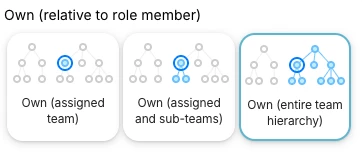
Have you tried the other “own” team filters? :-) Those depend on how the team and organisation is structured:
Regarding scheduling a call back from Personio, when you go to “Support” at the bottom left, above your profile icon, you’ll find different support options. One of them a contact us button where you can request call backs or also submit your request as a ticket:
This however pre-requires you to be an account owner. If this is not available to you, check with your Admin. 😊
I’ve not been able to resolve it unfortunately - I tried adjusting the custom filter to just Team = Germany and that happily restricted view to the other country teams but did not give the access required for Team Germany! I’m stuck I’m afraid - I’ll reach out to Support and see if I can schedule a call with someone at Personio I’m sure it’s something small that I’m missed.
Hello @HStan were you able to solve your issue with the Support Team? Best, Daniele
⚠️Achtung! Dieses Thema könnte veraltet sein
Dieses Thema wurde vor mehr als erstellt. Unser Produkt entwickelt sich schnell weiter — stelle gerne eine neue Frage, um die aktuellsten Infos zu bekommen.
Werde Teil der Personio Voyager Community!
Bitte benutze für die Registrierung die gleiche E-Mail-Adresse, die Du auch zum Login in Deinem Personio Account benutzt. Dies erleichtert es uns, Dir effektiv und effizient zu helfen, wenn wir z.B. etwas in Deinem Account überprüfen müssen. Bereits registriert? > Anmelden
Achtung: Dein öffentlicher Benutzername darf keine persönlichen Informationen wie E-Mail oder andere private Daten enthalten!
Herzlich willkommen in der Personio Voyager Community.
Die Service und Networking Community für alle Personio Kund*innen und HRler*innen. Solltest Du Dich noch nicht registriert haben, klicke bitte unten auf "Benutzerkonto erstellen". Benutzerkonto erstellen
Enter your E-mail address. We'll send you an e-mail with instructions to reset your password.