I have seen the new option to delegate absence approvals which I am pleased to see. However, As far as I can see there is only the option to have the approver’s supervisor as the substitute for the approvals. In a small organisation such as ours, with flat hierarchy levels, this can quickly lead to our CEO receiving a whole bunch of approvals.
It would be preferable to be able to select a colleague who can obtain the approval workflows, i.e. a workflow that is not vertical but horizontal (example: a team leader may ask another team-leader colleague to cover this during his/her vacation) rather than have C-level folks receive the approval requests.
Anyone else think this is a good suggestion?
Regards,
Linda
Beste Antwort von International Support Team
Hi @Linda,
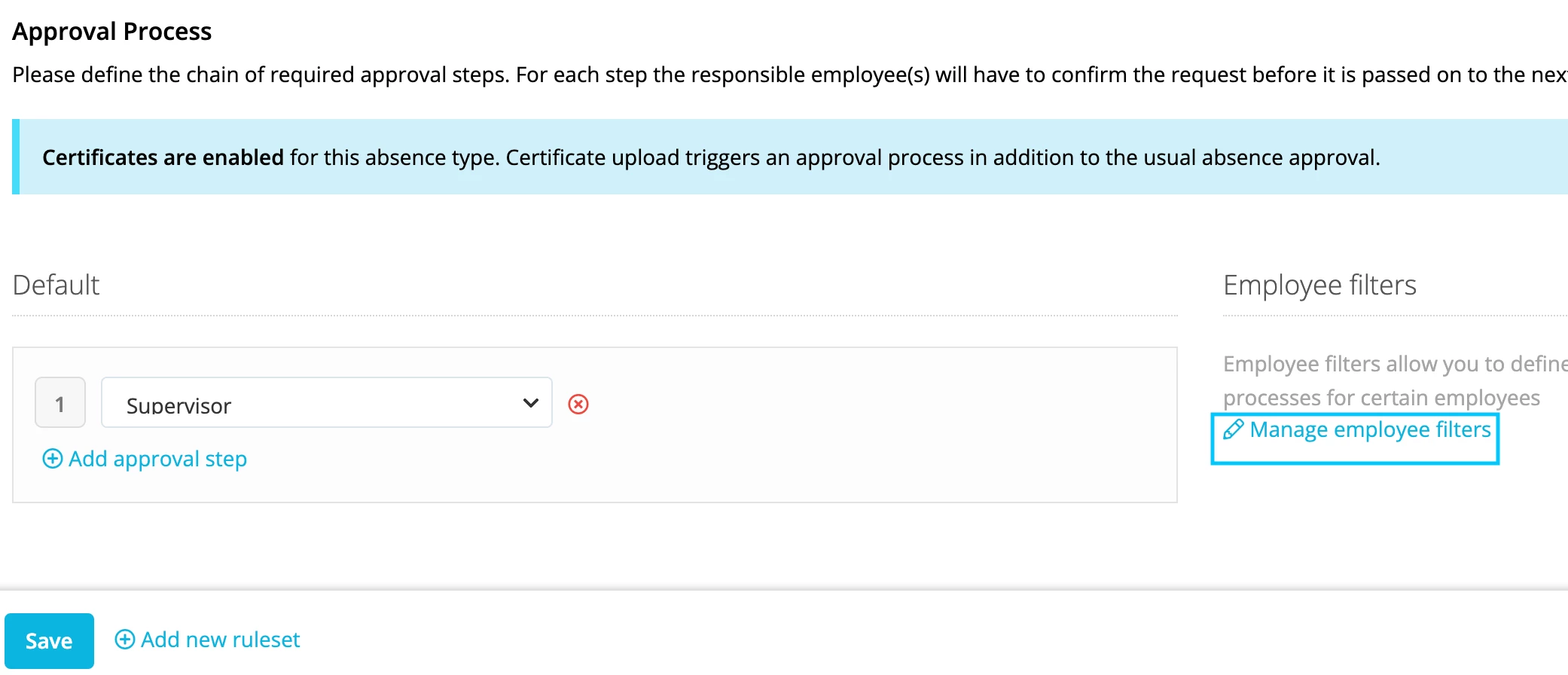
Thank you for your community question! In the Approvals Work Flow you can also select a Specific Employee.
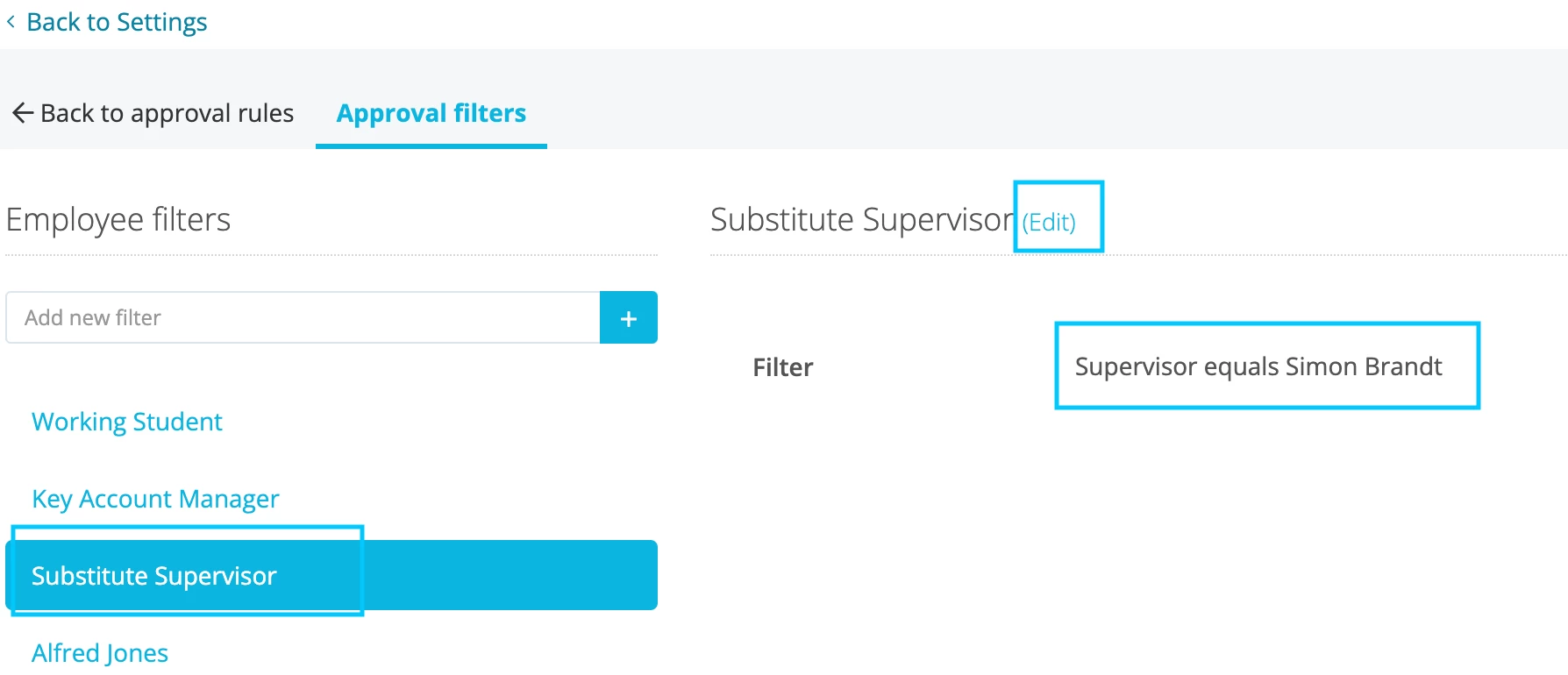
Step 1: Create an Employee filter for who will substitute a certain Supervisor.
Go to Settings > Approvals > Relevant Absence type > Employee filters > Add new Filter > Supervisor equals (name of the Supervisor that is on Leave).
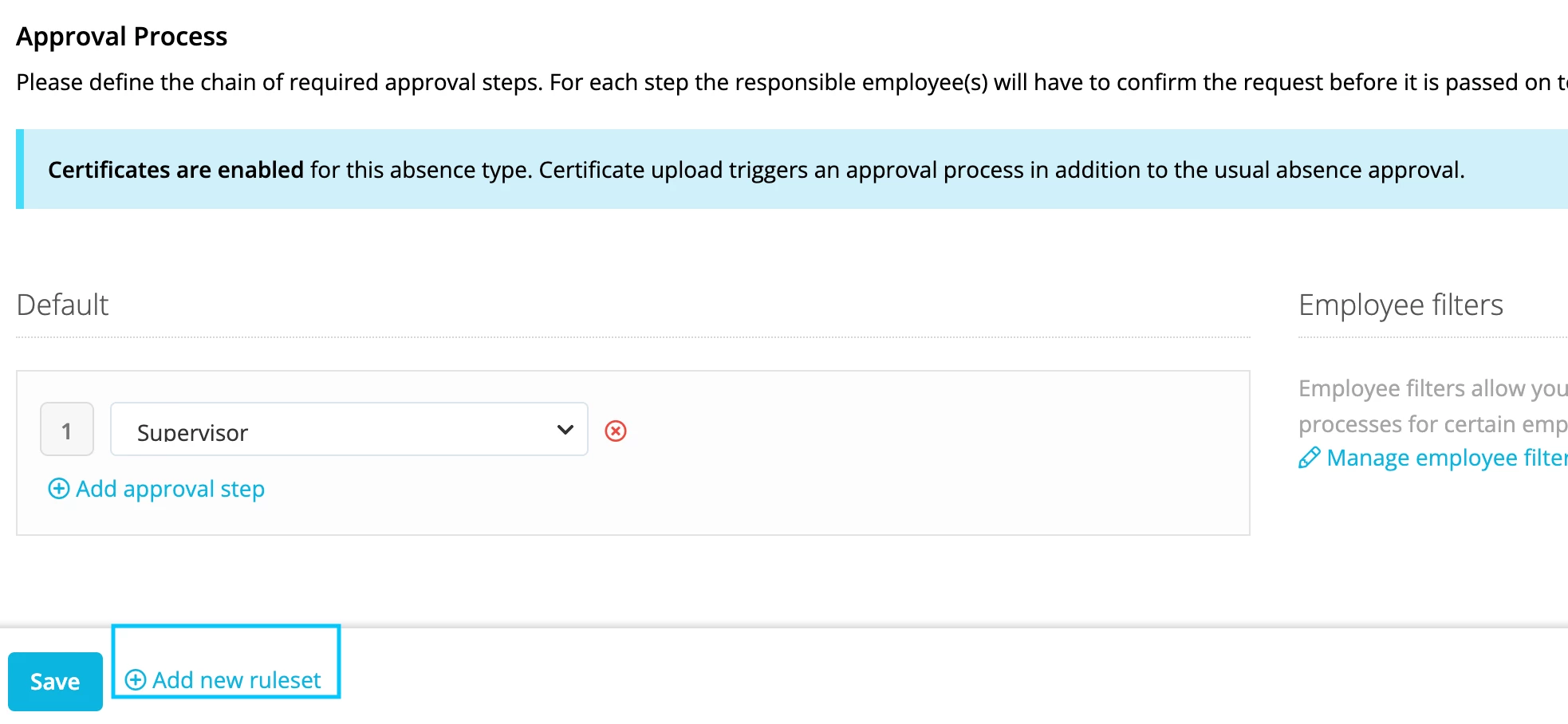
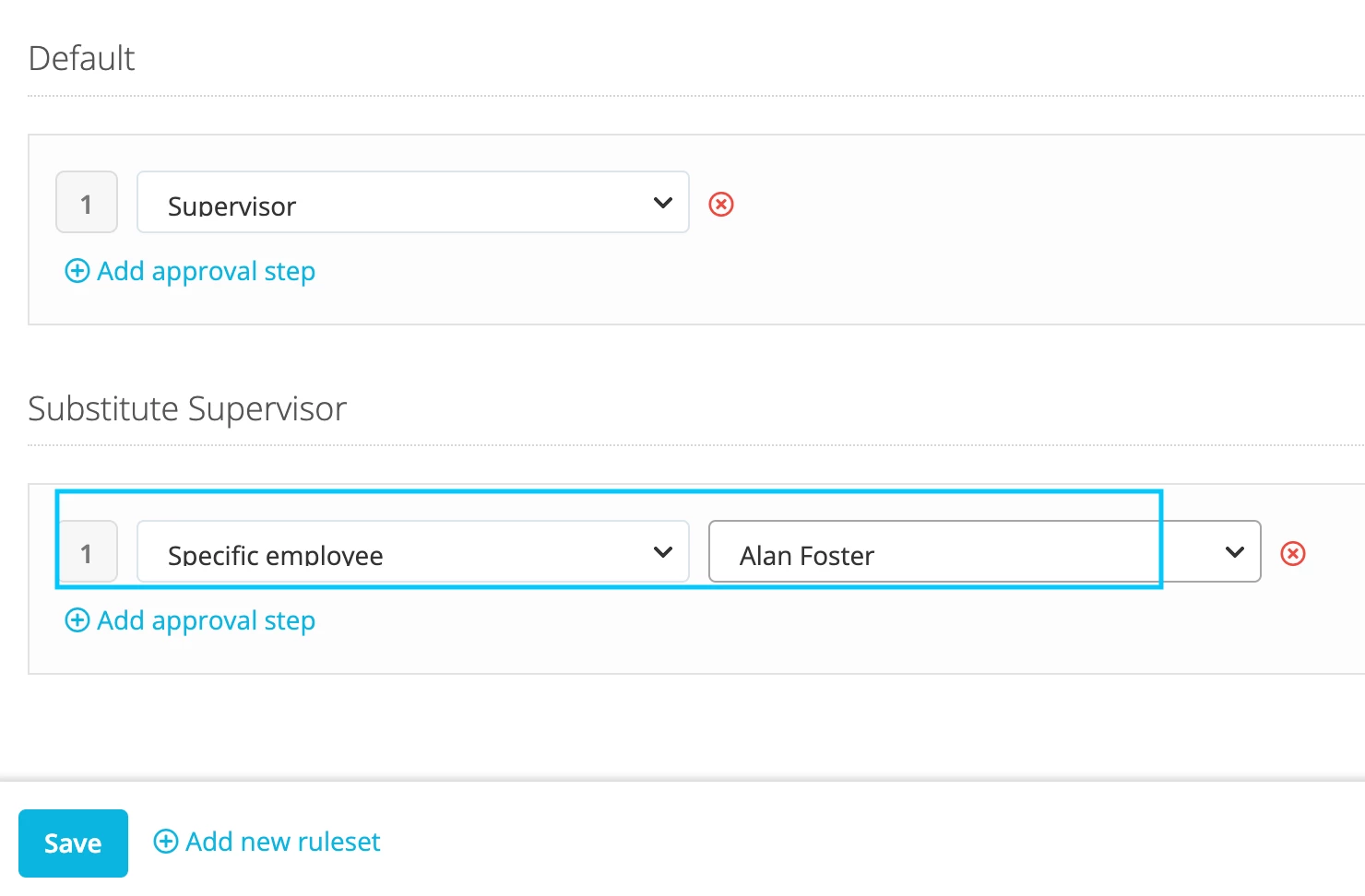
Step 2: Go back to Approval Rules. Settings > Approvals > Relevant Absence type > Add new ruleset > select the Employee filter you previously created > Specific Employee > name of the employee that will take over the approvals > Save.
Once again thank your for your community question. Here you will find more information regarding: Set up approval workflows.
Thank you for your community question! In the Approvals Work Flow you can also select a Specific Employee.
Step 1: Create an Employee filter for who will substitute a certain Supervisor.
Go to Settings > Approvals > Relevant Absence type > Employee filters > Add new Filter > Supervisor equals (name of the Supervisor that is on Leave).
Step 2: Go back to Approval Rules. Settings > Approvals > Relevant Absence type > Add new ruleset > select the Employee filter you previously created > Specific Employee > name of the employee that will take over the approvals > Save.
Once again thank your for your community question. Here you will find more information regarding: Set up approval workflows.
We need to manually add the substitution rule every time the supervisor is on leave, right? Otherwise the requests will be permanently forwarded to the substitute?
And for each supervisor we have to create an extra substitution rule, this can't be handled in one if for each supervisor there is a different substitute?
In the 2 points you’re right. We need to manually add the substitute rule every time the supervisor is on leave, and also change it back when the supervisor is back from leave. Otherwise it will be permanently forwarded to the substitute.
Also for each supervisor we will have to create an extra substitution rule.
Can we give the rights to add themselves their substitute rule to some employees, e.i. all team leads?
Other way, is there an option to generate automathic requests to add substitute rules when an absence is requested to the person in HR who have the rights to do these chnages?
Answer to question 1: Unfortunately only Admins can make changes in the Approval Processes.
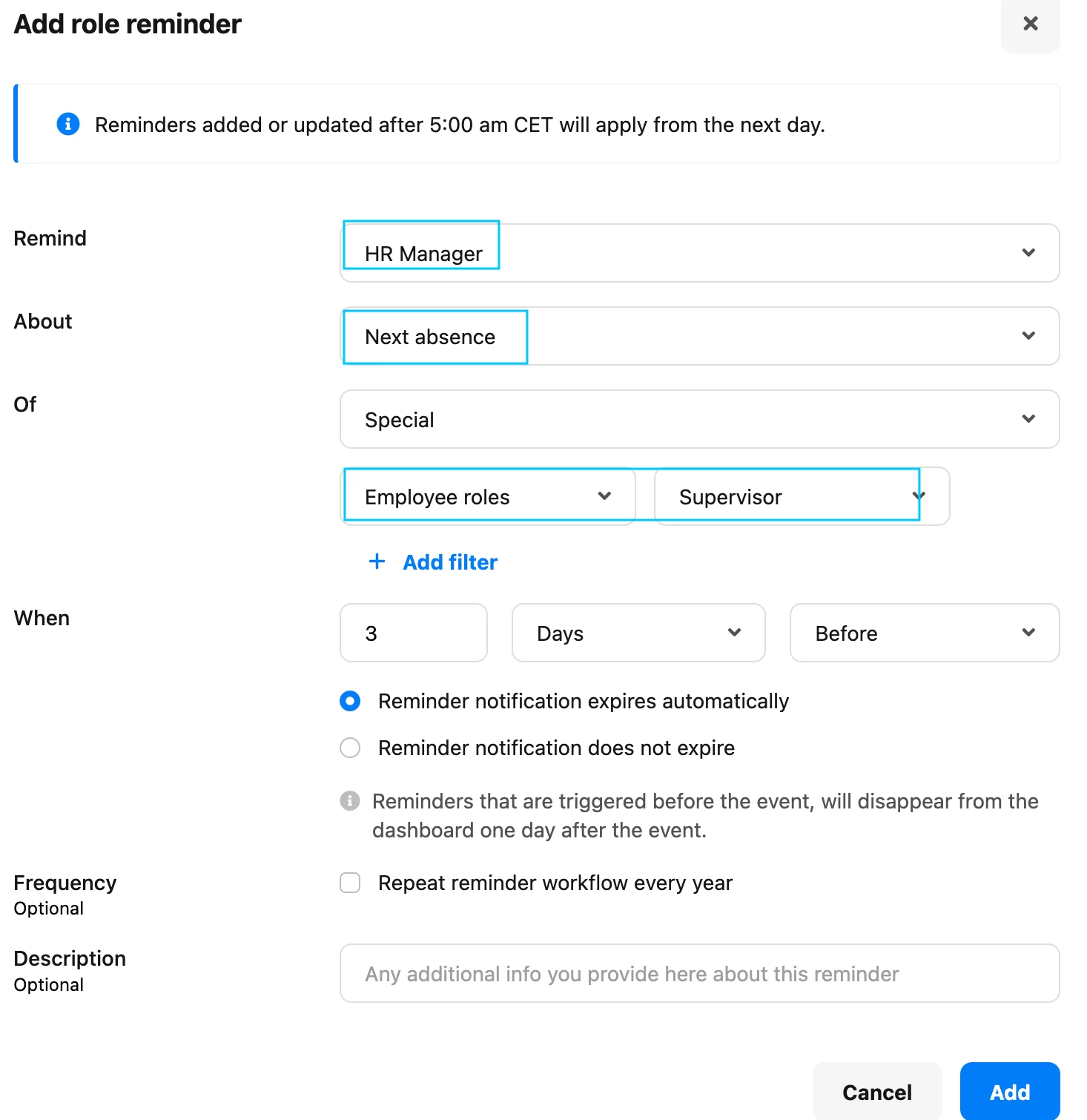
Answer to question 2: Unfortunately we don’t have this option, a possibility is to setup a reminder for the HR team for example for when a Supervisor goes on leave, so they can setup the Approvals workflow for the substitute.
Settings > Employee Roles > Relevant Employee Role > Reminders > Add role reminder:
Thank you very much for sharing your feedback with us!
I wish you an amazing day.
Best,
Sofia
⚠️Achtung! Dieses Thema könnte veraltet sein
Dieses Thema wurde vor mehr als erstellt. Unser Produkt entwickelt sich schnell weiter — stelle gerne eine neue Frage, um die aktuellsten Infos zu bekommen.
Werde Teil der Personio Voyager Community!
Bitte benutze für die Registrierung die gleiche E-Mail-Adresse, die Du auch zum Login in Deinem Personio Account benutzt. Dies erleichtert es uns, Dir effektiv und effizient zu helfen, wenn wir z.B. etwas in Deinem Account überprüfen müssen. Bereits registriert? > Anmelden
Achtung: Dein öffentlicher Benutzername darf keine persönlichen Informationen wie E-Mail oder andere private Daten enthalten!
Herzlich willkommen in der Personio Voyager Community.
Die Service und Networking Community für alle Personio Kund*innen und HRler*innen. Solltest Du Dich noch nicht registriert haben, klicke bitte unten auf "Benutzerkonto erstellen". Benutzerkonto erstellen
Enter your E-mail address. We'll send you an e-mail with instructions to reset your password.