As an administrator I have access to everything in Personio. I have HR colleagues in different locations (without admin rights), who would also like to be able to create documents and personalise them and send them put for signatures. However this does not seem to be an option for them. They can not personalise via the {{ }}. Is this something I can change in the access rights? I can’t fnd the right option. I know they can upload documents and create templates, but I’m talking about the customisation you can add like this: https://support.personio.de/hc/en-us/articles/ [removed by moderator] #creating-document-templates
Thank you!
Beste Antwort von Lauraglendon
Hi @LaureRoeland,
First of all, welcome to the Personio Community Great to have you on board!
Can you confirm that your colleagues in HR have edit access, or is it custom access to only a certain group? If it’s custom access, of course they can only update documents within the custom group of employees. To check this, go to Settings > Employee Roles > HR role > Documents > Edit. If ‘Edit - Own’ is not ticked, they will not be able to edit documents on their own profile. (Guide here!)
Editing rights enable them to use/personalise/send document templates and delete documents as well.
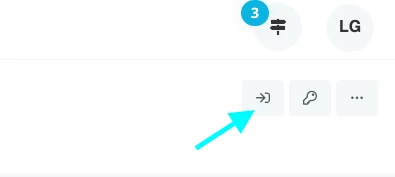
Once you are happy with their access here, please then try and log in an employee, by clicking on one of your HR colleague’s profiles and selecting the ‘Login as employee’ key:
Login as employee
From there, go to an employees account that they should have Document Edit access to, and try to create a document.
If, by chance, you would like them to also have access to upload new document templates in Settings > Documents, you can grant them ‘Account Configuration’ - ‘Documents’ access (in Settings > Employee Roles > HR role).
First of all, welcome to the Personio Community Great to have you on board!
Can you confirm that your colleagues in HR have edit access, or is it custom access to only a certain group? If it’s custom access, of course they can only update documents within the custom group of employees. To check this, go to Settings > Employee Roles > HR role > Documents > Edit. If ‘Edit - Own’ is not ticked, they will not be able to edit documents on their own profile. (Guide here!)
Editing rights enable them to use/personalise/send document templates and delete documents as well.
Once you are happy with their access here, please then try and log in an employee, by clicking on one of your HR colleague’s profiles and selecting the ‘Login as employee’ key:
Login as employee
From there, go to an employees account that they should have Document Edit access to, and try to create a document.
If, by chance, you would like them to also have access to upload new document templates in Settings > Documents, you can grant them ‘Account Configuration’ - ‘Documents’ access (in Settings > Employee Roles > HR role).
Hi Laura, thank you very much! I indeed forgot to indicate the ‘account config > documents’. May I ask you, is it possible when someone creates a document that needs multiple signatures, can the next person in line also still add text to the document? If there are placeholders still empty? Thank you!
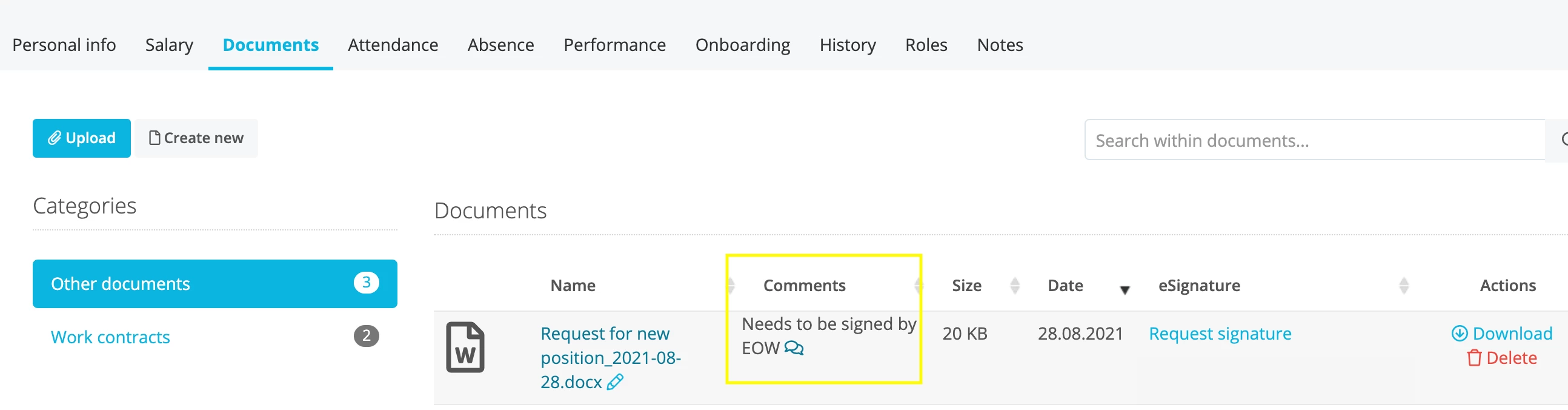
That’s a great question. The placeholders and content of the document can only be edited upon creation. There is the option to add notes however, so that anyone with access to the document in an employee’s account can add a comment that’s visible under associated employee’s page.
To do so, go to the their Documents section, click on the pencil icon beside the document name and type comment, like so;
I really love this idea and would recommend adding it to the ideation section within our Personio Community, if you believe this is something that you and other Personio users could benefit from!
If there is anything else we can help with, please do let us know.
Best regards,
Laura
Übersetzen
⚠️Achtung! Dieses Thema könnte veraltet sein
Dieses Thema wurde vor mehr als erstellt. Unser Produkt entwickelt sich schnell weiter — stelle gerne eine neue Frage, um die aktuellsten Infos zu bekommen.
Werde Teil der Personio Voyager Community!
Bitte benutze für die Registrierung die gleiche E-Mail-Adresse, die Du auch zum Login in Deinem Personio Account benutzt. Dies erleichtert es uns, Dir effektiv und effizient zu helfen, wenn wir z.B. etwas in Deinem Account überprüfen müssen. Bereits registriert? > Anmelden
Achtung: Dein öffentlicher Benutzername darf keine persönlichen Informationen wie E-Mail oder andere private Daten enthalten!
Herzlich willkommen in der Personio Voyager Community.
Die Service und Networking Community für alle Personio Kund*innen und HRler*innen. Solltest Du Dich noch nicht registriert haben, klicke bitte unten auf "Benutzerkonto erstellen". Benutzerkonto erstellen
Enter your E-mail address. We'll send you an e-mail with instructions to reset your password.



 Great to have you on board!