I’ve been using the Last Login report as we just rolled out in head office this week and I want to see who has successfully accessed the system.
One person appears on the Last Login report as having logged in on Tuesday but has since reached out to me saying that he hasn’t been able to login and needs help with his MFA setup.
I need to know if the report includes attempted logins or just successful ones.
Beste Antwort von mruscito
Hi @AliceM !
When you use our Export reporting function, the data shown is only successful logins. We currently do not have have a reporting functionality that allows us to pull information on attempted logins.
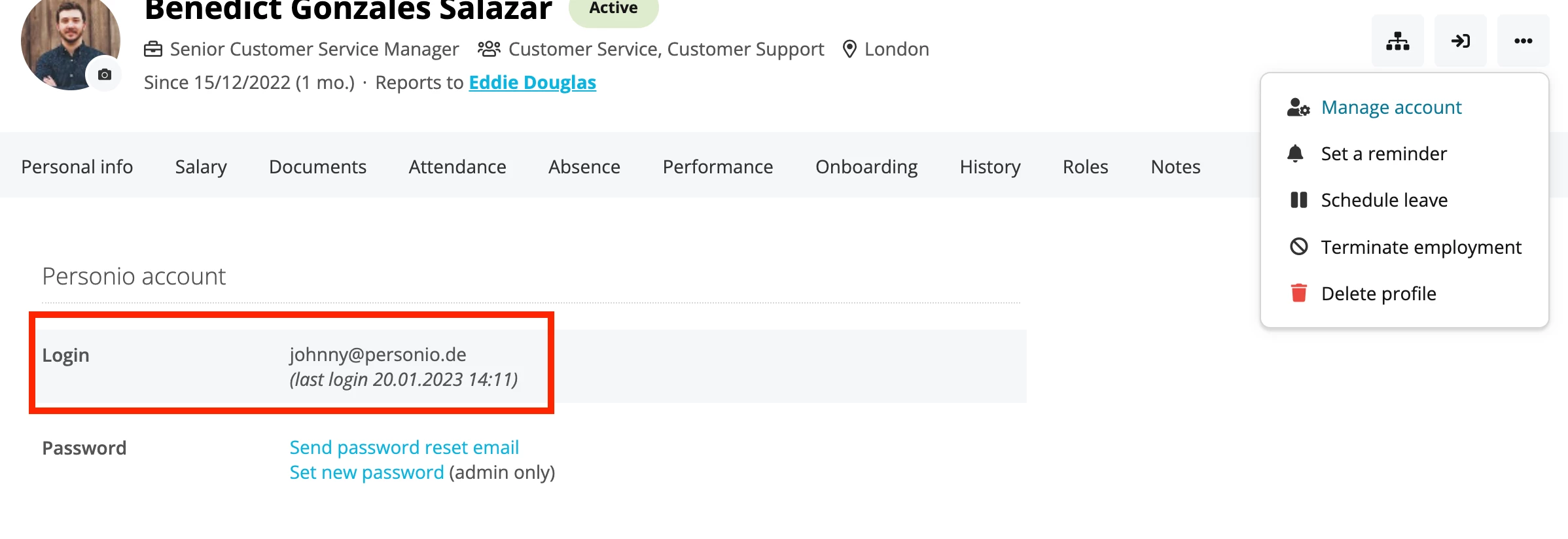
To determine the issue with your employee’s account, go to their profile, click on the button with the 3 dots & select Manage Account.
There, you will see the details of the last login. ⬇
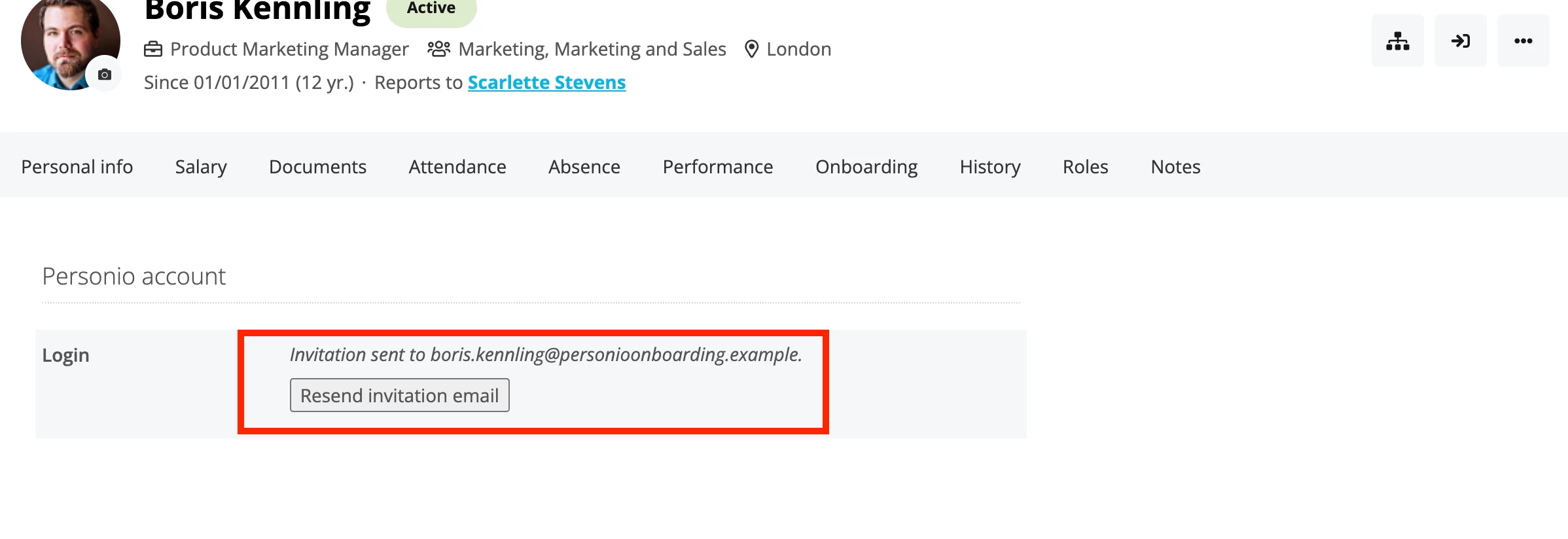
If there are no details shown, that means that the account had never been logged into. In that case, you can click on Resend invitation email to prompt the employee to set up their login information. ⬇
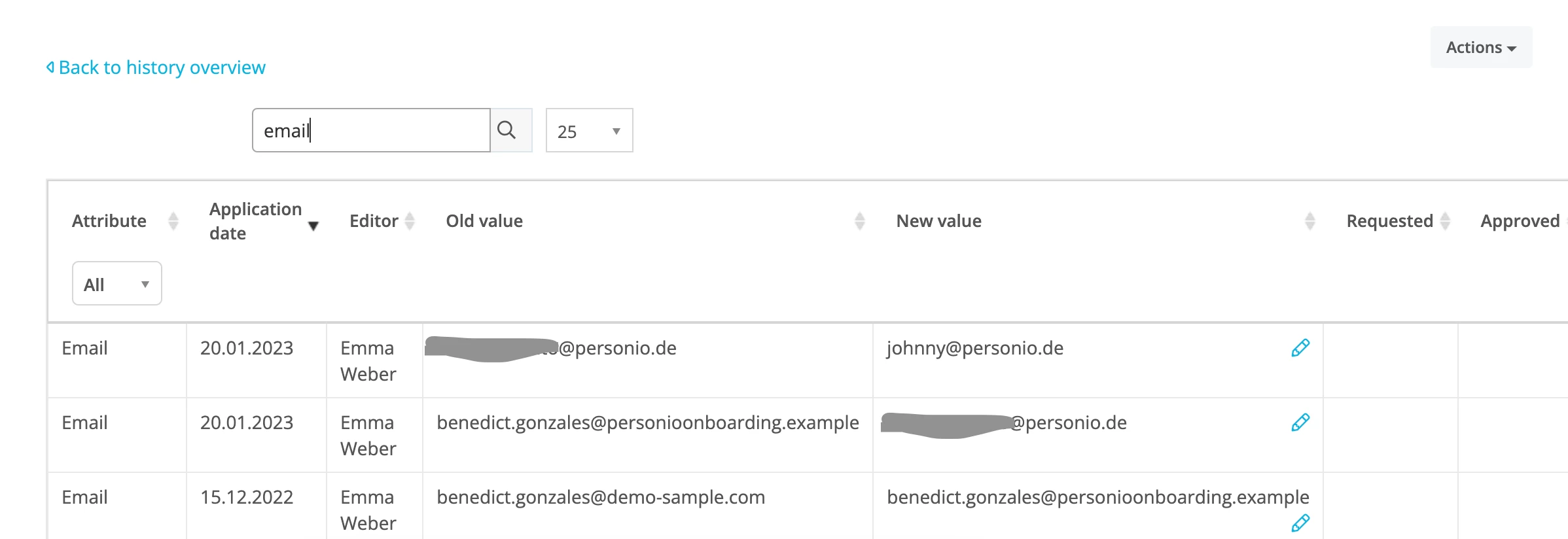
However, if there has been login activity, then you need to check if the employee’s email address has been changed since the last login. Go to the History tab in their profile, click on Detail view, and type in Email in the search bar. If the address has been changed, go back to Manage Account and click Send password reset email.
I hope this helps. If you need any further assistance, send your query to our Customer Support Team via Find Answers. That way, we can take a look into your account to identify the exact problem.
When you use our Export reporting function, the data shown is only successful logins. We currently do not have have a reporting functionality that allows us to pull information on attempted logins.
To determine the issue with your employee’s account, go to their profile, click on the button with the 3 dots & select Manage Account.
There, you will see the details of the last login. ⬇
If there are no details shown, that means that the account had never been logged into. In that case, you can click on Resend invitation email to prompt the employee to set up their login information. ⬇
However, if there has been login activity, then you need to check if the employee’s email address has been changed since the last login. Go to the History tab in their profile, click on Detail view, and type in Email in the search bar. If the address has been changed, go back to Manage Account and click Send password reset email.
I hope this helps. If you need any further assistance, send your query to our Customer Support Team via Find Answers. That way, we can take a look into your account to identify the exact problem.
Take care!
Übersetzen
⚠️Achtung! Dieses Thema könnte veraltet sein
Dieses Thema wurde vor mehr als erstellt. Unser Produkt entwickelt sich schnell weiter — stelle gerne eine neue Frage, um die aktuellsten Infos zu bekommen.
Werde Teil der Personio Voyager Community!
Bitte benutze für die Registrierung die gleiche E-Mail-Adresse, die Du auch zum Login in Deinem Personio Account benutzt. Dies erleichtert es uns, Dir effektiv und effizient zu helfen, wenn wir z.B. etwas in Deinem Account überprüfen müssen. Bereits registriert? > Anmelden
Achtung: Dein öffentlicher Benutzername darf keine persönlichen Informationen wie E-Mail oder andere private Daten enthalten!
Herzlich willkommen in der Personio Voyager Community.
Die Service und Networking Community für alle Personio Kund*innen und HRler*innen. Solltest Du Dich noch nicht registriert haben, klicke bitte unten auf "Benutzerkonto erstellen". Benutzerkonto erstellen
Enter your E-mail address. We'll send you an e-mail with instructions to reset your password.