At present, when you create a document on an employee profile as a word document and subsequently try to download this created document, it downloads as a PDF.
Please could this be adjusted so that it downloads in the format it was originally created in?
Beste Antwort von Daniele
Hi @janscomb, now I see how it would be beneficial for admins.
I just tested it out in my own demo account where I’m an admin, and it seems to work just fine!
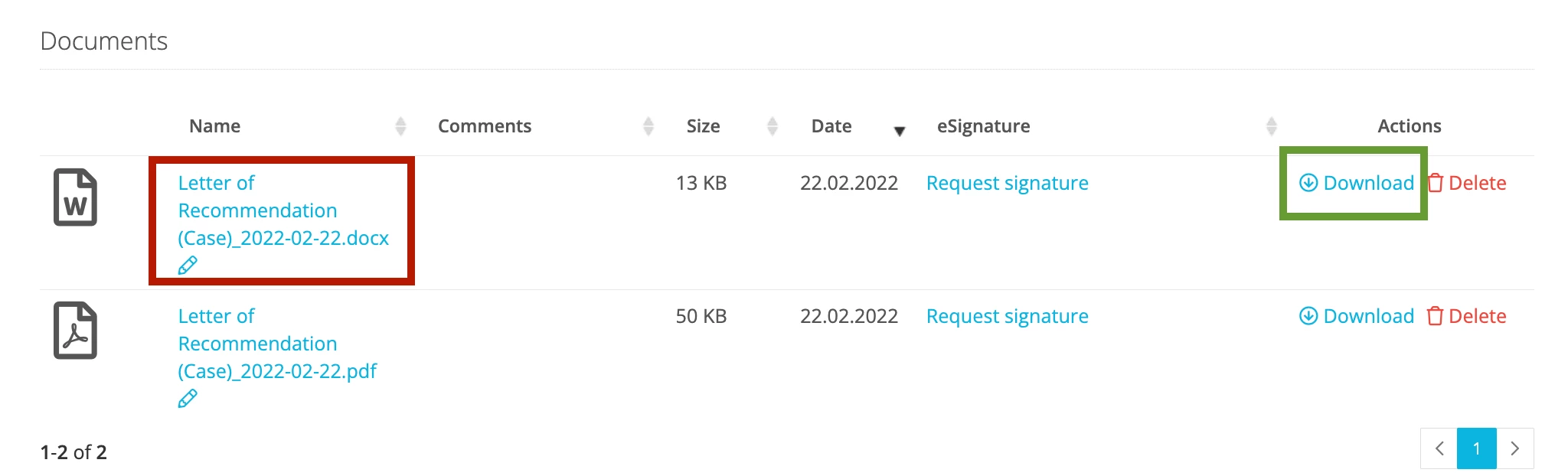
If I click on the title (red box) the document will be downloaded in PDF. But if I click on download (green box) the document gets downloaded in .docx format which I can edit right away.
two ways two download a document
To make this possible, you need to have selected the .docx format when first creating a document from a template
creating a new document from a template
Does that work for you?
Please let me know if you have any follow-up questions.
Hi @janscomb, Thank you for submitting your feedback.
I assume that this restriction is intended: most Employee Documents are supposed to remain untouched. If they are easy to download via Word, the information on the Documents can get altered. Does that make sense?
If you still think there should be the ability to download documents in Word format, it would be great if you can briefly let us know what would be the added value for you, for example by describing your use case.
I can understand this point of view and yes for the majority of role types this makes sense but not for those with full admin rights.
As a key admin I may need to download the template and make an adjustment for a specific employees needs.
I appreciate you can have lots of different template versions of say a letter for different scenarios but this can create a large number of saved templates.
Hi @janscomb, now I see how it would be beneficial for admins.
I just tested it out in my own demo account where I’m an admin, and it seems to work just fine!
If I click on the title (red box) the document will be downloaded in PDF. But if I click on download (green box) the document gets downloaded in .docx format which I can edit right away.
two ways two download a document
To make this possible, you need to have selected the .docx format when first creating a document from a template
creating a new document from a template
Does that work for you?
Please let me know if you have any follow-up questions.
Thanks Danielle - that does work for me though I’d say from a UX point of view it is a little confusing. Appreciate you resolving this.
Yes, I fully agree with you there! I’m glad this helped, and I apologize for the delay in my initial reply.
Feel free to submit your next questions in the Community :)
Best, Daniele
Note: Since the feature described in your original post is already possible, I would convert it from an idea to question so it will be easier to find in the Support Area and more users can benefit from it.
It´s great to be able to download the document in Word Format, but once the document is ready and filled if this document also has to be signed, the only way to make it possible is that the employee send it to his own mail in order to be signed which it make it a bit unfriendly….It would be great if there were any chance to make a document be able to sign without need to send it by mail…
Kind regards
Mercedes
Übersetzen
⚠️Achtung! Dieses Thema könnte veraltet sein
Dieses Thema wurde vor mehr als erstellt. Unser Produkt entwickelt sich schnell weiter — stelle gerne eine neue Frage, um die aktuellsten Infos zu bekommen.
Werde Teil der Personio Voyager Community!
Bitte benutze für die Registrierung die gleiche E-Mail-Adresse, die Du auch zum Login in Deinem Personio Account benutzt. Dies erleichtert es uns, Dir effektiv und effizient zu helfen, wenn wir z.B. etwas in Deinem Account überprüfen müssen. Bereits registriert? > Anmelden
Achtung: Dein öffentlicher Benutzername darf keine persönlichen Informationen wie E-Mail oder andere private Daten enthalten!
Herzlich willkommen in der Personio Voyager Community.
Die Service und Networking Community für alle Personio Kund*innen und HRler*innen. Solltest Du Dich noch nicht registriert haben, klicke bitte unten auf "Benutzerkonto erstellen". Benutzerkonto erstellen
Enter your E-mail address. We'll send you an e-mail with instructions to reset your password.