
I thought that every profile created (means every new employee) will get assigned a employee ID as a unique identifier. I now realize that this ID is not generated automatically - can I set this up so it is creating it with every new employee/ profile?

Answered
Employee ID


- First Steps
Beste Antwort von ConorCunningham
Hey
With every employee profile that is created a Personio ID is created along with it. However, this ID is for internal use and is not to be used as an Employee ID, because it can be subject to change. We always recommend that customers create a custom attribute called Employee ID and use our bulk import function to upload these ID’s into multiple employee profiles at once.
Once created, you can mark this custom attribute as a Unique Id by going to Settings > Employee Information > ( navigating to the section which contains the attribute ) > Clicking on the Unique Id checkmark box > Clicking on Save.
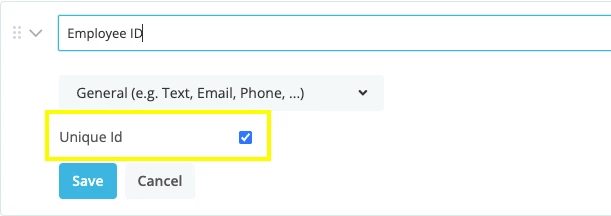
Unfortunately there is no functionality on Personio at the moment that would allow for automatic ID creation with the addition of a new employee profile. Therefore you will need to manually enter this number for each new employee.
I hope I was able to answer your question, however I am happy to assist further.
Best,
Conor








Werde Teil der Personio Voyager Community!
Bitte benutze für die Registrierung die gleiche E-Mail-Adresse, die Du auch zum Login in Deinem Personio Account benutzt. Dies erleichtert es uns, Dir effektiv und effizient zu helfen, wenn wir z.B. etwas in Deinem Account überprüfen müssen. Bereits registriert? > Anmelden
Achtung: Dein öffentlicher Benutzername darf keine persönlichen Informationen wie E-Mail oder andere private Daten enthalten!
Herzlich willkommen in der Personio Voyager Community.
Die Service und Networking Community für alle Personio Kund*innen und HRler*innen. Solltest Du Dich noch nicht registriert haben, klicke bitte unten auf "Benutzerkonto erstellen". Benutzerkonto erstellen
Enter your E-mail address. We'll send you an e-mail with instructions to reset your password.