We have built an API integration with Teamtailor but cannot find the answers what next?
I can find the employee by searching with the name, but how to build a reminder/task for Admins/manager to notice there is a new employee in the system to fulfill the next steps and update the missing information?
Beste Antwort von mruscito
Hi @Terhi !
Excellent question 🚀
If you have set up your integration so that a candidate’s hire date is pushed from Teamtailor to Personio, then you can create a reminder workflow based the new employee’s hire date.
How this works ⬇
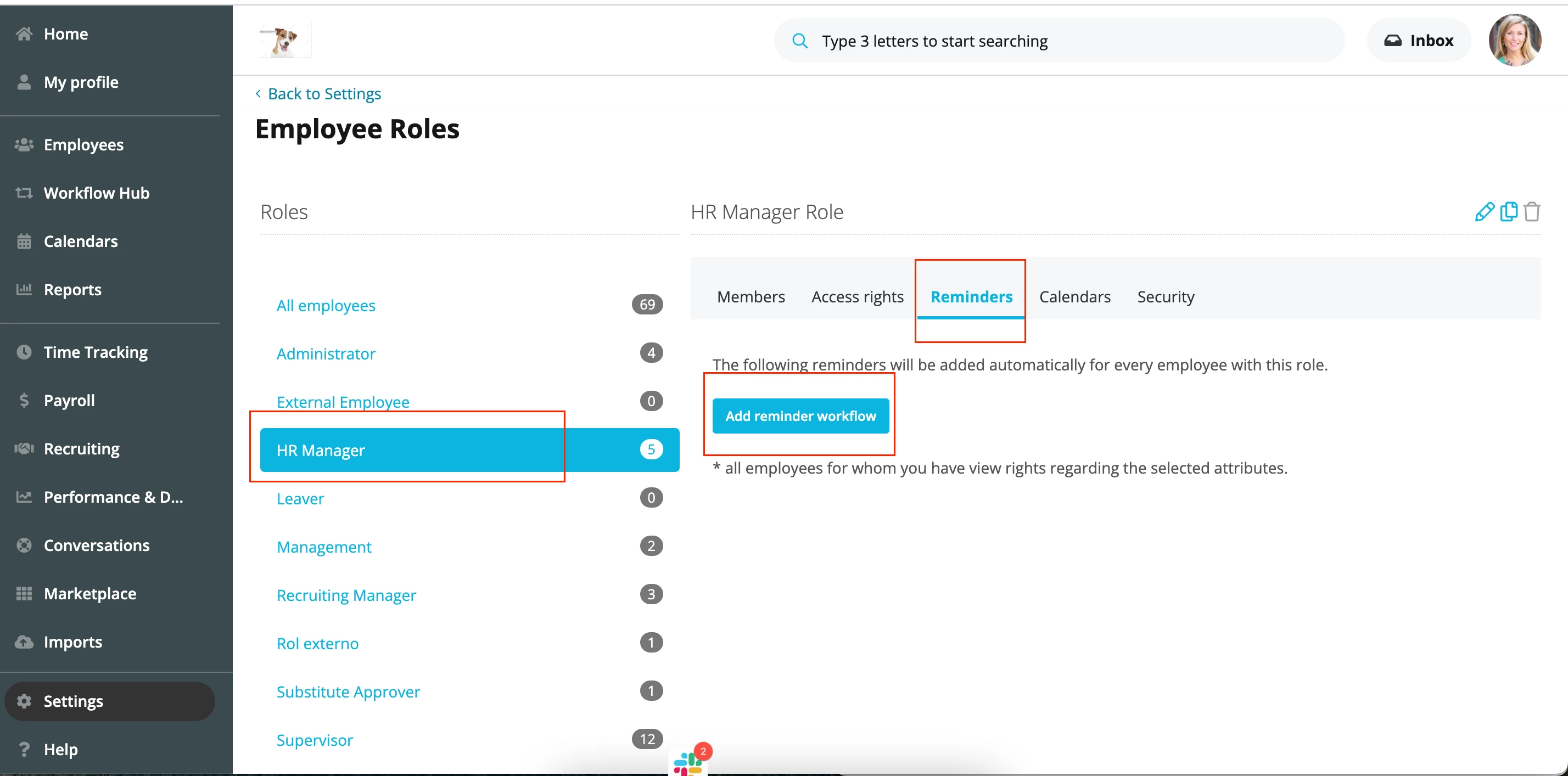
To trigger a reminder to an HR Manager about a new joiner’s profile, you need to navigate to Settings > PEOPLE > Employee Roles and select the relevant role. Here, it could be HR Manager. Then, go to Reminders and click Add reminder workflow. ⬇
How to find the Reminders workflow area
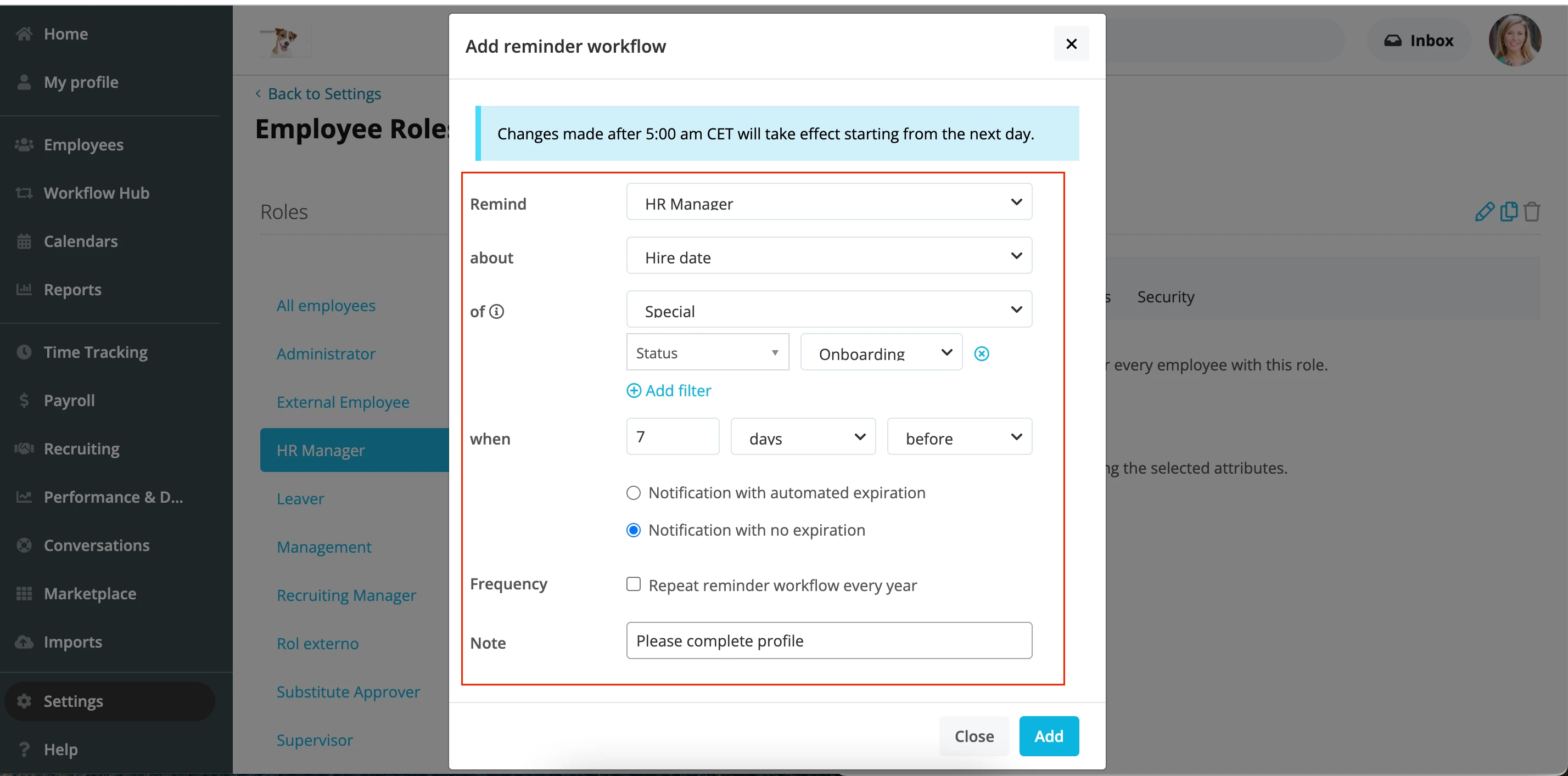
Now, here is where you add the important details. I suggest that you add the filter Status equals Onboarding in the third line, so that the system knows to trigger notifications for a specific group of employees, which in this case is the onboarding ones.
Adding the details of the customized reminder
When the HR Manager receives the notification, they can go in and see what’s missing from the profile. From there, they can assign the profile an onboarding template. These templates can be really useful, as you can create specific tasks to be done by the new joiner, the HR Manager, the supervisor, the IT Team, etc. For more information on onboarding workflows, check out this area of our Help Centre.⬇
If you have set up your integration so that a candidate’s hire date is pushed from Teamtailor to Personio, then you can create a reminder workflow based the new employee’s hire date.
How this works ⬇
To trigger a reminder to an HR Manager about a new joiner’s profile, you need to navigate to Settings > PEOPLE > Employee Roles and select the relevant role. Here, it could be HR Manager. Then, go to Reminders and click Add reminder workflow. ⬇
How to find the Reminders workflow area
Now, here is where you add the important details. I suggest that you add the filter Status equals Onboarding in the third line, so that the system knows to trigger notifications for a specific group of employees, which in this case is the onboarding ones.
Adding the details of the customized reminder
When the HR Manager receives the notification, they can go in and see what’s missing from the profile. From there, they can assign the profile an onboarding template. These templates can be really useful, as you can create specific tasks to be done by the new joiner, the HR Manager, the supervisor, the IT Team, etc. For more information on onboarding workflows, check out this area of our Help Centre.⬇
Any questions, just let me know! I hope this helped answer your question 😊
Megan
Übersetzen
⚠️Achtung! Dieses Thema könnte veraltet sein
Dieses Thema wurde vor mehr als erstellt. Unser Produkt entwickelt sich schnell weiter — stelle gerne eine neue Frage, um die aktuellsten Infos zu bekommen.
Werde Teil der Personio Voyager Community!
Bitte benutze für die Registrierung die gleiche E-Mail-Adresse, die Du auch zum Login in Deinem Personio Account benutzt. Dies erleichtert es uns, Dir effektiv und effizient zu helfen, wenn wir z.B. etwas in Deinem Account überprüfen müssen. Bereits registriert? > Anmelden
Achtung: Dein öffentlicher Benutzername darf keine persönlichen Informationen wie E-Mail oder andere private Daten enthalten!
Herzlich willkommen in der Personio Voyager Community.
Die Service und Networking Community für alle Personio Kund*innen und HRler*innen. Solltest Du Dich noch nicht registriert haben, klicke bitte unten auf "Benutzerkonto erstellen". Benutzerkonto erstellen
Enter your E-mail address. We'll send you an e-mail with instructions to reset your password.