I wonder could anyone share how they are tracking employee referrals in the recruitment module?
If I create a tracking link for a referral it only links to the application page so in order for the person to read the job description they have to click out of the referral link and then that tracking link is possibly lost.
If the person does apply through the “referral” tracking link how can they share who referred them?
Thanks
Beste Antwort von International Support Team
Hi @Volvic
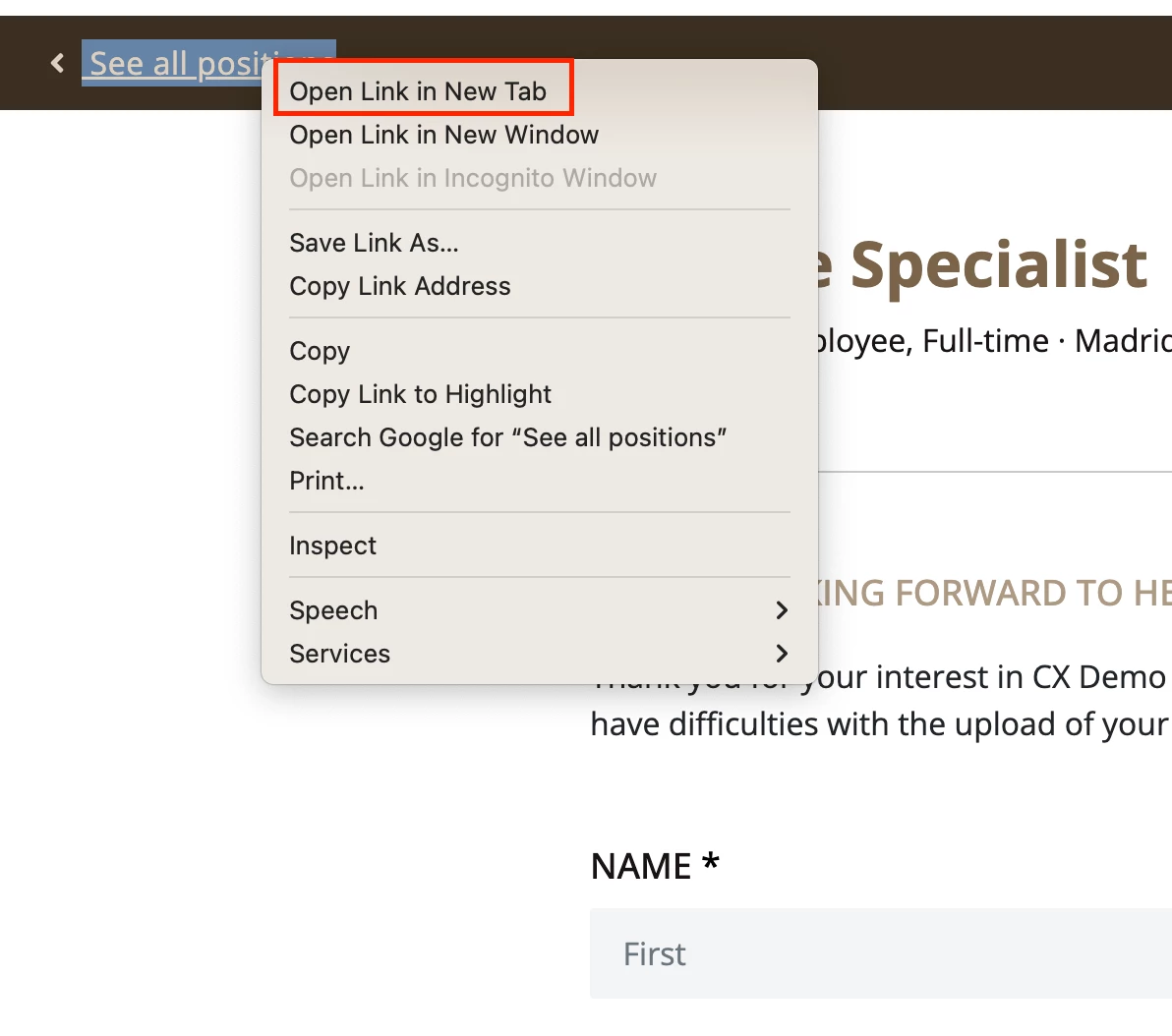
Yes, you can use tracking links for this to show it was an internal referral which will show them the Application form. Unfortunately if they do click back to the overview of all positions this Tracking link is gone so it may be best that they reopen the link they received when they are ready to apply or they can go back to see the relevant information in another tab as seen below:
Right clicking on the ‘See all positions’ option
It may also be best to advise any users sharing the referral link to also share the link to just the job description but then ask them to reply on the given tracking link.
If you would like them to show who referred them then you can create a new optional part of the Application form in Settings > Recruiting > Attributes then add it in Settings > Recruiting > Career Page > Application form settings. This will be shown on all Application forms but can be made optional so only applicants it applies for should fill it out. I can see there has already been a post made for this in our Ideation section:
Please check out this link above and upvote the idea to show the increased demand for this functionality in our product. Our product team is able to then review these ideas and potentially include them in future updates to the functionality of the product.
I hope this helps you with your query and that you have a lovely day!
All the best,
Erica 😊
If anyone else has some best practices or ways they are able to implement their own internal referral process on their accounts please comment below! ✨
Yes, you can use tracking links for this to show it was an internal referral which will show them the Application form. Unfortunately if they do click back to the overview of all positions this Tracking link is gone so it may be best that they reopen the link they received when they are ready to apply or they can go back to see the relevant information in another tab as seen below:
Right clicking on the ‘See all positions’ option
It may also be best to advise any users sharing the referral link to also share the link to just the job description but then ask them to reply on the given tracking link.
If you would like them to show who referred them then you can create a new optional part of the Application form in Settings > Recruiting > Attributes then add it in Settings > Recruiting > Career Page > Application form settings. This will be shown on all Application forms but can be made optional so only applicants it applies for should fill it out. I can see there has already been a post made for this in our Ideation section:
Please check out this link above and upvote the idea to show the increased demand for this functionality in our product. Our product team is able to then review these ideas and potentially include them in future updates to the functionality of the product.
I hope this helps you with your query and that you have a lovely day!
All the best,
Erica 😊
If anyone else has some best practices or ways they are able to implement their own internal referral process on their accounts please comment below! ✨
Übersetzen
⚠️Achtung! Dieses Thema könnte veraltet sein
Dieses Thema wurde vor mehr als erstellt. Unser Produkt entwickelt sich schnell weiter — stelle gerne eine neue Frage, um die aktuellsten Infos zu bekommen.
Werde Teil der Personio Voyager Community!
Bitte benutze für die Registrierung die gleiche E-Mail-Adresse, die Du auch zum Login in Deinem Personio Account benutzt. Dies erleichtert es uns, Dir effektiv und effizient zu helfen, wenn wir z.B. etwas in Deinem Account überprüfen müssen. Bereits registriert? > Anmelden
Achtung: Dein öffentlicher Benutzername darf keine persönlichen Informationen wie E-Mail oder andere private Daten enthalten!
Herzlich willkommen in der Personio Voyager Community.
Die Service und Networking Community für alle Personio Kund*innen und HRler*innen. Solltest Du Dich noch nicht registriert haben, klicke bitte unten auf "Benutzerkonto erstellen". Benutzerkonto erstellen
Enter your E-mail address. We'll send you an e-mail with instructions to reset your password.