I am testing the performance tool right now to launch soon our first official review. While testing, I created a self-assessment, two peer-reviews and a manager feedback.
Now I have 4 different review answers for one employee for one cycle. How can I combine all of these in one overview? Considering that one employee will have several peers filling in their review, there must be an option to show all feedbacks at once? Otherwise, where can the manager create an own overview with notes on the feedback to be shared?
Thank you
Eileen
Beste Antwort von International Support Team
Hi @Paired,
Thank you for reaching out to the community with your question!
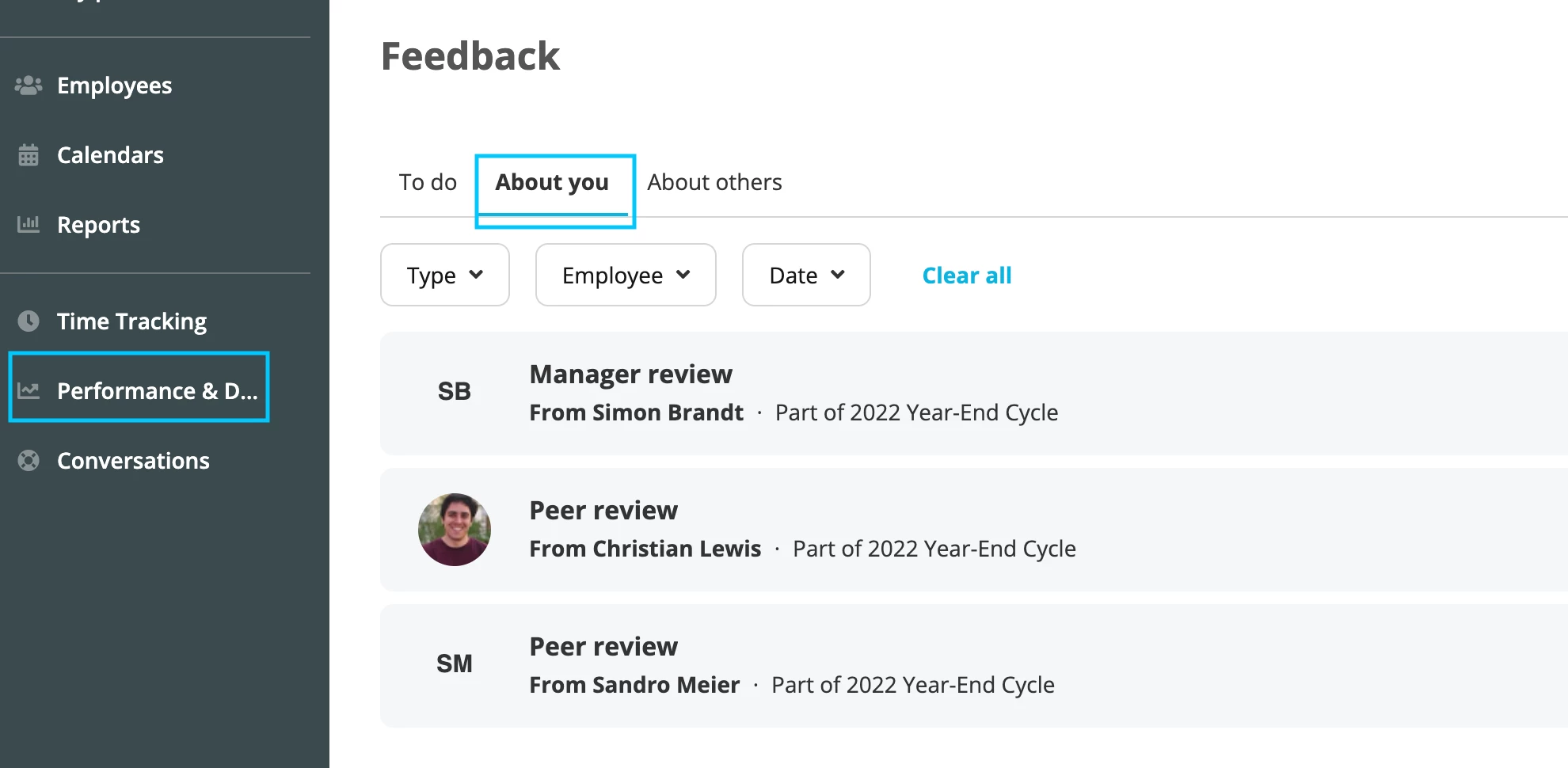
The employee will be able to see all his Peer Reviews, by going toPerformance & Development > Feedback > About you. In the “About you” section the employee will find an overview of all the Peer Reviews.
Please have in mind that only the Peer reviews of whom the box was ticked as “Share with (name of the person the review is about)” will be visible here. Unfortunately combining all of these Reviews in one Overview field, it’s not possible.
(Image from test Account)
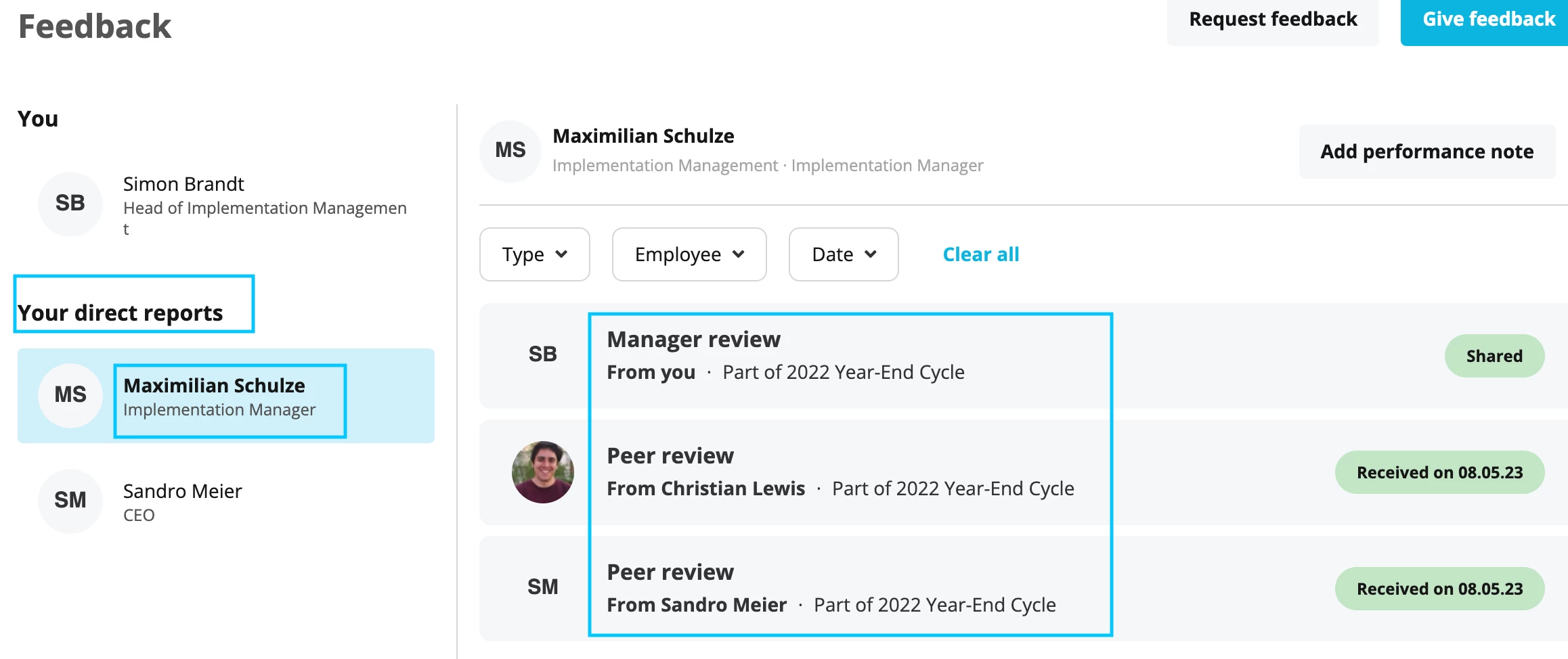
The Manager will be able to see all the reviews of a certain employee by going to Performance & Development > Your direct reports > select the relevant employee.
(Image from test Account)
Unfortunately combining all of these Reviews in one Overview field, it’s not possible.
You can search for a post in our ideation area and to vote for it, in case another user has shared this suggestion for improvement. In case you don’t find any idea that describes your need, you can always post a new idea:
Thank you for reaching out to the community with your question!
The employee will be able to see all his Peer Reviews, by going toPerformance & Development > Feedback > About you. In the “About you” section the employee will find an overview of all the Peer Reviews.
Please have in mind that only the Peer reviews of whom the box was ticked as “Share with (name of the person the review is about)” will be visible here. Unfortunately combining all of these Reviews in one Overview field, it’s not possible.
(Image from test Account)
The Manager will be able to see all the reviews of a certain employee by going to Performance & Development > Your direct reports > select the relevant employee.
(Image from test Account)
Unfortunately combining all of these Reviews in one Overview field, it’s not possible.
You can search for a post in our ideation area and to vote for it, in case another user has shared this suggestion for improvement. In case you don’t find any idea that describes your need, you can always post a new idea:
Thank you for your answer. Can I find anywhere information / guidance on how Personio suggests to use the feedback as manager for the employees? I assume that you have best practices from your own in-house usage of the tool?
I feel as if personio needs to create a workflow for the performance process. It leaves a lot to be desired in this area. All input should go through a workflow and end up in one document rather than many separate documents.
Have there been any updates to the performance process since these messages were posted? I, too, am finding a lot to be desired with the process. Ideally we would like all of the evaluations combined. When I ask Personio how to do this it says to export them and manually combine them. The reason I have the software is to save me time, not to create more processes that detract from it. Also, after the performance review there should be a way to capture the result of the discussion and various inputs. This is missing. I was hoping that this process would be seamless with the software, saving me and others a lot of time. Unfortunately it is not at all. Any suggestions would be welcome. Thanks.
⚠️Achtung! Dieses Thema könnte veraltet sein
Dieses Thema wurde vor mehr als erstellt. Unser Produkt entwickelt sich schnell weiter — stelle gerne eine neue Frage, um die aktuellsten Infos zu bekommen.
Werde Teil der Personio Voyager Community!
Bitte benutze für die Registrierung die gleiche E-Mail-Adresse, die Du auch zum Login in Deinem Personio Account benutzt. Dies erleichtert es uns, Dir effektiv und effizient zu helfen, wenn wir z.B. etwas in Deinem Account überprüfen müssen. Bereits registriert? > Anmelden
Achtung: Dein öffentlicher Benutzername darf keine persönlichen Informationen wie E-Mail oder andere private Daten enthalten!
Herzlich willkommen in der Personio Voyager Community.
Die Service und Networking Community für alle Personio Kund*innen und HRler*innen. Solltest Du Dich noch nicht registriert haben, klicke bitte unten auf "Benutzerkonto erstellen". Benutzerkonto erstellen
Enter your E-mail address. We'll send you an e-mail with instructions to reset your password.