Does anyone have an ideal way of handling interns/working students who become full-time employees?
Concerning People Management: What specific steps need to be taken in Personio?
Regarding Recruiting: For example, when a position is taken over as an FTE, it is filled without being advertised beforehand. In reports, the position should still appear as "Hired" - what is the best way to handle this in Personio?
Maybe someone has some good best practice examples or tips. I would be very pleased :)
Cheers, Vanessa
Beste Antwort von mruscito
Hey @Vanessa Charly
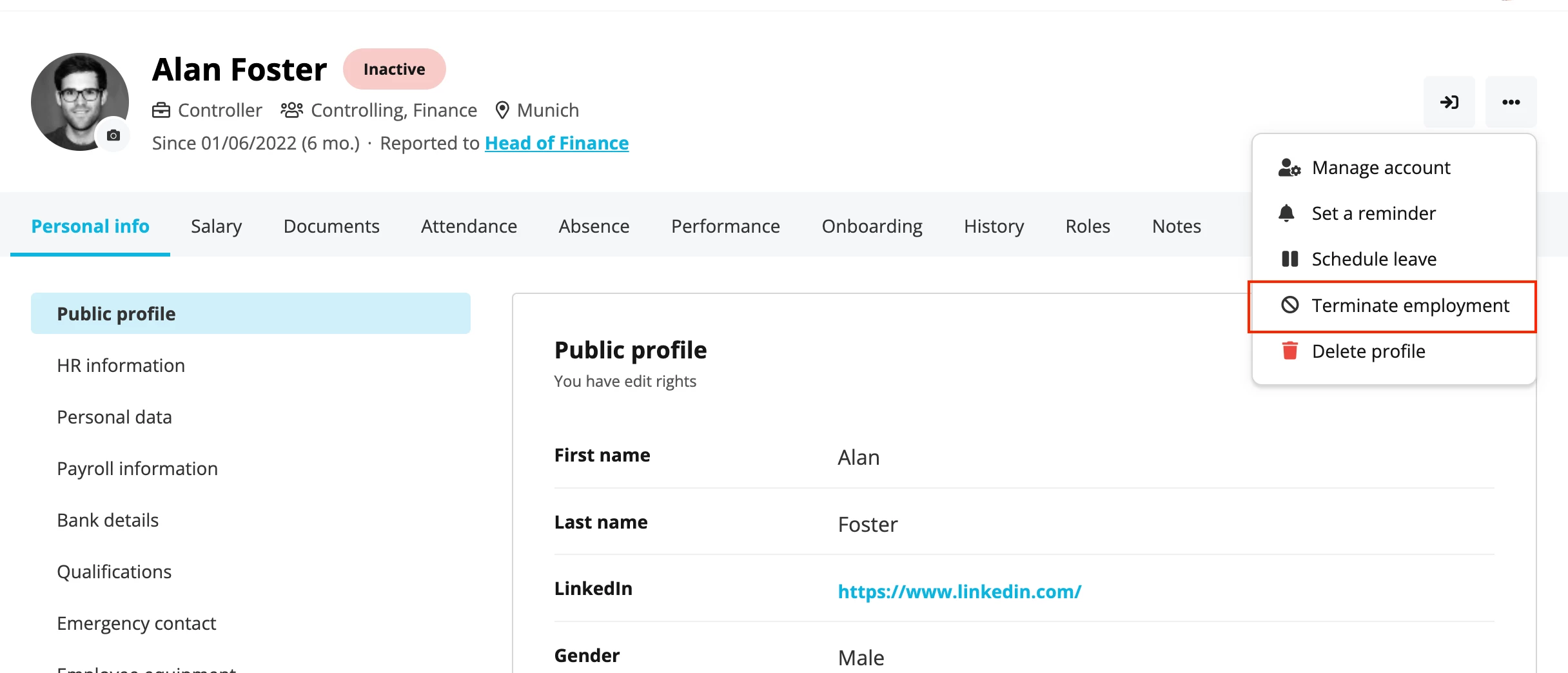
Our Support Team does suggest a new profile if:
➡ The person’s first employment contract has been formally terminated in Personio, using the Terminate employment button ⬇
➡ You plan to register a new hire date for that person, based on their new employment contract
If either idea is not what you are planning to do, then you can keep the same profile and just make the necessary adjustments ✍
*********
As for your recruiting question, I assume that you are using our Recruiting module? If so, I suggest the following:
➡ Create a job position, but don’t publish it 🚨 Keep it as a draft.
➡ Create an application for each internal applicant interested in X position. Choose the correct recruiting channel for each candidate.
➡ Once a candidate is chosen, go into their application and set them to Hired. If their full name and email address matches their existing employee profile, no duplicate will be created.
➡ Now, you are able to run reports for this type of hire. I suggest trying the Applications report under System Reports, and add filters for Position and Recruiting Channel.
Try it out, and see how you like this solution! If you run into any issues, you can open a support request via Find Answers.
📍If the intern/student is going full-time with no gap between their employment contracts, then you can simply change their employee attributes, salary, work schedules, etc. in their profile. You would treat it the same as someone going from full-time position to a part-time one.
By doing it like this, you are able to track the changes in their profile or via reporting. Our Custom Reports function is great for that 👌
📍For recruiting, is your concern that you advertised the intern job with part-time hours, but the hired candidate is now going to do the same job as FTE? And you want this to reflect in reporting?
Regarding point 1: that's good to know - last time I was advised by Support to create a new profile when changing the type of employment. But it's a lot easier that way.
Regarding point 2: The person was previously employed as a working student and will now take on a new position full-time. However, we have not published or advertised this position, as we have already calculated with an internal “hire”. How do you note an internal filling of a new position so that it also appears as hired in reporting?
➡ Create a job position, but don’t publish it 🚨 Keep it as a draft.
➡ Create an application for each internal applicant interested in X position. Choose the correct recruiting channel for each candidate.
➡ Once a candidate is chosen, go into their application and set them to Hired. If their full name and email address matches their existing employee profile, no duplicate will be created.
➡ Now, you are able to run reports for this type of hire. I suggest trying the Applications report under System Reports, and add filters for Position and Recruiting Channel.
Try it out, and see how you like this solution! If you run into any issues, you can open a support request via Find Answers.
Hi @Vanessa Charly, I will go ahead and mark this question as “answered” - if you have any further questions, please let us know in a comment! 🤗
Best, Daniele
Übersetzen
⚠️Achtung! Dieses Thema könnte veraltet sein
Dieses Thema wurde vor mehr als erstellt. Unser Produkt entwickelt sich schnell weiter — stelle gerne eine neue Frage, um die aktuellsten Infos zu bekommen.
Werde Teil der Personio Voyager Community!
Bitte benutze für die Registrierung die gleiche E-Mail-Adresse, die Du auch zum Login in Deinem Personio Account benutzt. Dies erleichtert es uns, Dir effektiv und effizient zu helfen, wenn wir z.B. etwas in Deinem Account überprüfen müssen. Bereits registriert? > Anmelden
Achtung: Dein öffentlicher Benutzername darf keine persönlichen Informationen wie E-Mail oder andere private Daten enthalten!
Herzlich willkommen in der Personio Voyager Community.
Die Service und Networking Community für alle Personio Kund*innen und HRler*innen. Solltest Du Dich noch nicht registriert haben, klicke bitte unten auf "Benutzerkonto erstellen". Benutzerkonto erstellen
Enter your E-mail address. We'll send you an e-mail with instructions to reset your password.