I’m looking for a report that mamangers can run about planned absences with dates. I found how to run report about number of days but not with dates.
For example: bigining of March, they want to run a report about planned leave for their team for the whole month with dates for each team members.
Do you know how to do it?
Many thanks in advance for your help.
Beste Antwort von Annlisa
Hello @CelineD 😊,
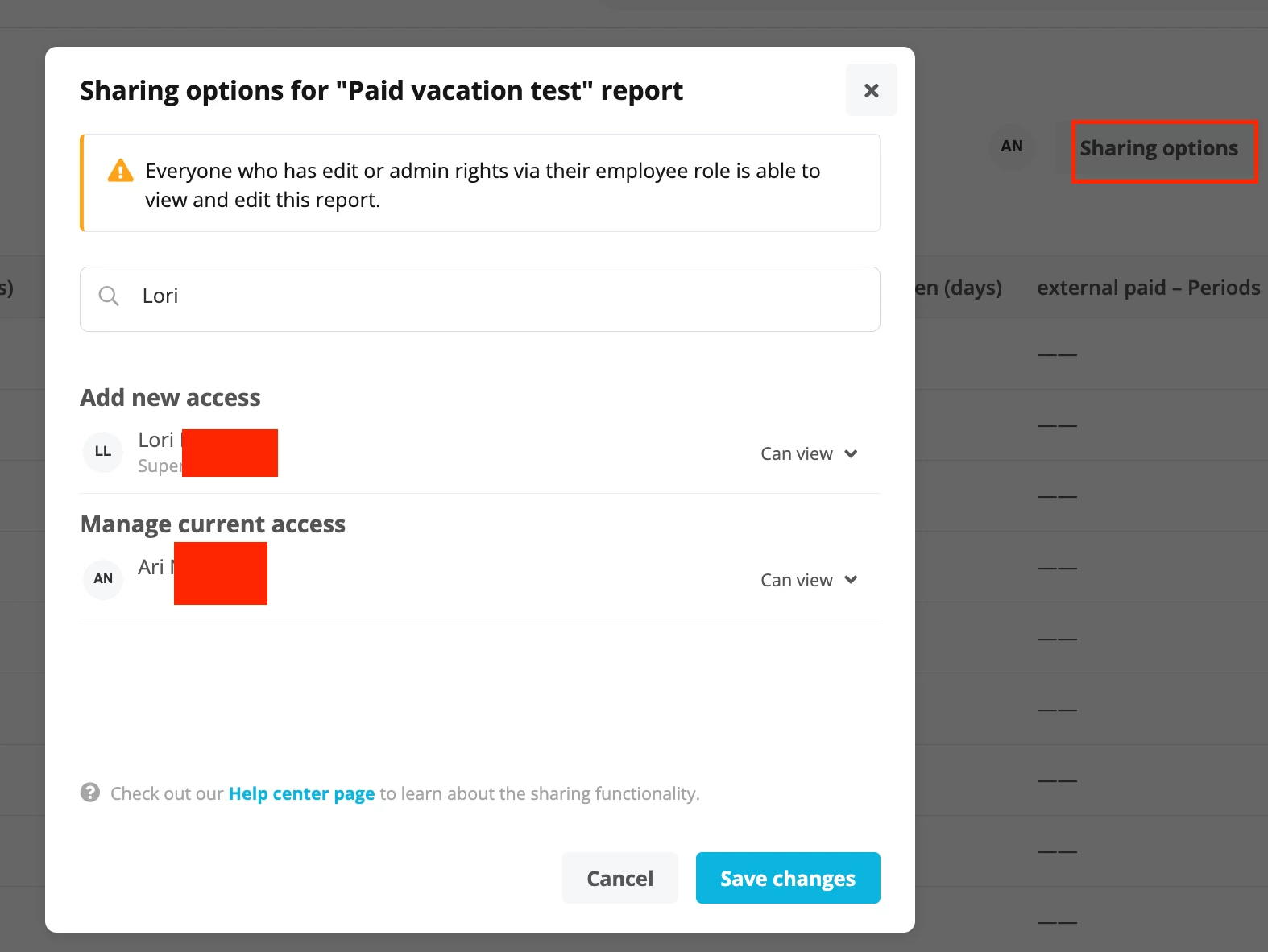
I’m getting back to you as I thought that we actually have a way to give your employees access to a specific Custom Report through the Sharing options window.
Employees who you share a Custom report with will only be able to view that particular custom report, export it but they will not be able to edit it.
This means that only your employees with Admin and Edit rights to the Custom report will be able to edit that Report.
You can find the Sharing options tab in your Custom Report newly created as you can see from my screenshot below. You can add the Employees you would like to share it with:
My apologies since I did not think about it immediately yesterday.
If you need further information about this process, you can find it in the relevant Helpcenter article below:
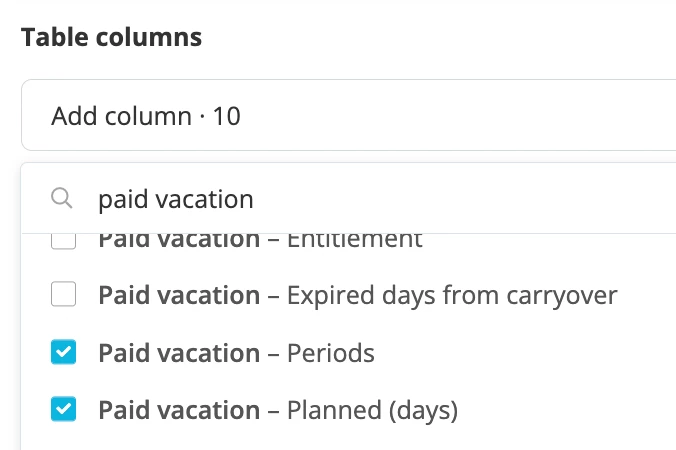
If you navigate to Reports>Custom Reports, you will have the option to create a new Custom report, select the dates and in the Table columns section, you will have the option to select per each Absence type, Periods (will show the dates) and Planned days (will show the number of days planned) as in my screenshot below:
You can find all the relevant instruction and information on how to create Custom reports in the Helpcenter article below:
Unfortunately it would not be possible to grant Access Rights to a specific Custom Report. This can only be done for the System reports.
If you want, you may take in consideration that within the System Reports there’s a report called Absence days, but this will only shows the number of days planned but not the dates nor the Absence type.
Since, this is a feature that we do not have in Personio, I would like to encourage you to post this suggestion of improvement in our ideation area. This way, other users will be able to vote for it, and the suggestion will be shared with our product team. In order for us to fully understand your idea, I share with you a couple of questions that your description should clarify when posting in the ideation area:
What would you like to achieve with Personio? What issue do you need to solve?
Why? What would be the added value for you?
How are you solving it right now?
The more details, the better! However, remember not to share any personal or business data with the public. Make sure to add the link to the idea in this thread, so that other users that find your question can upvote it. Thank you in advance for sharing your ideas with us .
I’m getting back to you as I thought that we actually have a way to give your employees access to a specific Custom Report through the Sharing options window.
Employees who you share a Custom report with will only be able to view that particular custom report, export it but they will not be able to edit it.
This means that only your employees with Admin and Edit rights to the Custom report will be able to edit that Report.
You can find the Sharing options tab in your Custom Report newly created as you can see from my screenshot below. You can add the Employees you would like to share it with:
My apologies since I did not think about it immediately yesterday.
If you need further information about this process, you can find it in the relevant Helpcenter article below:
I’m not sure this will work because for what I need to do, managers need to see the report but also to be able to edit the timeframe of information they want.
If I give them access to edit rights to custom reports and I give access to only that specific report as you’ve just shown me, do you think this could be a solution?
As soon as you give the Edit Access rights to the Custom Reports, the View Access Rights will automatically be populated, as you can see from my screenshot below:
Unfortunately this will not be possible. You can either give your employees access to all Custom reports, in order for them to be able to view and edit them or Sharing the Report with them, but they will not be able to Edit it.
If one employee in this “group” has an Admin role, he can edit the Report on behalf of the other employees.
At this time, I would still recommend you to share your idea and feedback in our ideation area.😊
Hi @CelineD, I’m Christoph the Product Manager for Analytics and Reporting. Would you be interested to participate in a discovery interview about reporting and analytics?
Let me know if you have any questions, happy to provide more details.
All the best,
Christoph
Übersetzen
⚠️Achtung! Dieses Thema könnte veraltet sein
Dieses Thema wurde vor mehr als erstellt. Unser Produkt entwickelt sich schnell weiter — stelle gerne eine neue Frage, um die aktuellsten Infos zu bekommen.
Werde Teil der Personio Voyager Community!
Bitte benutze für die Registrierung die gleiche E-Mail-Adresse, die Du auch zum Login in Deinem Personio Account benutzt. Dies erleichtert es uns, Dir effektiv und effizient zu helfen, wenn wir z.B. etwas in Deinem Account überprüfen müssen. Bereits registriert? > Anmelden
Achtung: Dein öffentlicher Benutzername darf keine persönlichen Informationen wie E-Mail oder andere private Daten enthalten!
Herzlich willkommen in der Personio Voyager Community.
Die Service und Networking Community für alle Personio Kund*innen und HRler*innen. Solltest Du Dich noch nicht registriert haben, klicke bitte unten auf "Benutzerkonto erstellen". Benutzerkonto erstellen
Enter your E-mail address. We'll send you an e-mail with instructions to reset your password.








 .
.