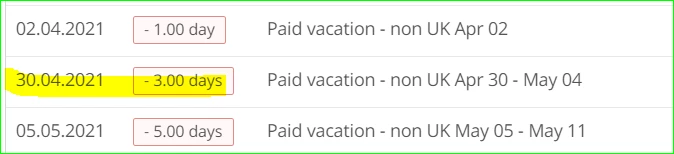
Hello, does anybody know how to delete those approved holidays as the person worked on those days. Thank you

 +1
+1Hello, does anybody know how to delete those approved holidays as the person worked on those days. Thank you
Beste Antwort von Daniele
Hi
Thank You for reaching out! 
It is possible to edit and to delete an Absence, no matter if it takes place in the present, past or future. To do so, just go to the respective Employee Profile, then click on the Absence Tab.
On the calendar, just navigate to the relevant dates and click on the Absence you would like to modify. Then, you can either change the dates or delete that Absence entirely.
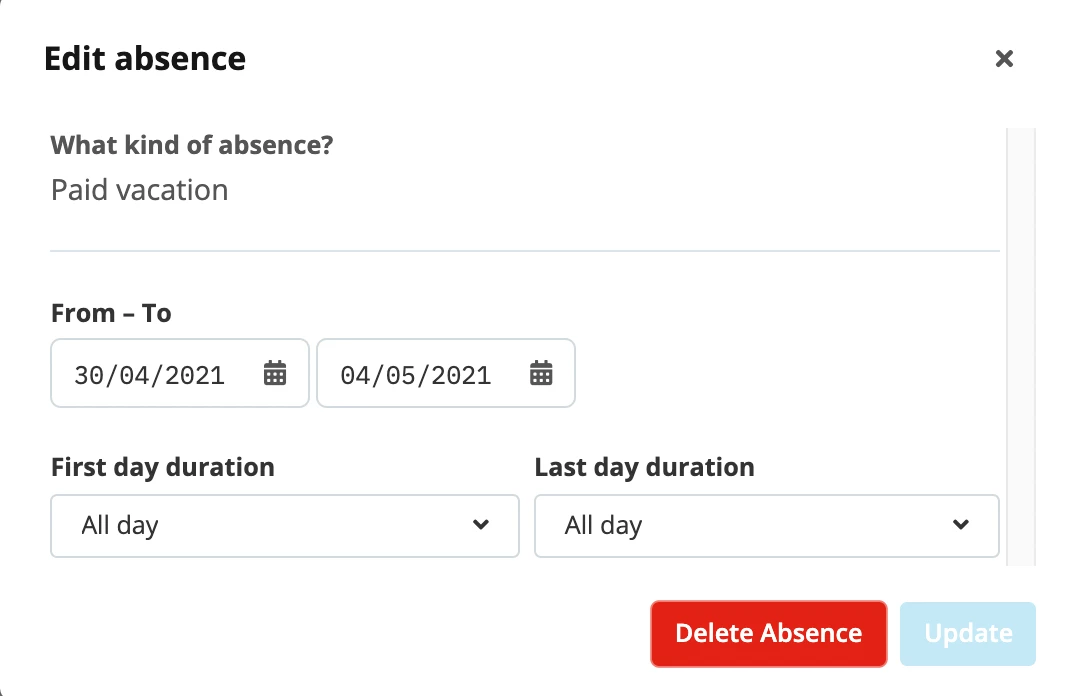
If the Employee has propose rights for this type of Absence, they can even do it themselves. In that case, requesting to delete an Absence would trigger the same Approval Process as requesting an Absence.
Let me know if this would solve your matter or if you have any further questions about this topic :)
Best,
Daniele
Bitte benutze für die Registrierung die gleiche E-Mail-Adresse, die Du auch zum Login in Deinem Personio Account benutzt. Dies erleichtert es uns, Dir effektiv und effizient zu helfen, wenn wir z.B. etwas in Deinem Account überprüfen müssen. Bereits registriert? > Anmelden
Achtung: Dein öffentlicher Benutzername darf keine persönlichen Informationen wie E-Mail oder andere private Daten enthalten!
Die Service und Networking Community für alle Personio Kund*innen und HRler*innen. Solltest Du Dich noch nicht registriert haben, klicke bitte unten auf "Benutzerkonto erstellen". Benutzerkonto erstellen
Enter your E-mail address. We'll send you an e-mail with instructions to reset your password.