How can I add numeric figures in cost center section? Like we have different cost centers of each employee and that needs to be added in their account?
Answered
How can I add numeric figures in cost center section? Like we have different cost centers of each employee and that needs to be added in their account?
We are updating our employee profiles and we were trying to add cost center details of our employee where percentage option has added by default. We have various cost centers like A, B, C etc that we need to add into employee profile section but I am unable to do that change. Please let me know how to create that template or step and how to add it?
Beste Antwort von mruscito
Hi @satish !
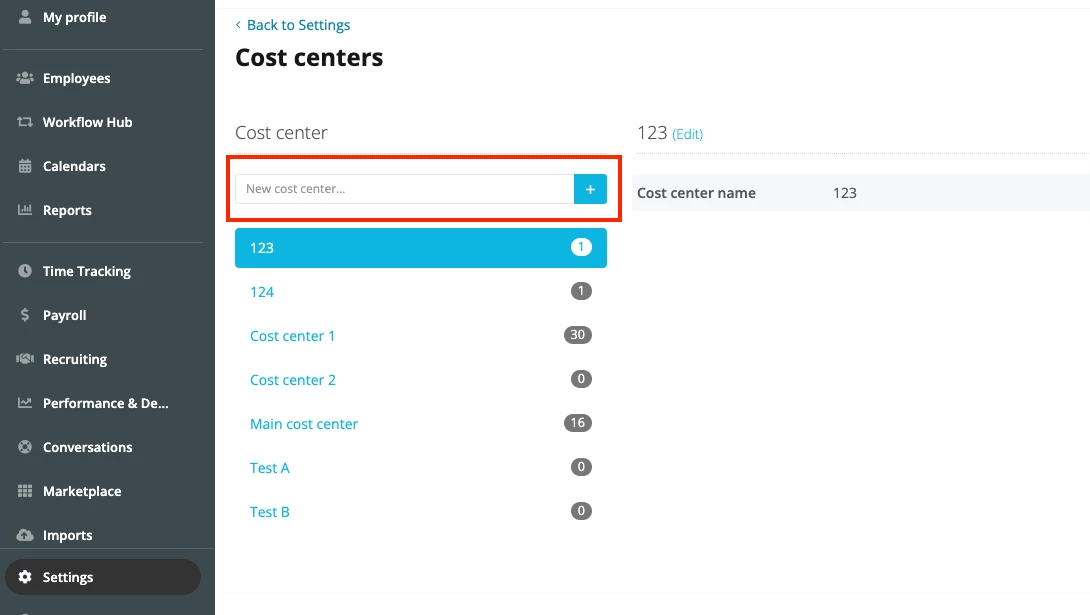
You have two options here: you can go to Settings > ORGANIZATION > Cost Centers and manually add new cost centre options. Just be careful if you want to delete some options, as this will permanently erase all data entries related to that cost centre. ⬇
Then, you would have to go to the relevant employee profiles and make the changes to their cost centre from there.
📣Alternatively, you can perform an employee data import. 📣
With this method, not only are you adding new cost centre options to your account but are also automatically updating the employees’ profiles at the same time!
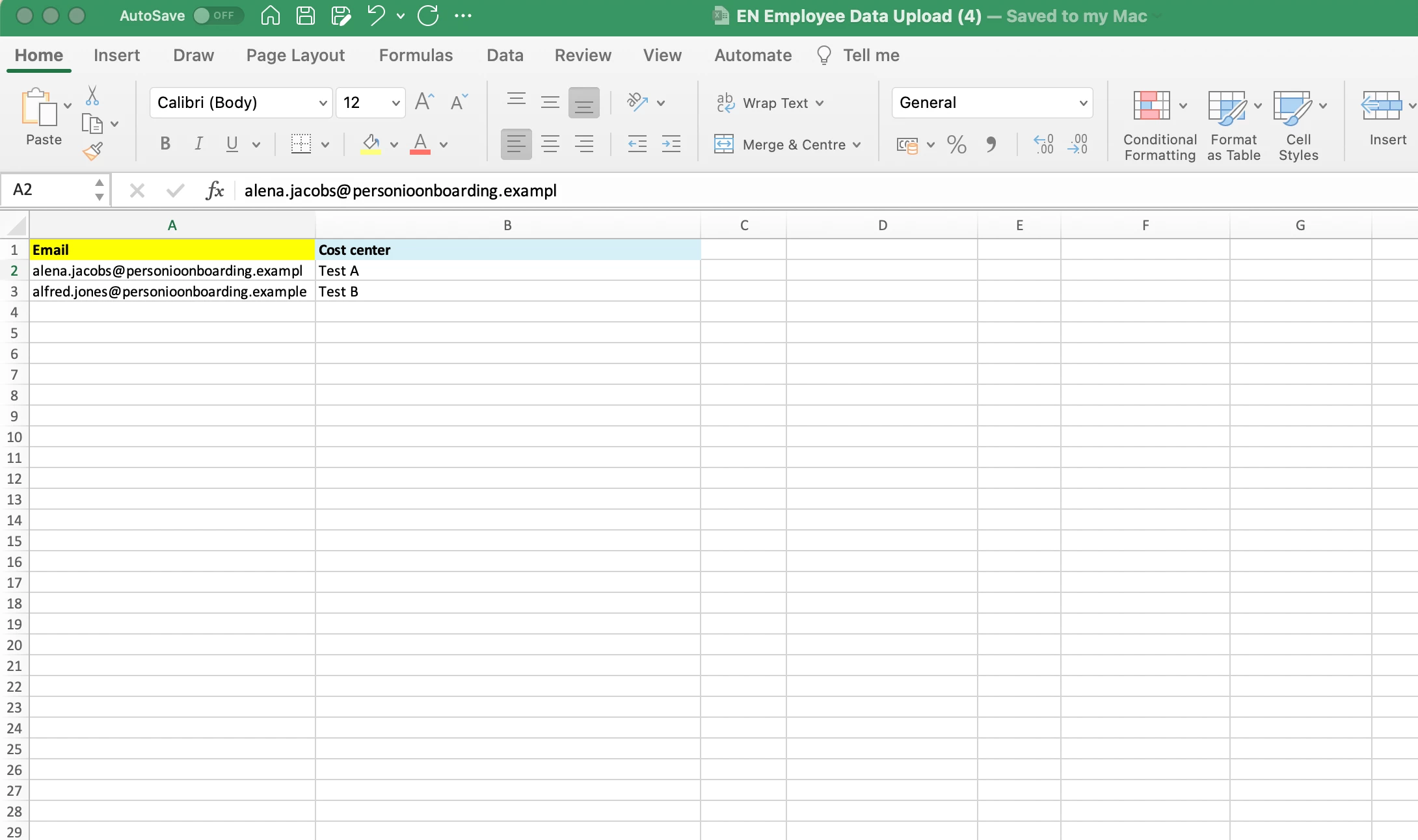
In this Helpcentre article (Import employee data), you will find a template that you can use for the import. You do not have to upload information for all the categories listed - you can delete the columns that are not relevant for you, that way you do not import any erroneous information. I suggest that you use the columns Email and Cost Center - just add the employees’ email addresses that are registered in their profiles, and include the cost centre that they belong to. ⬇
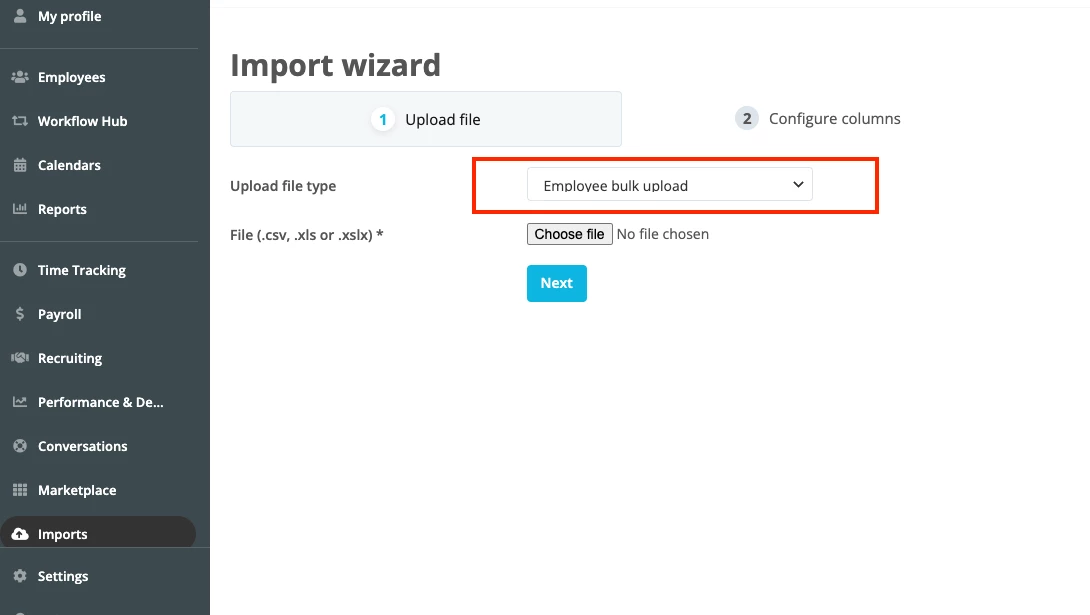
When your file is ready, go to the menu bar in Personio and select Imports. There, choose Employee bulk upload and follow the rest of the steps. It could take a few minutes for the import to load fully into your account.
You have two options here: you can go to Settings > ORGANIZATION > Cost Centers and manually add new cost centre options. Just be careful if you want to delete some options, as this will permanently erase all data entries related to that cost centre. ⬇
Then, you would have to go to the relevant employee profiles and make the changes to their cost centre from there.
📣Alternatively, you can perform an employee data import. 📣
With this method, not only are you adding new cost centre options to your account but are also automatically updating the employees’ profiles at the same time!
In this Helpcentre article (Import employee data), you will find a template that you can use for the import. You do not have to upload information for all the categories listed - you can delete the columns that are not relevant for you, that way you do not import any erroneous information. I suggest that you use the columns Email and Cost Center - just add the employees’ email addresses that are registered in their profiles, and include the cost centre that they belong to. ⬇
When your file is ready, go to the menu bar in Personio and select Imports. There, choose Employee bulk upload and follow the rest of the steps. It could take a few minutes for the import to load fully into your account.
I hope the answer above was helpful for you! If this was the case, please mark the post as Best Answer. If there is any other detail you need from us, please let us know. We will be happy to support you further 😊.
I wish you a lovely day 🌸.
Best,
Andrea
Übersetzen
⚠️Achtung! Dieses Thema könnte veraltet sein
Dieses Thema wurde vor mehr als erstellt. Unser Produkt entwickelt sich schnell weiter — stelle gerne eine neue Frage, um die aktuellsten Infos zu bekommen.
Werde Teil der Personio Voyager Community!
Bitte benutze für die Registrierung die gleiche E-Mail-Adresse, die Du auch zum Login in Deinem Personio Account benutzt. Dies erleichtert es uns, Dir effektiv und effizient zu helfen, wenn wir z.B. etwas in Deinem Account überprüfen müssen. Bereits registriert? > Anmelden
Achtung: Dein öffentlicher Benutzername darf keine persönlichen Informationen wie E-Mail oder andere private Daten enthalten!
Herzlich willkommen in der Personio Voyager Community.
Die Service und Networking Community für alle Personio Kund*innen und HRler*innen. Solltest Du Dich noch nicht registriert haben, klicke bitte unten auf "Benutzerkonto erstellen". Benutzerkonto erstellen
Enter your E-mail address. We'll send you an e-mail with instructions to reset your password.