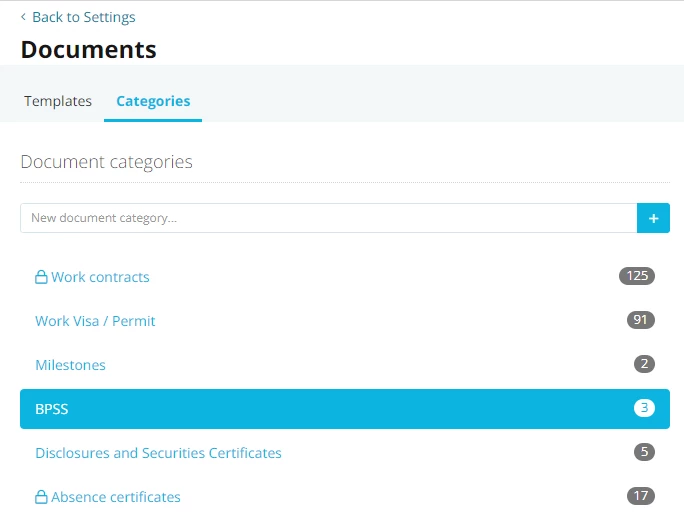
I’m haivng trouble finding the 3 instances where we have the BPSS Document Type in use..
I have tried using the Report ‘Custom Report’ but it doesn’t allow to search Document Categories from what I have found.
I want to tidy up our Categories and streamline this but for the life of me I can’t find where these 3 files under BPSS are… is there an easy way to find it or do I need to go into each employee individually?
This also is another use case for having the ability to report on Documents and Documents Metadata. @Andrea
Link to proposed solution found in other Document Storage solutions
If any of you have the solution - appreciate your help.
Beste Antwort von Andrea Mendoza
Hi @JHBEM,
I do understand the need of reporting data regarding documents with your last posts. Thanks for the details, I am happy that Conor reached out to you on your idea mentioned above 😊.
In order to see in which profiles there are documents on your categoryBPSS, there are two options:
Checking in your employee profiles: at the moment there is no report that shows this information, so you would need to take a look in your employees’ profiles. Don’t forget to check employees on status inactive and on leave.
Undertaking an export of company data: Within the export, a separate folder for each employee is created in the zip file, containing all documents sorted by different categories.
The following idea might describe a suitable solution for this case:
As always, feel free to vote for it!
Let me know if I can clarify anything else for you.
I do understand the need of reporting data regarding documents with your last posts. Thanks for the details, I am happy that Conor reached out to you on your idea mentioned above 😊.
In order to see in which profiles there are documents on your categoryBPSS, there are two options:
Checking in your employee profiles: at the moment there is no report that shows this information, so you would need to take a look in your employees’ profiles. Don’t forget to check employees on status inactive and on leave.
Undertaking an export of company data: Within the export, a separate folder for each employee is created in the zip file, containing all documents sorted by different categories.
The following idea might describe a suitable solution for this case:
As always, feel free to vote for it!
Let me know if I can clarify anything else for you.
It does answer the question - although not the solution I was hoping for…
i.e. didn’t want to have to go into each individual’s Document record to find out who (active and inactive) has these documents….
I am not sure what is faster.. as I just want to move the file from one Document Category to another and then remove the BPSS document category altogether.
Übersetzen
⚠️Achtung! Dieses Thema könnte veraltet sein
Dieses Thema wurde vor mehr als erstellt. Unser Produkt entwickelt sich schnell weiter — stelle gerne eine neue Frage, um die aktuellsten Infos zu bekommen.
Werde Teil der Personio Voyager Community!
Bitte benutze für die Registrierung die gleiche E-Mail-Adresse, die Du auch zum Login in Deinem Personio Account benutzt. Dies erleichtert es uns, Dir effektiv und effizient zu helfen, wenn wir z.B. etwas in Deinem Account überprüfen müssen. Bereits registriert? > Anmelden
Achtung: Dein öffentlicher Benutzername darf keine persönlichen Informationen wie E-Mail oder andere private Daten enthalten!
Herzlich willkommen in der Personio Voyager Community.
Die Service und Networking Community für alle Personio Kund*innen und HRler*innen. Solltest Du Dich noch nicht registriert haben, klicke bitte unten auf "Benutzerkonto erstellen". Benutzerkonto erstellen
Enter your E-mail address. We'll send you an e-mail with instructions to reset your password.