When uploading a new document template, a window of options appears for you to set up the name, category and language of the file. I’d like to know how to define a different language from the default options in this section (Dutch, Spanish, German, English, French, Italian).
Thank you :)
Beste Antwort von Andrea Mendoza
Dear @Ting,
Welcome to the Personio Community, we are thrilled to see you here 🎊 🥳
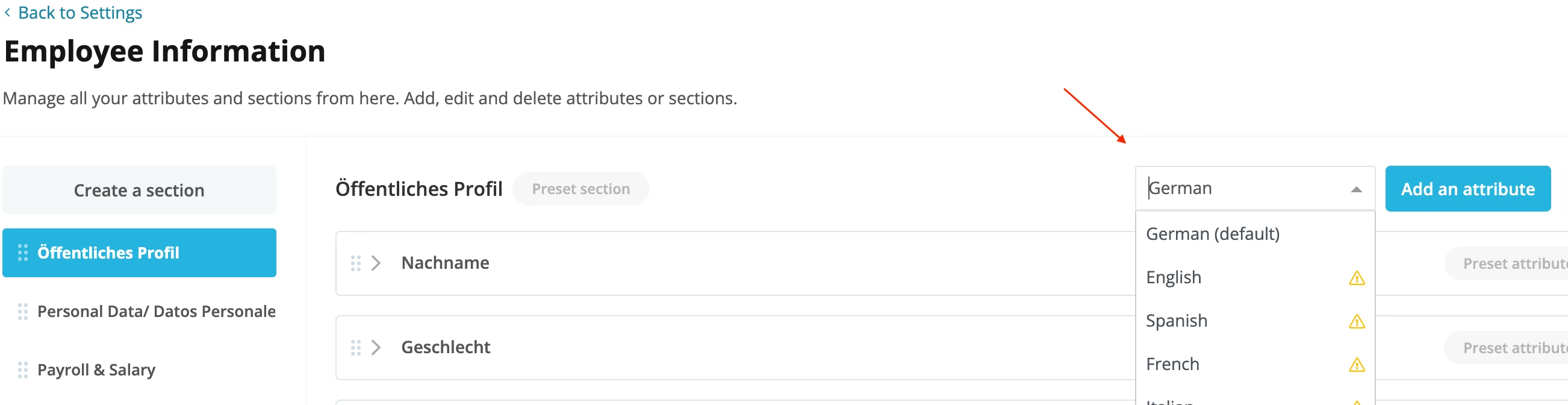
The languages shown in the list of options when uploading a document template, are directly related to the languages available in Settings > People > Employee information:
Document templates are connected to Employee Information for the usage of placeholders (see more details about how to use placeholders in this link). Whenever a placeholder is inserted on your template, Personio will display the information saved in the Attribute in the language you chose from the drop-down list of your screenshot.
For example, if you select the language Spanish, Personio will display on the placeholders the Attributes saved on the Employee Information for Spanish as well.
On the moment, it is not possible to add any further language either for the Employee information, nor in the drop-down list for document templates. If you would like our product team to consider this functionality as a suggestion for improvement, please feel free to post this functionality in our ideation area:
Welcome to the Personio Community, we are thrilled to see you here 🎊 🥳
The languages shown in the list of options when uploading a document template, are directly related to the languages available in Settings > People > Employee information:
Document templates are connected to Employee Information for the usage of placeholders (see more details about how to use placeholders in this link). Whenever a placeholder is inserted on your template, Personio will display the information saved in the Attribute in the language you chose from the drop-down list of your screenshot.
For example, if you select the language Spanish, Personio will display on the placeholders the Attributes saved on the Employee Information for Spanish as well.
On the moment, it is not possible to add any further language either for the Employee information, nor in the drop-down list for document templates. If you would like our product team to consider this functionality as a suggestion for improvement, please feel free to post this functionality in our ideation area:
I was wondering if this is still the current status quo? Our templates are in two languages, so it’d be great to have the option to define the language of a certain output within the placeholder itself, and not have to rely on one setting for the entire document.
This topic was created more than ago. Our product evolves fast – feel free to ask a new question to make sure you get the latest info.
Werde Teil der Personio Voyager Community!
Bitte benutze für die Registrierung die gleiche E-Mail-Adresse, die Du auch zum Login in Deinem Personio Account benutzt. Dies erleichtert es uns, Dir effektiv und effizient zu helfen, wenn wir z.B. etwas in Deinem Account überprüfen müssen. Bereits registriert? > Anmelden
Achtung: Dein öffentlicher Benutzername darf keine persönlichen Informationen wie E-Mail oder andere private Daten enthalten!
Herzlich willkommen in der Personio Voyager Community.
Die Service und Networking Community für alle Personio Kund*innen und HRler*innen. Solltest Du Dich noch nicht registriert haben, klicke bitte unten auf "Benutzerkonto erstellen". Benutzerkonto erstellen
Enter your E-mail address. We'll send you an e-mail with instructions to reset your password.