We added a few questions to employee information area that we want answers for from all the existing employees. The existing employees are not going through onboarding phase, therefore, the tasks triggered by the onboarding flow is not the option here. Is there any other way how could we assign a task for all employees to update the new questions in the employee information area?
Beste Antwort von Sofia V.
Hi @EgleB,
If the employees no longer have the Onboarding status but the Active status, when a change is made to the onboarding template this will unfortunately not trigger an update. As Workaround is to assign again the onboarding template in the profiles of the employees, but please be aware that when this is reassigned all onboarding taks will show again as pending.
I assume that the attributes that the employees have to fill in are existing attributes, a possibility is to create a workflow for you to receive an notification when an attribute has been updated.
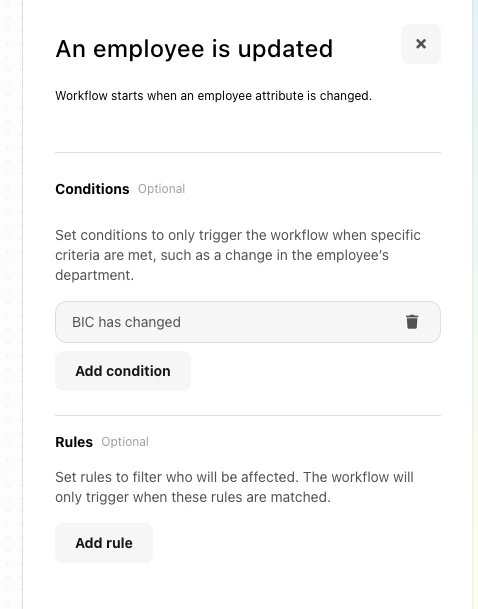
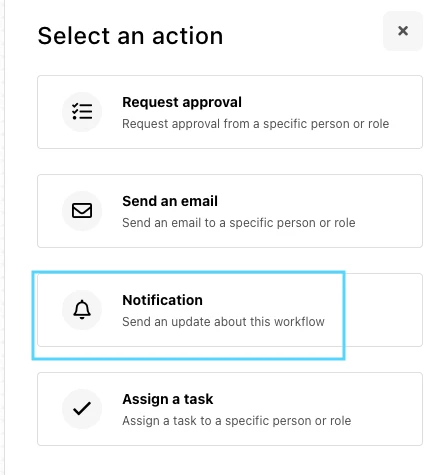
This you can do by going to Automations > Create Workflow > Start from scratch > Event in Personio > An employee is updated > Add conditions: select here for what attributes you would like to receive a notification in case this attribute has been filled in > Add > Notification: Select here who should receive te notification in case the employees updated this attribute.
I would encourage you to send this idea/feedback/suggestion through the new ‘Give feedback’ feature directly in your Personio account. Submissions will be forwarded directly to the relevant product teams. You can find more information in this community post.
If there is an update in this area, you will be informed through our Personio Product Updates or via an in-app notification.
So you wouldn’t be able to assign the attribute to be completed in the same way that you would in an onboarding workflow.
You could assign a ‘task’ through the automations section of Personio, which employees would need to physically tick off in the system, although they would be able to tick it without actually having completed the section.
To do this, you would just need to add a temporary attribute that you can change, using an upload, to trigger the workflow and assign it to everyone and then you can remove this attribute after the workflows have been triggered.
Otherwise, it would just be a case of sending an email to employees letting them know they need to complete it and monitoring completion through reporting.
So you wouldn’t be able to assign the attribute to be completed in the same way that you would in an onboarding workflow.
You could assign a ‘task’ through the automations section of Personio, which employees would need to physically tick off in the system, although they would be able to tick it without actually having completed the section.
To do this, you would just need to add a temporary attribute that you can change, using an upload, to trigger the workflow and assign it to everyone and then you can remove this attribute after the workflows have been triggered.
Otherwise, it would just be a case of sending an email to employees letting them know they need to complete it and monitoring completion through reporting.
I hope this helps!
Hi Zoe,
Thanks for your reply. Could you tell me a bit in more detail how to add a temporary attribute and trigger its workflow? Also, I don’t need to upload anything in articular, I just want to assign a task to everyone.
If the employees no longer have the Onboarding status but the Active status, when a change is made to the onboarding template this will unfortunately not trigger an update. As Workaround is to assign again the onboarding template in the profiles of the employees, but please be aware that when this is reassigned all onboarding taks will show again as pending.
I assume that the attributes that the employees have to fill in are existing attributes, a possibility is to create a workflow for you to receive an notification when an attribute has been updated.
This you can do by going to Automations > Create Workflow > Start from scratch > Event in Personio > An employee is updated > Add conditions: select here for what attributes you would like to receive a notification in case this attribute has been filled in > Add > Notification: Select here who should receive te notification in case the employees updated this attribute.
I would encourage you to send this idea/feedback/suggestion through the new ‘Give feedback’ feature directly in your Personio account. Submissions will be forwarded directly to the relevant product teams. You can find more information in this community post.
If there is an update in this area, you will be informed through our Personio Product Updates or via an in-app notification.
Have a lovely day!
Best,
Sofia
⚠️Achtung! Dieses Thema könnte veraltet sein
Dieses Thema wurde vor mehr als erstellt. Unser Produkt entwickelt sich schnell weiter — stelle gerne eine neue Frage, um die aktuellsten Infos zu bekommen.
Werde Teil der Personio Voyager Community!
Bitte benutze für die Registrierung die gleiche E-Mail-Adresse, die Du auch zum Login in Deinem Personio Account benutzt. Dies erleichtert es uns, Dir effektiv und effizient zu helfen, wenn wir z.B. etwas in Deinem Account überprüfen müssen. Bereits registriert? > Anmelden
Achtung: Dein öffentlicher Benutzername darf keine persönlichen Informationen wie E-Mail oder andere private Daten enthalten!
Herzlich willkommen in der Personio Voyager Community.
Die Service und Networking Community für alle Personio Kund*innen und HRler*innen. Solltest Du Dich noch nicht registriert haben, klicke bitte unten auf "Benutzerkonto erstellen". Benutzerkonto erstellen
Enter your E-mail address. We'll send you an e-mail with instructions to reset your password.