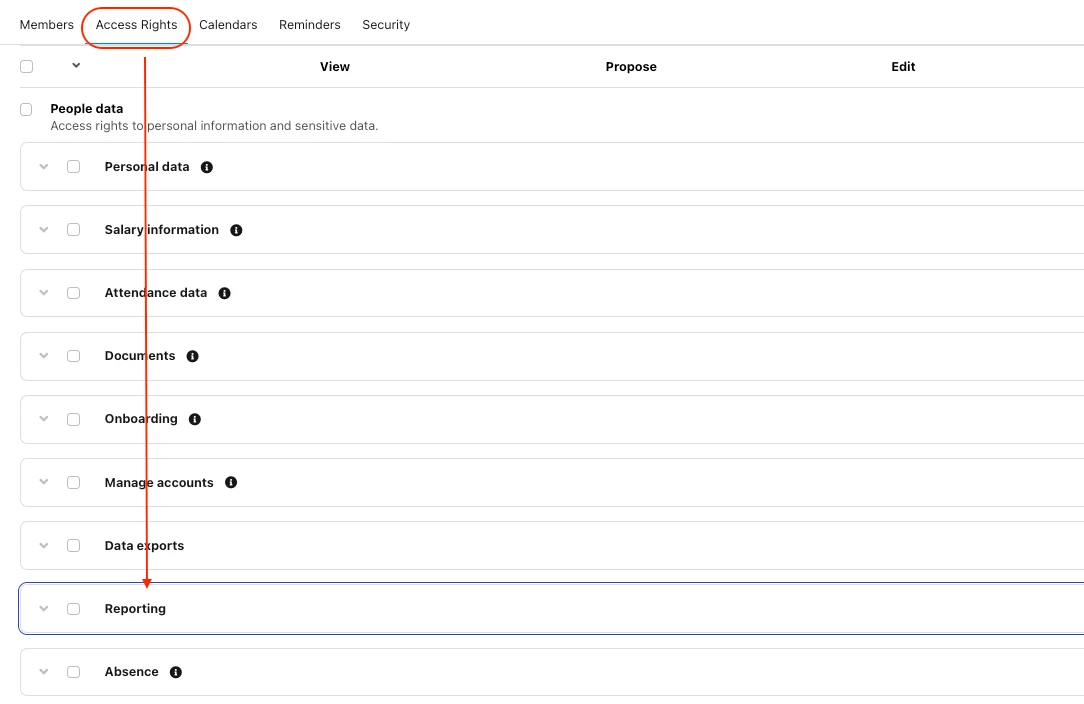
I have done everthing as in the article but I feel like I am missing something fundamental - I am still only seeing the reports of the role’s own team, even though I checked the settings & accesses 1000times.
Do you maybe have any advice for me?
Happy to hear back!
Thanks & best
Rali
Beste Antwort von Valentina S.
Hi @rstambolieva and @Nathan Jolly,
When it comes to Reports, it’s important to check the relevant Access rights.
For System Reports: granting access to the specific System Report is not enough (Settings > Employee roles > People data > Reporting); you also need to grant access to the attribute data.
In fact, you also need to grant access to the attribute data. This can be done by going to Access Rights > Personal data, and selecting at least View > All to the sections where the core attributes are located. Some System Reports may require further attribute data access, such as Termination date and Weekly hours for Headcount and FTE reports, and any Absence type for Absence rate and Absence days and hours reports.
For Custom Reports: employees need access to the Reports access rights section (Settings > Employee roles > People data > Custom reports, select View/Edit: All). Bear in mind that employees with access to Custom Reports will be able to report on all employee data within Personio. Also, this configuration will allow the employee to access the Reports > Your reports and view all existing Custom Reports.
More information on Reports can be found in the following articles from our Help Center:
I am still only seeing the reports of the role’s own team
Does it mean you’re only seeing data from the role’s own team, or that you don’t have access to custom reports you have created on your side ? Also please note that for Beta reports, it can’t be shared with other employees other that the one who has created it for now.
I think you can also have a look in the attributes access rights (ie : People Data). The role you’re creating need to have at least a view right on specific attributes.
Maybe you can share some screenshots, or real life example of what you want to achieve, I’ll be glad to help you !
When it comes to Reports, it’s important to check the relevant Access rights.
For System Reports: granting access to the specific System Report is not enough (Settings > Employee roles > People data > Reporting); you also need to grant access to the attribute data.
In fact, you also need to grant access to the attribute data. This can be done by going to Access Rights > Personal data, and selecting at least View > All to the sections where the core attributes are located. Some System Reports may require further attribute data access, such as Termination date and Weekly hours for Headcount and FTE reports, and any Absence type for Absence rate and Absence days and hours reports.
For Custom Reports: employees need access to the Reports access rights section (Settings > Employee roles > People data > Custom reports, select View/Edit: All). Bear in mind that employees with access to Custom Reports will be able to report on all employee data within Personio. Also, this configuration will allow the employee to access the Reports > Your reports and view all existing Custom Reports.
More information on Reports can be found in the following articles from our Help Center:
Thanks for the detailed reply! I did find a workaround - but then I used this method; Thanks Valentina ! :)
⚠️Achtung! Dieses Thema könnte veraltet sein
Dieses Thema wurde vor mehr als erstellt. Unser Produkt entwickelt sich schnell weiter — stelle gerne eine neue Frage, um die aktuellsten Infos zu bekommen.
Werde Teil der Personio Voyager Community!
Bitte benutze für die Registrierung die gleiche E-Mail-Adresse, die Du auch zum Login in Deinem Personio Account benutzt. Dies erleichtert es uns, Dir effektiv und effizient zu helfen, wenn wir z.B. etwas in Deinem Account überprüfen müssen. Bereits registriert? > Anmelden
Achtung: Dein öffentlicher Benutzername darf keine persönlichen Informationen wie E-Mail oder andere private Daten enthalten!
Herzlich willkommen in der Personio Voyager Community.
Die Service und Networking Community für alle Personio Kund*innen und HRler*innen. Solltest Du Dich noch nicht registriert haben, klicke bitte unten auf "Benutzerkonto erstellen". Benutzerkonto erstellen
Enter your E-mail address. We'll send you an e-mail with instructions to reset your password.