I have a question about the recurring compensation of one of our employees.
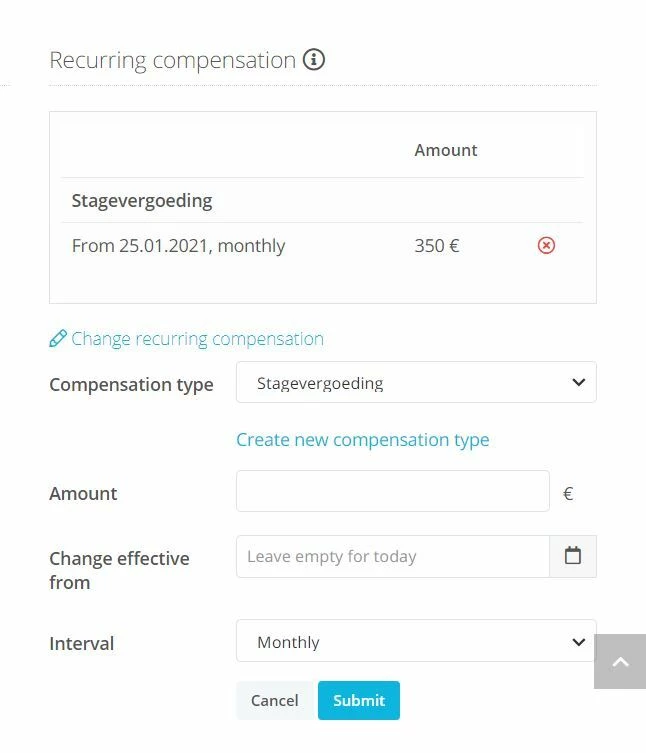
The ‘stagevergoeding’ in this case (which means internship payment), will come to an end at the 4th of June, so last Friday. I want to end this type of the recurring compensation, without deleting it all. If I use the the red cross to delete it, it will not be visible anymore that the compensation has been applicable for a period of time, is that correct? I can change the compensation to 0 from the 5th of June, however, if I do that, the recurring compensation will still appear on the payroll, but at the amount of 0 euros. I'm looking for a way to not have this recurring compensation appear anymore at all on the payroll. Is there a way to end this type of recurring compensation?
Thank you!
Beste Antwort von Daniele
Hello @ExpatMortgages, Thank You for reaching out!
I am happy to help you with this enquiry.
If I use the the red cross to delete it, it will not be visible anymore that the compensation has been applicable for a period of time, is that correct?
That is correct! Clicking on the red cross makes retroactive changes, so the whole record for the recurring compensation will be removed even for the past months.
To end the regular payment of recurring compensation in Personio from a specific point in time onwards, go to the overview as shown in your screenshot and set the payment amount to zero from the required date (e.g. 5. June).
if I do that, the recurring compensation will still appear on the payroll, but at the amount of 0 euros.
Do you mean the Preliminary Payroll?
If the amount is set to 0, it actually shouldn’t appear on the Preliminary Payroll at all for the respective month. If this is the case, please let me know, so we can have a look at it together.
Or do you mean the Salary Tab?
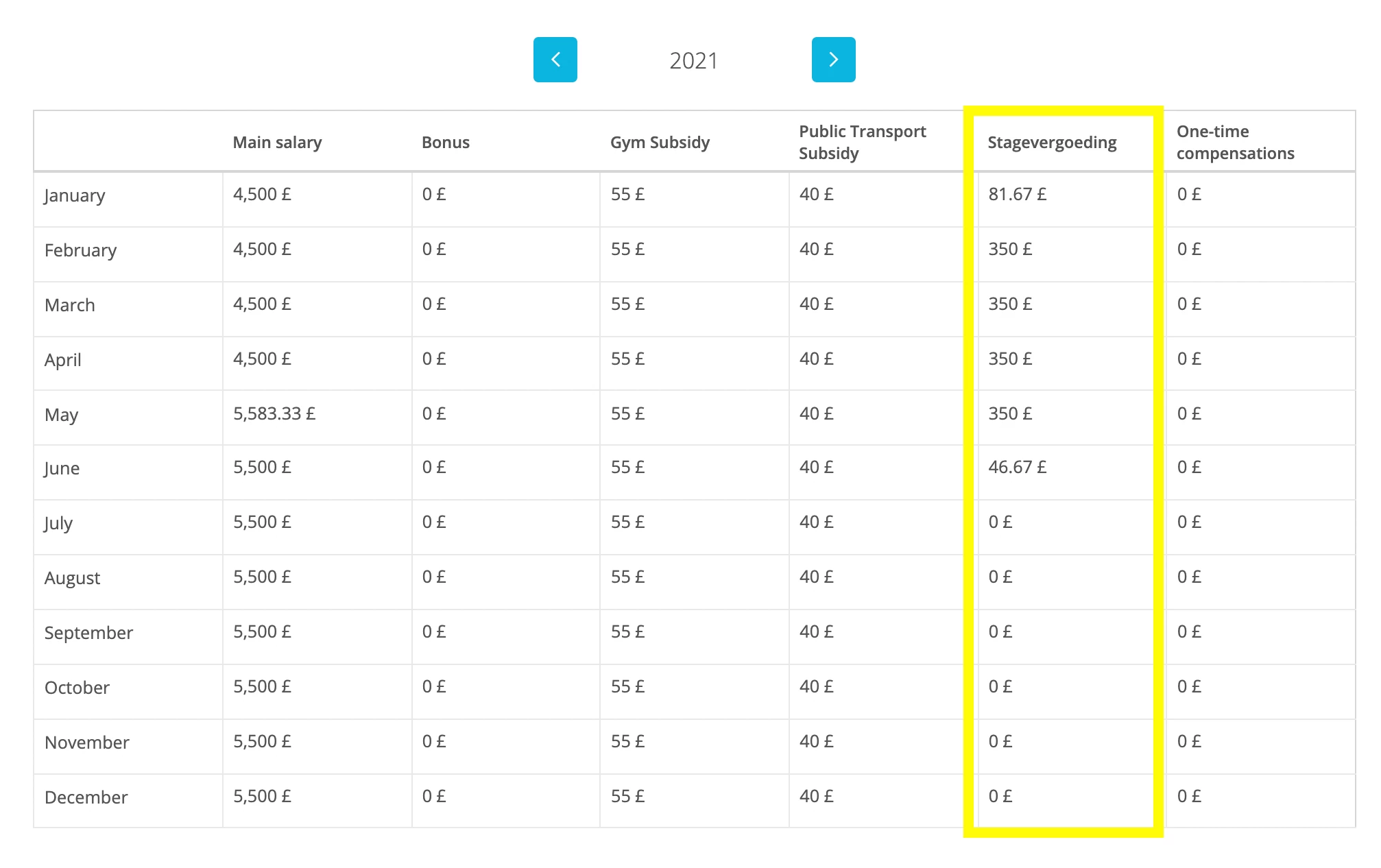
In that case, any type of Recurring Compensation that was made for that employee in the current year will be displayed. The purpose of this overview is to show you all the monthly compensations at a glance.
Have a look at my example:
The compensation type Stagevergoeding has been active for some months in 2021, so it will be shown as a column, even if some entries are €0.
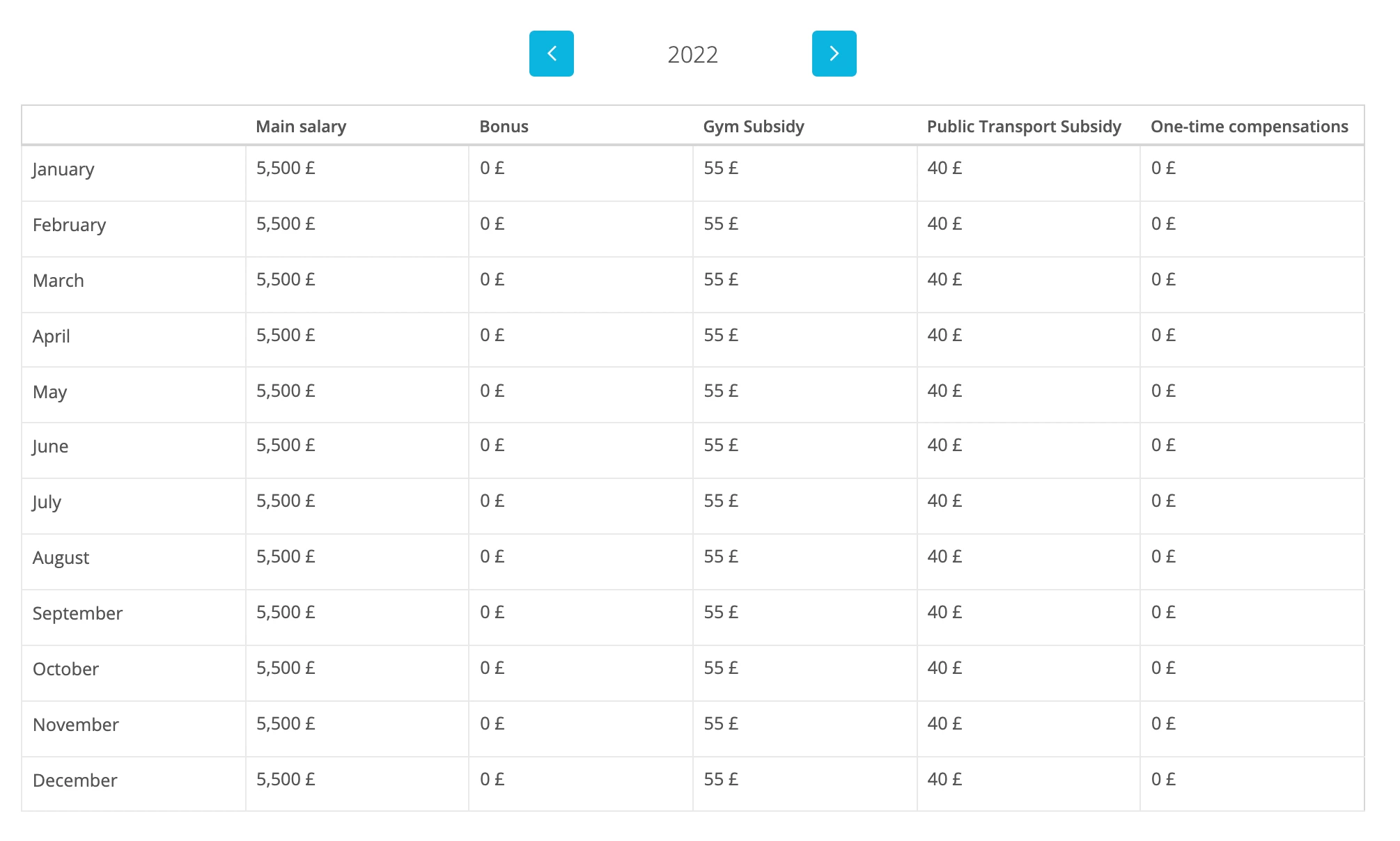
Since it has been inactivated from 05 June 2021, it is not visible anymore in the overview of 2022.
Hello @ExpatMortgages, Thank You for reaching out!
I am happy to help you with this enquiry.
If I use the the red cross to delete it, it will not be visible anymore that the compensation has been applicable for a period of time, is that correct?
That is correct! Clicking on the red cross makes retroactive changes, so the whole record for the recurring compensation will be removed even for the past months.
To end the regular payment of recurring compensation in Personio from a specific point in time onwards, go to the overview as shown in your screenshot and set the payment amount to zero from the required date (e.g. 5. June).
if I do that, the recurring compensation will still appear on the payroll, but at the amount of 0 euros.
Do you mean the Preliminary Payroll?
If the amount is set to 0, it actually shouldn’t appear on the Preliminary Payroll at all for the respective month. If this is the case, please let me know, so we can have a look at it together.
Or do you mean the Salary Tab?
In that case, any type of Recurring Compensation that was made for that employee in the current year will be displayed. The purpose of this overview is to show you all the monthly compensations at a glance.
Have a look at my example:
The compensation type Stagevergoeding has been active for some months in 2021, so it will be shown as a column, even if some entries are €0.
Since it has been inactivated from 05 June 2021, it is not visible anymore in the overview of 2022.
Thank you for your very quick and thorough reply! I'll change it to 0 from the 5th of June, and double check if it will appear on the preliminary payroll for July.
Dieses Thema wurde vor mehr als erstellt. Unser Produkt entwickelt sich schnell weiter — stelle gerne eine neue Frage, um die aktuellsten Infos zu bekommen.
Werde Teil der Personio Voyager Community!
Bitte benutze für die Registrierung die gleiche E-Mail-Adresse, die Du auch zum Login in Deinem Personio Account benutzt. Dies erleichtert es uns, Dir effektiv und effizient zu helfen, wenn wir z.B. etwas in Deinem Account überprüfen müssen. Bereits registriert? > Anmelden
Achtung: Dein öffentlicher Benutzername darf keine persönlichen Informationen wie E-Mail oder andere private Daten enthalten!
Herzlich willkommen in der Personio Voyager Community.
Die Service und Networking Community für alle Personio Kund*innen und HRler*innen. Solltest Du Dich noch nicht registriert haben, klicke bitte unten auf "Benutzerkonto erstellen". Benutzerkonto erstellen
Enter your E-mail address. We'll send you an e-mail with instructions to reset your password.