Some of our employees have a different working schedule each week. So for instance the work every week 24 hours per week but in week 1 they work on monday, wednesday and friday and in week 2 they work on friday, saturday, sunday.
How do I take care of the absence holiday requests so the correct amount of leave is calculated for these employees?
Beste Antwort von marielle.van.wieringen
Hi @ConorCunningham,
Thanks for you reply. What do you mean with “then on the remaining days you can create another absence just to input for the other days for tracking purposes. “ What kind of tracking purposes do you mean?
And in the Help article it is written: “The working hours of employees who work on flexible days can be distributed evenly over the corresponding days of the week (generally Monday to Friday). “. What does it mean exactly? If someone works 40 hours a week, you need to put 5,7 hours (40 hours / 7 working days) per day?
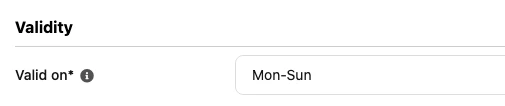
From what I gather these employees work on a flexible schedule, which means they will need their own absence type. The reason being you will need to have the valid on settings enabled for Mon-Sun to ensure vacation is deducted for all days of the week.
The only issue you need to consider on this is the employee will need to only put the amount of absence they want deducted. For example if the employee is taking the week off, they shouldn’t put the full week of absence for their request as it will deduct 7 days. Instead what I would recommend is for them to put three days in for their normal holiday absence, then on the remaining days you can create another absence just to input for the other days for tracking purposes.
We have a helpcenter guide that goes through similar instances relating to flexible schedules of which I will provide below:
Thanks for you reply. What do you mean with “then on the remaining days you can create another absence just to input for the other days for tracking purposes. “ What kind of tracking purposes do you mean?
And in the Help article it is written: “The working hours of employees who work on flexible days can be distributed evenly over the corresponding days of the week (generally Monday to Friday). “. What does it mean exactly? If someone works 40 hours a week, you need to put 5,7 hours (40 hours / 7 working days) per day?
What do you mean with “then on the remaining days you can create another absence just to input for the other days for tracking purposes. “ What kind of tracking purposes do you mean?
Technically the employee will only enter their paid vacation on the days that they are due to work so it will be three days in this case. However if the employee is off for a full week, the other employees may only see that they are off for three days.
So if you wanted to let other employees know that they are off for the full week, you could choose to use another absence type to fill in the other 4 days of the week (the non-scheduled work days). It is entirely up to you on this if you want to do this though.
And in the Help article it is written: “The working hours of employees who work on flexible days can be distributed evenly over the corresponding days of the week (generally Monday to Friday). “. What does it mean exactly? If someone works 40 hours a week, you need to put 5,7 hours (40 hours / 7 working days) per day?
Yes exactly. As this will be Mon-Sun for your employees, you will divide the 24 hours per week over 7 days (roughly 3.5 hours per day). Keep in mind, this advice is for part time employees, not employees who work the normal 40 hour full time week.
If you have any follow up questions, please let me know.
So according to the working schedule an employee who works 24 hours a week, it says 3,4 hours on every day of the week. If this employees wants 3 days off (24 hours in total) he needs to calculate himself how many days/hours to request to make sure the total amount is 24 hours?
I don’t see how this could work. Please explain :)
Let me re-think this situation with a better solution.
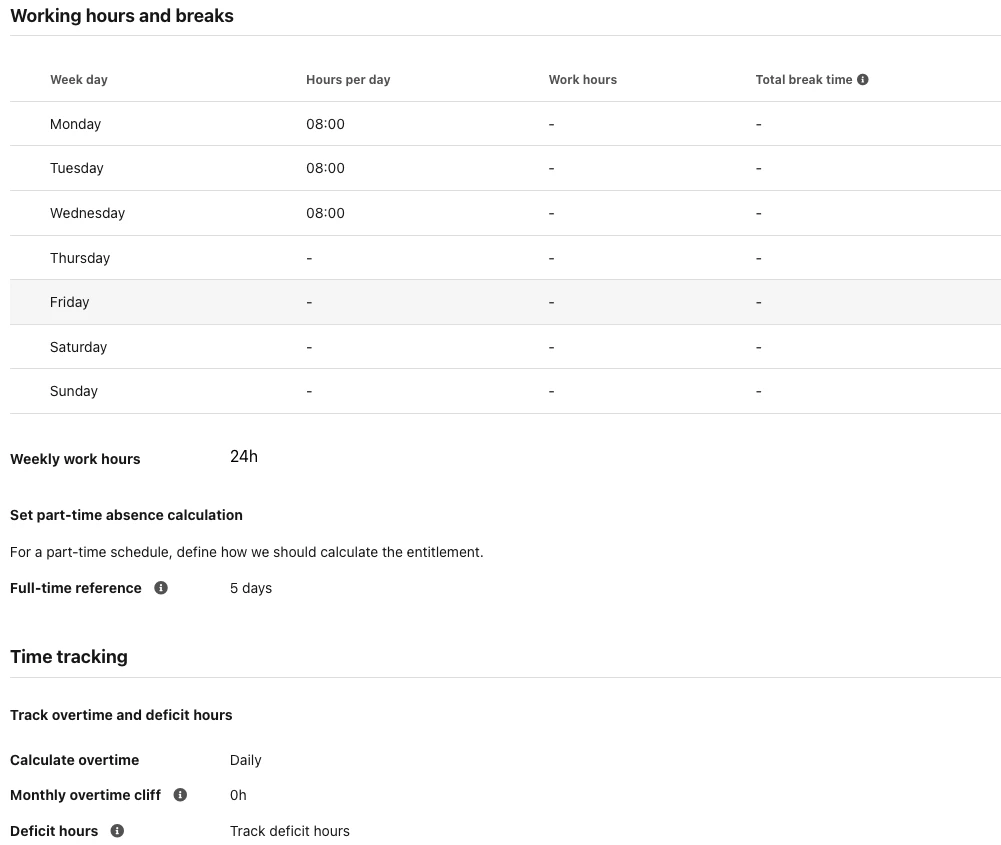
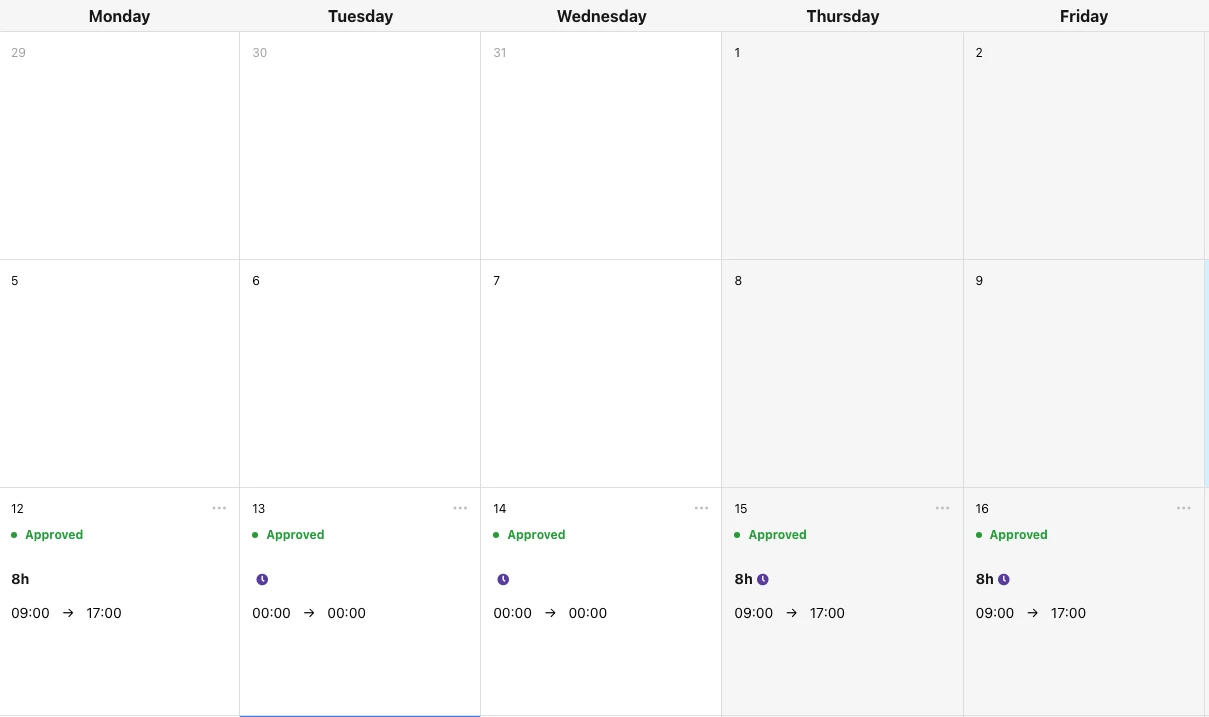
I would create a working schedule and nominate three days of the week with 8 hours to be worked. For this working schedule I would then activate deficit hours and the employee will enter their hours as normal on the days they work and for the days they do not work they will enter 00:00 > 00:00 to activate the deficit hours.
In my example below, I have Mon, Tue, Wed as normal working days of 8 hours, but in this week I actually work Mon, Thur and Friday. For the days I work I will enter my hours and for the other days I will input the 00:00 time to activate deficithours and equal it out to 24 hours weekly. Therefore the 16 hours underworked hours will be balanced out by the 16 hours overtime hours giving me the total working hours of 24 hours per week.
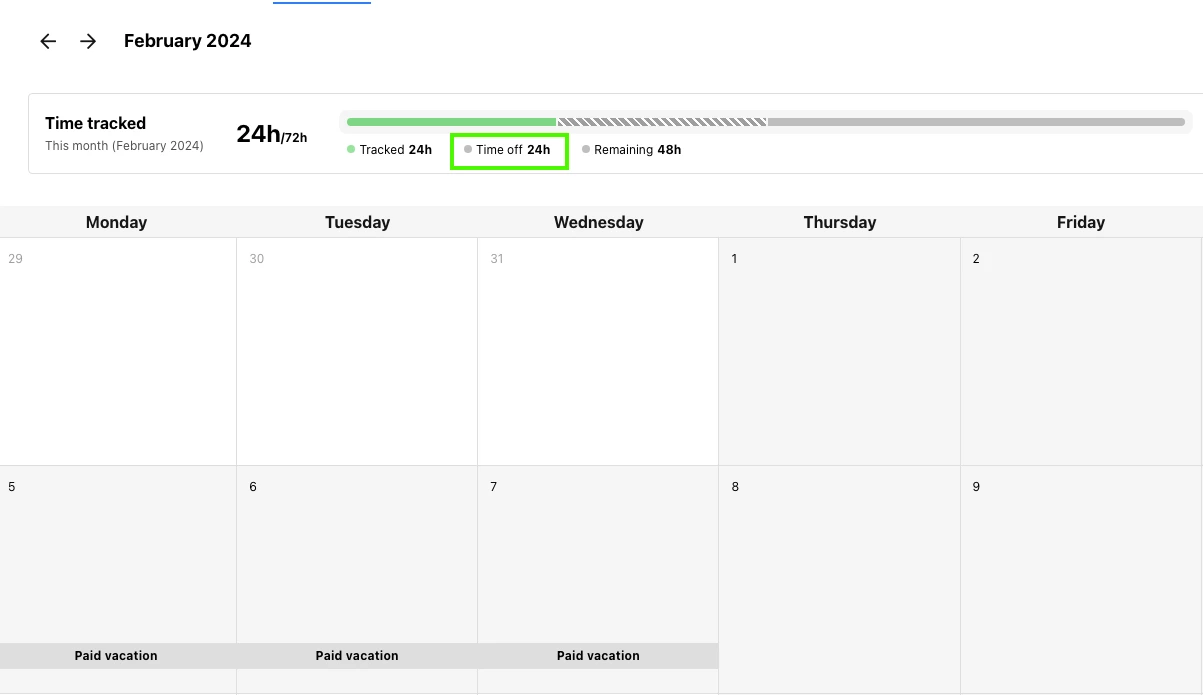
If the employee wants to take the week off, they would then input the three days that they have been assigned the hours. So for example above Mon, Tue and Wed are the days I have inputted as my normal working days so if I was the employee I would request these days off and this would count as 24 hours according to the work schedule.
I hope this solution clears up any confusion in my previous answer, however I am happy to answer any follow up questions you may have.
Best regards,
Conor
⚠️Achtung! Dieses Thema könnte veraltet sein
Dieses Thema wurde vor mehr als erstellt. Unser Produkt entwickelt sich schnell weiter — stelle gerne eine neue Frage, um die aktuellsten Infos zu bekommen.
Werde Teil der Personio Voyager Community!
Bitte benutze für die Registrierung die gleiche E-Mail-Adresse, die Du auch zum Login in Deinem Personio Account benutzt. Dies erleichtert es uns, Dir effektiv und effizient zu helfen, wenn wir z.B. etwas in Deinem Account überprüfen müssen. Bereits registriert? > Anmelden
Achtung: Dein öffentlicher Benutzername darf keine persönlichen Informationen wie E-Mail oder andere private Daten enthalten!
Herzlich willkommen in der Personio Voyager Community.
Die Service und Networking Community für alle Personio Kund*innen und HRler*innen. Solltest Du Dich noch nicht registriert haben, klicke bitte unten auf "Benutzerkonto erstellen". Benutzerkonto erstellen
Enter your E-mail address. We'll send you an e-mail with instructions to reset your password.