Is there a way to get a list of missing absence certificates?
Let's say that HR department needs a monthly report on outstanding absences (i.e. missing absence certificates) and they'd like to see the list of people with some basic details (name of the team/department, absence start and end date) so they can get in touch with them and sort things out.
Best,
Vida
Beste Antwort von mruscito
Hi @Vida
Interesting question!
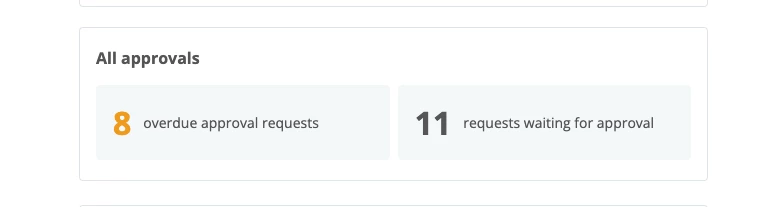
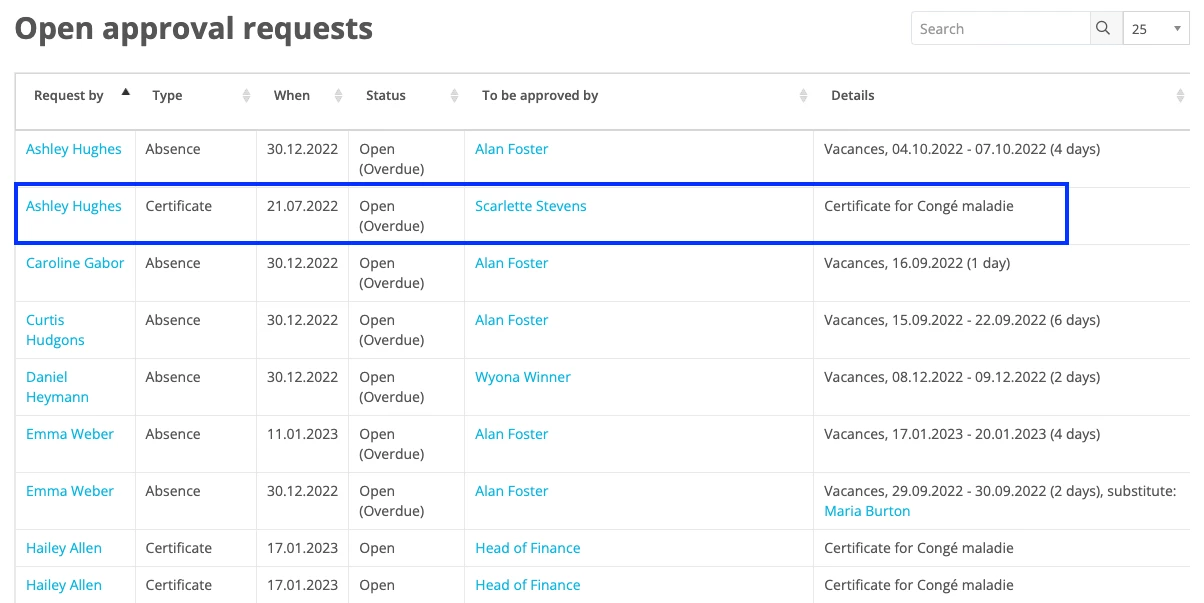
If the purpose of the report is to identify the specific individuals whose medical certificates are currently outstanding, then you do not need a report to see this information. An employee whose role has Admin rights can go to their Dashboard and go to the widget All approvals and view the outstanding tasks related to approval workflows. ⬇
❗However, if the employee in charge of looking up the missing certificates is not in a role with full Admin rights, then it will not be possible for them to access this type of information from their Dashboard. ❗
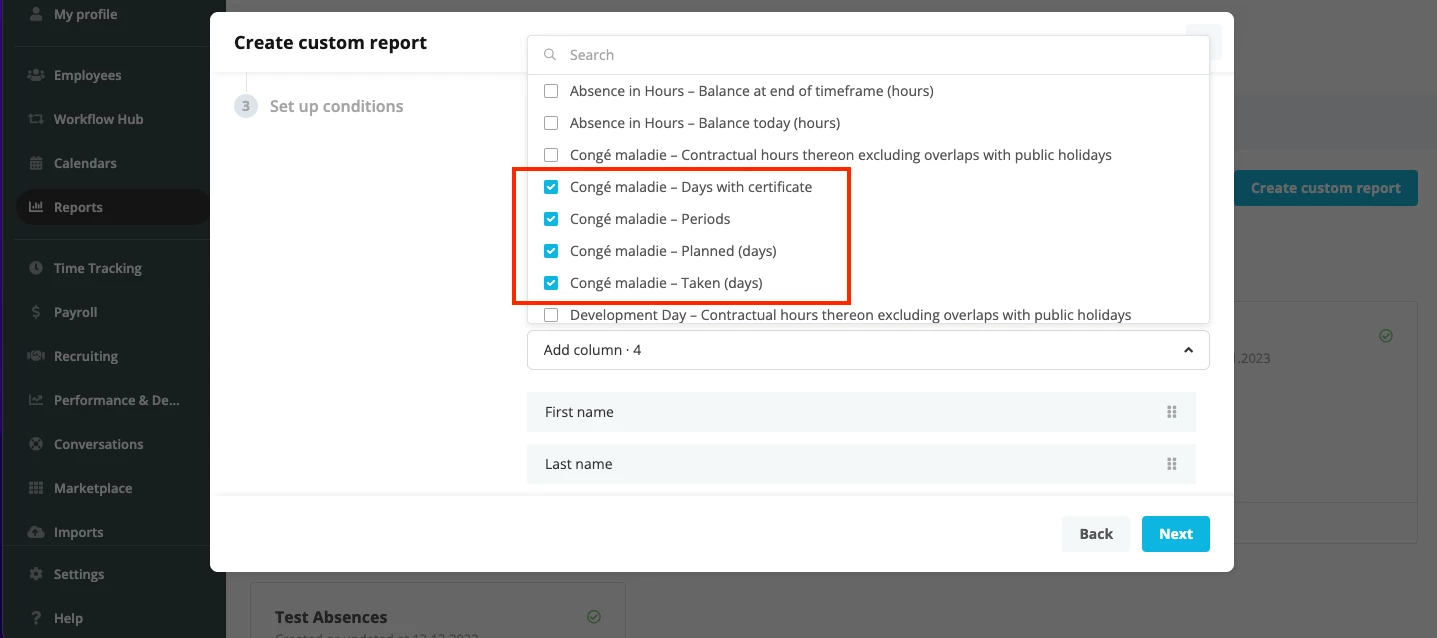
Instead, they can create a Timeframe custom report using certain filters as workarounds. They need to look up the absence type for sick leave and add the following 4 options: Days with certificate, Periods, Planned Days, Taken Days. ⬇
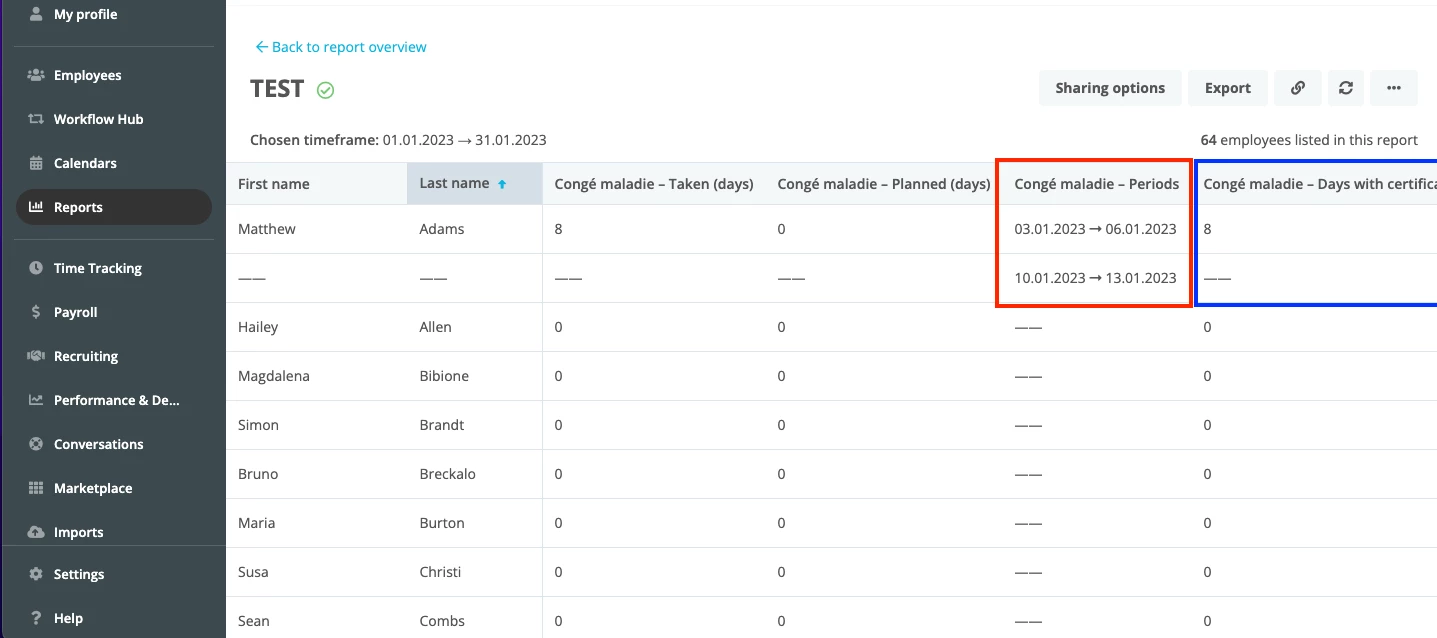
With this data, they can check the length of the absence periods and see if they are accounted for under the column Days with certificate. ⬇
In the above example, there are 2 absence periods which span 4 days each. In my absence type’s settings, sick notes are required after 3 consecutive days of absence. Here you can see that a total of 8 days have been accounted for with a certificate, so that means that 2 medical certificates have been uploaded in this employee’s profile.
However, this report only shows approved sick leave absences and approved certificates. You therefore might need to check in the employee’s personal Absence tab to see which absences are still pending approval, require a certificate to be uploaded, or need certificate approval. This second solution isn’t perfect, however it might work depending on your needs. I also encourage you to post your reporting idea in our Ideation section, so that other users can vote & comment on your suggestion. Let me know how you get on! Take care
If the purpose of the report is to identify the specific individuals whose medical certificates are currently outstanding, then you do not need a report to see this information. An employee whose role has Admin rights can go to their Dashboard and go to the widget All approvals and view the outstanding tasks related to approval workflows. ⬇
❗However, if the employee in charge of looking up the missing certificates is not in a role with full Admin rights, then it will not be possible for them to access this type of information from their Dashboard. ❗
Instead, they can create a Timeframe custom report using certain filters as workarounds. They need to look up the absence type for sick leave and add the following 4 options: Days with certificate, Periods, Planned Days, Taken Days. ⬇
With this data, they can check the length of the absence periods and see if they are accounted for under the column Days with certificate. ⬇
In the above example, there are 2 absence periods which span 4 days each. In my absence type’s settings, sick notes are required after 3 consecutive days of absence. Here you can see that a total of 8 days have been accounted for with a certificate, so that means that 2 medical certificates have been uploaded in this employee’s profile.
However, this report only shows approved sick leave absences and approved certificates. You therefore might need to check in the employee’s personal Absence tab to see which absences are still pending approval, require a certificate to be uploaded, or need certificate approval. This second solution isn’t perfect, however it might work depending on your needs. I also encourage you to post your reporting idea in our Ideation section, so that other users can vote & comment on your suggestion. Let me know how you get on! Take care
Amazing, great to hear @Vida ! Do let me know if you run into any issues or have more questions on this. Have a great rest of the week 🌈
Übersetzen
⚠️Achtung! Dieses Thema könnte veraltet sein
Dieses Thema wurde vor mehr als erstellt. Unser Produkt entwickelt sich schnell weiter — stelle gerne eine neue Frage, um die aktuellsten Infos zu bekommen.
Werde Teil der Personio Voyager Community!
Bitte benutze für die Registrierung die gleiche E-Mail-Adresse, die Du auch zum Login in Deinem Personio Account benutzt. Dies erleichtert es uns, Dir effektiv und effizient zu helfen, wenn wir z.B. etwas in Deinem Account überprüfen müssen. Bereits registriert? > Anmelden
Achtung: Dein öffentlicher Benutzername darf keine persönlichen Informationen wie E-Mail oder andere private Daten enthalten!
Herzlich willkommen in der Personio Voyager Community.
Die Service und Networking Community für alle Personio Kund*innen und HRler*innen. Solltest Du Dich noch nicht registriert haben, klicke bitte unten auf "Benutzerkonto erstellen". Benutzerkonto erstellen
Enter your E-mail address. We'll send you an e-mail with instructions to reset your password.