We are a company with different office locations worlwide and we would like to create document templates (for example job offer letter) that includes the office location as placeholder, so that we can create one template that would automatically adapt the address to
I tried to include placeholders like {{office_street}} but it doesn’t seem to work. Is there a way to do it?
Thank you in advance.
Kind,
Beste Antwort von Andrea Mendoza
Hi @Hellohere,
I see. The address within the offices is not an attribute, this is why it cannot be added as a placeholder for your document templates. If you would like to add this information as a placeholder, you would need to firstly add an attribute to the employee profiles in Settings > People > Employee information.
Placeholders work differently for document templates used in employee profiles and in candidate profiles:
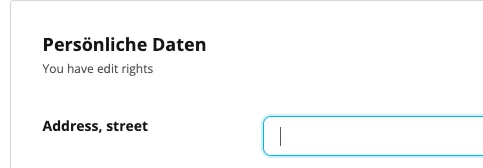
Employee profiles: For the information of the attribute to be filled automatically when you create a document on the employee profile (within the documents tab), you need to add the corresponding address in the attribute either in bulk for several employees through an import, or manually in the corresponding employee profile:
Employee profile > Personal info
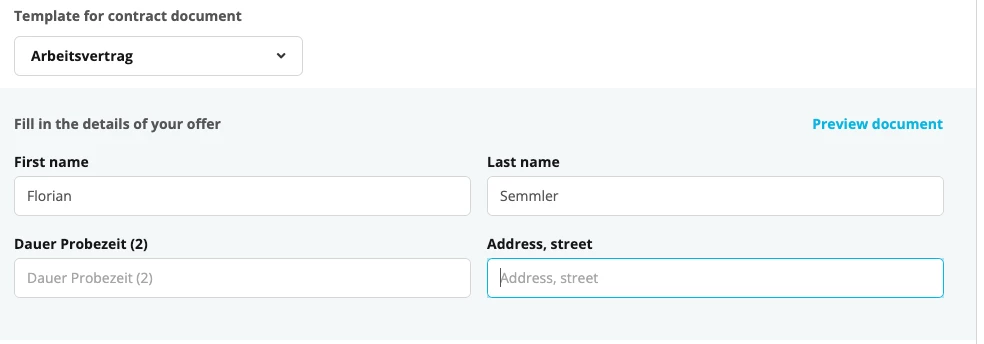
Candidate profile: in this case, the placeholder will appear when creating the document for an offer, but you will need to fill it in manually:
Recruiting > Candidate profile > Offer with document
I hope this information clarifies your question! Let me know if you need any further support.
Welcome to the Personio Community, we are happy to see you here 🥳.
Placeholders can be added in document templates, if they exist as an attribute under Settings > People > Employee information and if they have been filled in on the respective employee profile. Are these criteria fulfilled for the placeholder you mention?
Thank you for your answer, the attribute I’m talking about would be in Settings > Organization > Offices > Street/ZIP/City. I assign the employee with one of the offices but not with the values entered in the office settings. Is there a way to put the office’s address attributes as placeholders in document templates?
I see. The address within the offices is not an attribute, this is why it cannot be added as a placeholder for your document templates. If you would like to add this information as a placeholder, you would need to firstly add an attribute to the employee profiles in Settings > People > Employee information.
Placeholders work differently for document templates used in employee profiles and in candidate profiles:
Employee profiles: For the information of the attribute to be filled automatically when you create a document on the employee profile (within the documents tab), you need to add the corresponding address in the attribute either in bulk for several employees through an import, or manually in the corresponding employee profile:
Employee profile > Personal info
Candidate profile: in this case, the placeholder will appear when creating the document for an offer, but you will need to fill it in manually:
Recruiting > Candidate profile > Offer with document
I hope this information clarifies your question! Let me know if you need any further support.
Best,
Andrea
Übersetzen
⚠️Achtung! Dieses Thema könnte veraltet sein
Dieses Thema wurde vor mehr als erstellt. Unser Produkt entwickelt sich schnell weiter — stelle gerne eine neue Frage, um die aktuellsten Infos zu bekommen.
Werde Teil der Personio Voyager Community!
Bitte benutze für die Registrierung die gleiche E-Mail-Adresse, die Du auch zum Login in Deinem Personio Account benutzt. Dies erleichtert es uns, Dir effektiv und effizient zu helfen, wenn wir z.B. etwas in Deinem Account überprüfen müssen. Bereits registriert? > Anmelden
Achtung: Dein öffentlicher Benutzername darf keine persönlichen Informationen wie E-Mail oder andere private Daten enthalten!
Herzlich willkommen in der Personio Voyager Community.
Die Service und Networking Community für alle Personio Kund*innen und HRler*innen. Solltest Du Dich noch nicht registriert haben, klicke bitte unten auf "Benutzerkonto erstellen". Benutzerkonto erstellen
Enter your E-mail address. We'll send you an e-mail with instructions to reset your password.