I have a bit of a complicated one and can’t work out how to do it. New to Personio so bear with me. I am setting up Onboarding and adding the steps we need. One step is that the new supervisor needs to indicate what software and access the new starter needs. I have created an onboarding step with a checklist.
Our Information security manager then needs to approve this, but without seeing the rest of the onboarding.
How can I set it so that he can JUST SEE one step that has been completed by someone else?
I tried to set up an email step that sent out the information that had been filled out straight to him, but the only onboarding attributes I could select were free text boxes for some reason, and not checkboxes. So this route did not work either!
Beste Antwort von International Support Team
Hi @CVC,
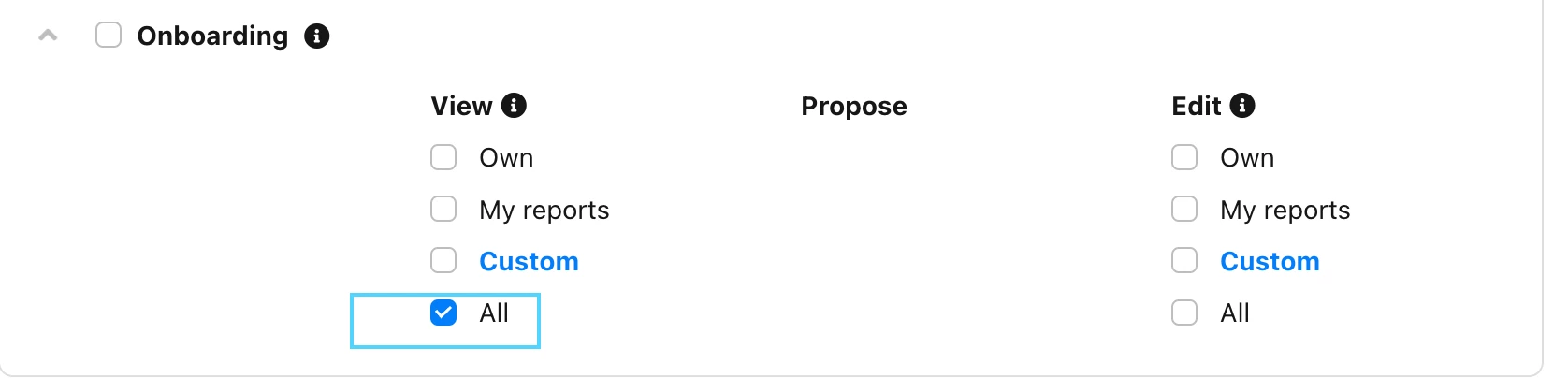
If the Supervisor has this as task, then only he will be able to see this taks. We do have to option to give to someone viewing rights to someone else taks, but unfortunately we cannot filter to give only viewing rights for only one step.
You can give viewing rights by going to Settings > Employee roles > relevant Employee role > Access rights > Onboarding:
Or Custom of you only wish to give Access rights of the Onboarding of one employee or a group of employees.
If the Supervisor has this as task, then only he will be able to see this taks. We do have to option to give to someone viewing rights to someone else taks, but unfortunately we cannot filter to give only viewing rights for only one step.
You can give viewing rights by going to Settings > Employee roles > relevant Employee role > Access rights > Onboarding:
Or Custom of you only wish to give Access rights of the Onboarding of one employee or a group of employees.
Thank you Sofia - yes the issue with the current situation is that the Information Security Manager can then see things he should not be able to see in terms of the employee’s record if I cannot isolate one step. I will put this forward as an idea.
⚠️Achtung! Dieses Thema könnte veraltet sein
Dieses Thema wurde vor mehr als erstellt. Unser Produkt entwickelt sich schnell weiter — stelle gerne eine neue Frage, um die aktuellsten Infos zu bekommen.
Werde Teil der Personio Voyager Community!
Bitte benutze für die Registrierung die gleiche E-Mail-Adresse, die Du auch zum Login in Deinem Personio Account benutzt. Dies erleichtert es uns, Dir effektiv und effizient zu helfen, wenn wir z.B. etwas in Deinem Account überprüfen müssen. Bereits registriert? > Anmelden
Achtung: Dein öffentlicher Benutzername darf keine persönlichen Informationen wie E-Mail oder andere private Daten enthalten!
Herzlich willkommen in der Personio Voyager Community.
Die Service und Networking Community für alle Personio Kund*innen und HRler*innen. Solltest Du Dich noch nicht registriert haben, klicke bitte unten auf "Benutzerkonto erstellen". Benutzerkonto erstellen
Enter your E-mail address. We'll send you an e-mail with instructions to reset your password.