Answered

Persisting a custom view of absences calendar

  • April 25, 2025
  • 9 Antworten
  • 0 Aufrufe

Hello,

I would like to persist a custom view in the absences calendar. Can I e.g. get permalink for absences calendar for specific set of employees I manually selected?

Alternatively can I filter Absences calendar by custom field we have in our Personio instance?
Beste Antwort von HRJoy

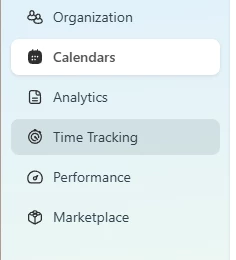
Hi, I will jump to the discussion. We ( as a regular employee) can’t see the option filter or Save current view. It’s probably due to the settings in Personio. Is there any documentation / something, where I can find, how to change the settings to enable this function? 
In the menu, I can’t see Time off & Attendance. 

Thanks


Apologies - I am looking at the ‘new’ Personio! I believe that is due to be fully rolled out by mid-May

9 Antworten

Mohamed A
Community Moderator Alumni
Forum|alt.badge.img+11
  • Community Moderator Alumni
  • April 29, 2025

Hi ​@Petr Kratky !

Tagging some folks here as they might be able to assist:

@Nathan Jolly ​@SabbuSchreiber ​@HRJoy 


SabbuSchreiber
Community Superstar
Forum|alt.badge.img+15
  • Community Superstar
  • April 30, 2025

Hi ​@Petr Kratky 

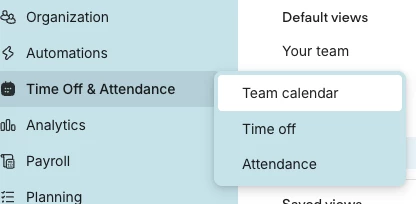
I’m not sure if I understand correctly. But there is an option to filter the calendar and save the current view when you go to the Team Calendar in the Menu:


Was that what you meant?


Forum|alt.badge.img+13
  • Busy Bee
  • April 30, 2025

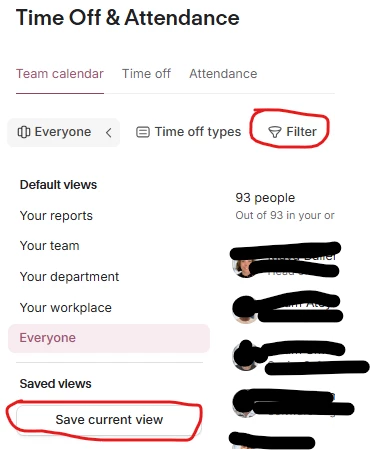
Hi - just agreeing with my fellow forumite; you can filter using the pre-set values, and by time off types, and then save the view for future use (apologies for the poor crayon use in my screengrab below!). 

If you filter by one of the pre-set values, you then get the option to add people individually to that view. So you can build a very specific set of people/absences, and then save that view to use again at any point in the future:


What I don’t think you can do is filter by custom attributes, which I think might be what you are asking?


  • First Steps
  • April 30, 2025

Hi, I will jump to the discussion. We ( as a regular employee) can’t see the option filter or Save current view. It’s probably due to the settings in Personio. Is there any documentation / something, where I can find, how to change the settings to enable this function? 
In the menu, I can’t see Time off & Attendance. 

Thanks


Forum|alt.badge.img+13
  • Busy Bee
  • Antwort
  • April 30, 2025

Hi, I will jump to the discussion. We ( as a regular employee) can’t see the option filter or Save current view. It’s probably due to the settings in Personio. Is there any documentation / something, where I can find, how to change the settings to enable this function? 
In the menu, I can’t see Time off & Attendance. 

Thanks


Apologies - I am looking at the ‘new’ Personio! I believe that is due to be fully rolled out by mid-May


  • First Steps
  • April 30, 2025

thanks! Is there any option how to enforce “new” Personio or we need just to wait? 


Forum|alt.badge.img+13
  • Busy Bee
  • April 30, 2025

thanks! Is there any option how to enforce “new” Personio or we need just to wait? 

The latest email on the update said that it would be gradually rolled out between 6-16 May. I think you have to just wait for it to happen, I don't think you control the exact moment it is applied.


  • First Steps
  • April 30, 2025

Ok, we will wait. Thanks for the info/help


  • Autor*in
  • First Steps
  • April 30, 2025

Cool, thank you all for your replies, seems like I timed my question right :-P

Good new that we’ll get this feature soon, it will be useful for us 👍