I want to send a reminder or workflow that notifies us if employees turn certain age based on their Birthday attribute. Is that possible?
I could set a reminder based on it, but it’s triggered every year and this is not what we want. We also don’t want to create an age attribute as this would require constant updating.
I was wondering if anyone has any advice.
Many thanks,
Aleksandra
Beste Antwort von Valentina S.
Hi @a.kmiotek and @HRJoy,
When it comes to set up a birthday reminder, meaning that the attribute Birthday is being used, the frequency is automatically set to yearly.
Currently, it is not possible to set up the birthday reminder every few years, or based on a certain value (e.g. when someone turns 40 or 50).
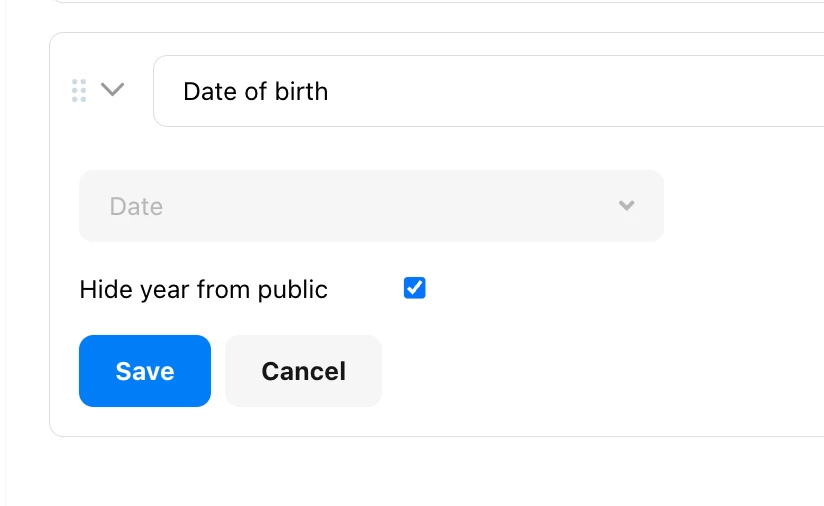
As a workaround, you can create a new custom attribute by going to Settings > People > Employee information > Add an attribute > Date type of attribute, and name it, for example, Date of birth - optionally, you can decide to hide the year from public view:
The system birthday report will help you check annually for special birthdays, since people with access to this report will be able to check the age and year of birth of all your employees, even if you decided to hide the year from the public view.
Thanks to the newly created Date of birth attribute, you can set up a new reminder (which won’t be automatically repeated annually) at the beginning of every year, only for employees turning a certain age.
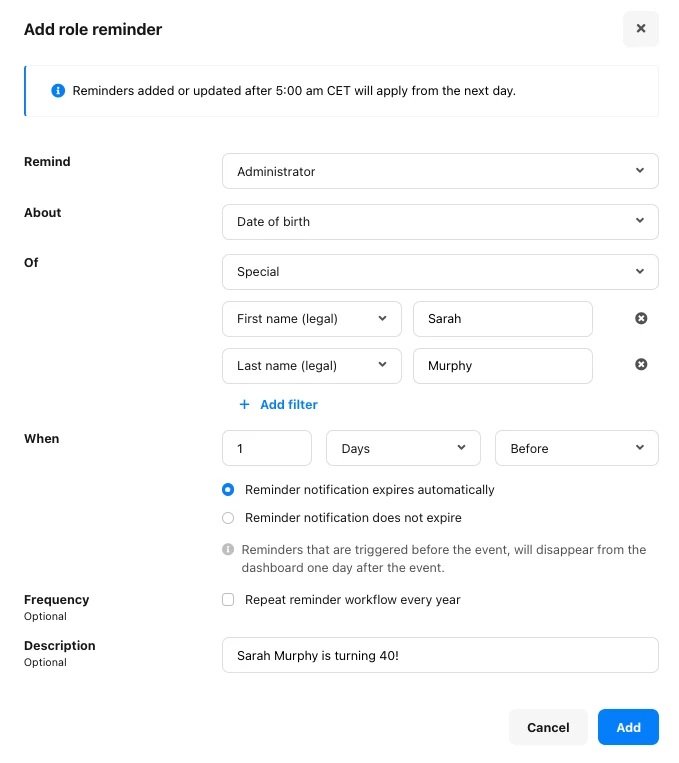
For example, going to Settings > People > Employee roles > Administrator > Reminders, you can create a new role reminder as follows:
I would encourage you to send your idea to create reminders for special birthdays through the new ‘Give feedback’ feature directly in your Personio account. Submissions will be forwarded directly to the relevant product teams. You can find more information in this community post.
If there is an update in this area, you will be informed through our Personio Product Updates or via an in-app notification.
Currently, it is not possible to set up the birthday reminder every few years, or based on a certain value (e.g. when someone turns 40 or 50).
As a workaround, you can create a new custom attribute by going to Settings > People > Employee information > Add an attribute > Date type of attribute, and name it, for example, Date of birth - optionally, you can decide to hide the year from public view:
The system birthday report will help you check annually for special birthdays, since people with access to this report will be able to check the age and year of birth of all your employees, even if you decided to hide the year from the public view.
Thanks to the newly created Date of birth attribute, you can set up a new reminder (which won’t be automatically repeated annually) at the beginning of every year, only for employees turning a certain age.
For example, going to Settings > People > Employee roles > Administrator > Reminders, you can create a new role reminder as follows:
I would encourage you to send your idea to create reminders for special birthdays through the new ‘Give feedback’ feature directly in your Personio account. Submissions will be forwarded directly to the relevant product teams. You can find more information in this community post.
If there is an update in this area, you will be informed through our Personio Product Updates or via an in-app notification.
Just wondering if any of the above responses have answered your question? If so, go ahead and select one as the Best Answer so that others may find this solution as well 🤩
⚠️Achtung! Dieses Thema könnte veraltet sein
Dieses Thema wurde vor mehr als erstellt. Unser Produkt entwickelt sich schnell weiter — stelle gerne eine neue Frage, um die aktuellsten Infos zu bekommen.
Werde Teil der Personio Voyager Community!
Bitte benutze für die Registrierung die gleiche E-Mail-Adresse, die Du auch zum Login in Deinem Personio Account benutzt. Dies erleichtert es uns, Dir effektiv und effizient zu helfen, wenn wir z.B. etwas in Deinem Account überprüfen müssen. Bereits registriert? > Anmelden
Achtung: Dein öffentlicher Benutzername darf keine persönlichen Informationen wie E-Mail oder andere private Daten enthalten!
Herzlich willkommen in der Personio Voyager Community.
Die Service und Networking Community für alle Personio Kund*innen und HRler*innen. Solltest Du Dich noch nicht registriert haben, klicke bitte unten auf "Benutzerkonto erstellen". Benutzerkonto erstellen
Enter your E-mail address. We'll send you an e-mail with instructions to reset your password.