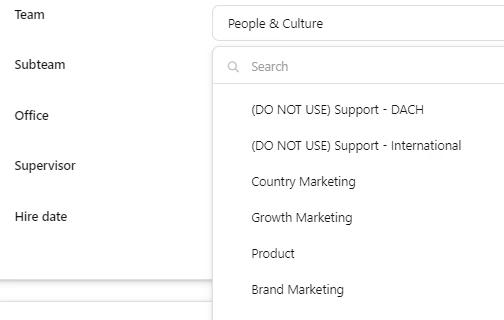
We have changed our organizational structure and changed/created new departments and teams.
We want keep the old departments and teams to keep the historical data and correct reporting. However, we don’t want them to be visible anymore in the drop down list for teams.
We have now, labeled them as (DO NOT USE) teams, but this is note a scalable way of working. As shown in the print screen below.
Does anyone have an idea or solution on how to fix this?
Beste Antwort von International Support Team
Hey @Tim
At the moment, your solution is the best workaround to clearly outline not to use these Departments and Teams going forward. What would be ideal in this situation is an archive option to stop the options showing, however the ability to pull reports on these old attributes. Now one major point to keep in mind, please do not delete Departments. The Department attribute is directly linked to the weekly hours attribute and deleting this can cause issues in salary calculations retrospectively.
We have had another user post a similar idea into our Ideation Area, so I would kindly ask that you upvote and comment on this post. It will give further visibility to our Product Team to the issue and hopefully in future it can be improved.
If there is anything else I can help with, please let me know.
At the moment, your solution is the best workaround to clearly outline not to use these Departments and Teams going forward. What would be ideal in this situation is an archive option to stop the options showing, however the ability to pull reports on these old attributes. Now one major point to keep in mind, please do not delete Departments. The Department attribute is directly linked to the weekly hours attribute and deleting this can cause issues in salary calculations retrospectively.
We have had another user post a similar idea into our Ideation Area, so I would kindly ask that you upvote and comment on this post. It will give further visibility to our Product Team to the issue and hopefully in future it can be improved.
If there is anything else I can help with, please let me know.
Dieses Thema wurde vor mehr als erstellt. Unser Produkt entwickelt sich schnell weiter — stelle gerne eine neue Frage, um die aktuellsten Infos zu bekommen.
Werde Teil der Personio Voyager Community!
Bitte benutze für die Registrierung die gleiche E-Mail-Adresse, die Du auch zum Login in Deinem Personio Account benutzt. Dies erleichtert es uns, Dir effektiv und effizient zu helfen, wenn wir z.B. etwas in Deinem Account überprüfen müssen. Bereits registriert? > Anmelden
Achtung: Dein öffentlicher Benutzername darf keine persönlichen Informationen wie E-Mail oder andere private Daten enthalten!
Herzlich willkommen in der Personio Voyager Community.
Die Service und Networking Community für alle Personio Kund*innen und HRler*innen. Solltest Du Dich noch nicht registriert haben, klicke bitte unten auf "Benutzerkonto erstellen". Benutzerkonto erstellen
Enter your E-mail address. We'll send you an e-mail with instructions to reset your password.