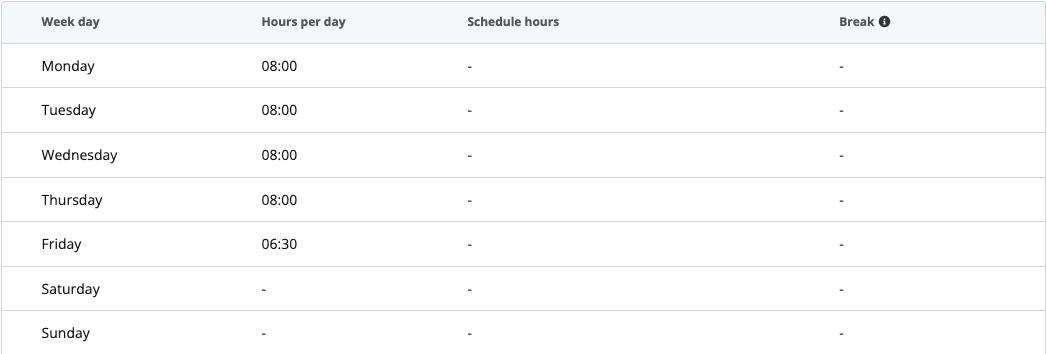
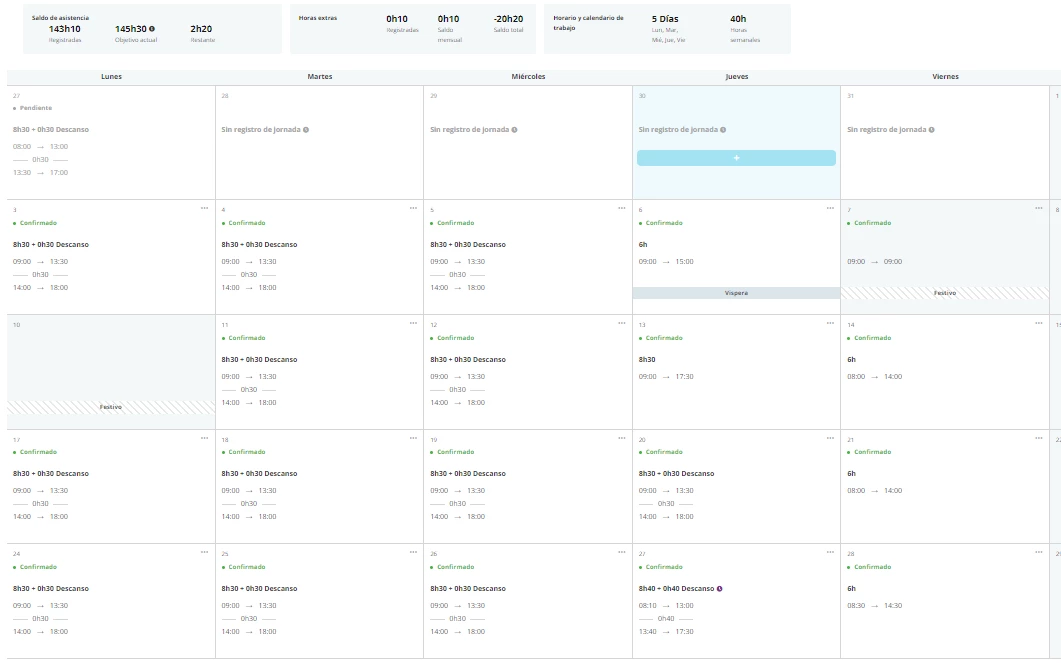
Here at Pro a Pro we are facing a slightly discomforting situation with the time tracking. We work a shorter shift on Fridays usually, but this situation also applies to Festivities Eve’s (i.e. if a Wednesday is an official Festivity, we will have a short shift on Tuesday AND on Friday that week).
Due to the shifts configuration in Personio, we have the shorter shift contemplated for Fridays, but we realized that when we have the festivity situation, the system “expects” a longer shift, and therefore is showing to all employees a message stating they haven’t completed the expected shift.
Is anyone else facing a similar situation? How could this be solved?
I’ve seen this post
With a similar scenario, but the solution states deactivating the “Track deficit hours and Deduct hours options if possible ✅”, and this raises another question: would that mean that we would have visibility on overtime and compensated hours still? This is something that we are required to do.
Happy to hear other people’s experience with this situations :)
Beste Antwort von International Support Team
Hey @Oscar
Yes exactly as you mentioned I would recommend turning off the track deficit hours option for the work schedule, while keeping the track overtime hours enabled. What this will do is stop the hours on weeks with festivities from being counted as deficit hours which are then balanced against overtime. To answer your second question, you will still be able to track overtime without issue, as in the circumstances the employee works over the inputted hours for the day, overtime will be added.
In my demo account, I put in a work schedule with the same details you have provided and put the hours less on a Friday.
On the Tuesday, I tracked less hours than specified in the work schedule (Based on festivity example) and no deficit hours were counted. Additionally on the Friday where it is a shorter day, I tracked time over the specified hours in the working schedule and it counted this as overtime.
If you run into any difficulties with this, please let me know and I will guide further.
Yes exactly as you mentioned I would recommend turning off the track deficit hours option for the work schedule, while keeping the track overtime hours enabled. What this will do is stop the hours on weeks with festivities from being counted as deficit hours which are then balanced against overtime. To answer your second question, you will still be able to track overtime without issue, as in the circumstances the employee works over the inputted hours for the day, overtime will be added.
In my demo account, I put in a work schedule with the same details you have provided and put the hours less on a Friday.
On the Tuesday, I tracked less hours than specified in the work schedule (Based on festivity example) and no deficit hours were counted. Additionally on the Friday where it is a shorter day, I tracked time over the specified hours in the working schedule and it counted this as overtime.
If you run into any difficulties with this, please let me know and I will guide further.
Thanks for the response! With this configuration you propose, what would be the effect on the whole monthly balance in case someone works less hours than required? Would that still be reflected?
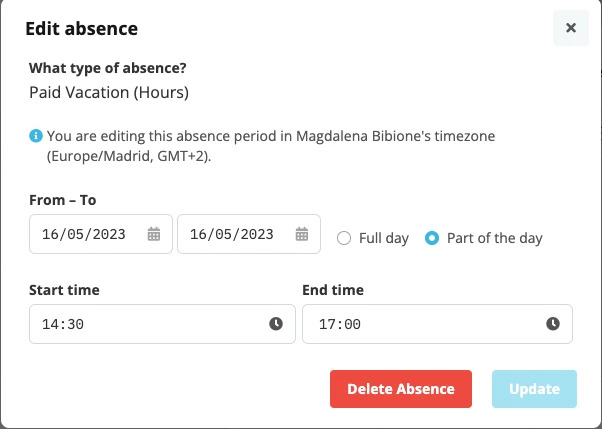
To add to my point, I would advise creating an hour based absence type for the festivity and for the hours that the employee misses due to the shorter shift, I would input this absence. This will deduct the hours from the monthly goal and ensure that even though the employee works a shorter shift, it is not showing an incorrect balance for hours not worked.
Example
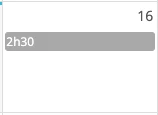
Absence inputted from 2.30pm to 5.00pm
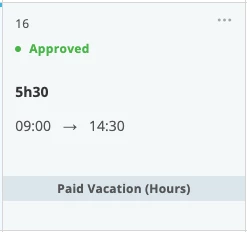
Attendance tab inputted working hours from 9am to 2.30pm
Happy to guide further on any other questions you have.
Will check configuring the combination of both factors. We have created the absences and tested it but I don’t see the deduction from the monthly balance working well, maybe due to the “track deficit hours” being active.
Run a test and it’s not computing correctly the monthly target time. Not sure if it can be seen clearly but with the configuration of the schedule keeping track of overtime (not deficit) and with a 2:30h absence to shorten the eve, the target time for the month shows 145:30 when as you can see, completing all days as per usual should sum up 143.
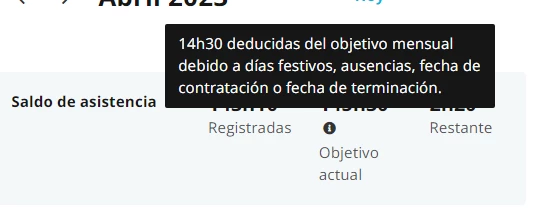
Could I ask you to hover over the i icon beside the Monthly Goal and let me know what it is saying there? A screenshot of the hours deducted while hovering over this will allow me to work out what may be happening here.
Hi @International Support Team , find here the snapshot, as you can see it’s deducting some hours, but not the hour based absence type. If I sum the hours work per day theorically sums 143, which is what is registered, but the target goal is still at 145:30. :)
I think this may be due to the absence settings for the hour based absence type.
Could you navigate to the settings of this absence type and ensure that the option for Consider time tracked during absences of this type as overtime is enabled. Once this has been set, the additional 2.5 hours should now be deducted from the Monthly goal.
Dieses Thema wurde vor mehr als erstellt. Unser Produkt entwickelt sich schnell weiter — stelle gerne eine neue Frage, um die aktuellsten Infos zu bekommen.
Werde Teil der Personio Voyager Community!
Bitte benutze für die Registrierung die gleiche E-Mail-Adresse, die Du auch zum Login in Deinem Personio Account benutzt. Dies erleichtert es uns, Dir effektiv und effizient zu helfen, wenn wir z.B. etwas in Deinem Account überprüfen müssen. Bereits registriert? > Anmelden
Achtung: Dein öffentlicher Benutzername darf keine persönlichen Informationen wie E-Mail oder andere private Daten enthalten!
Herzlich willkommen in der Personio Voyager Community.
Die Service und Networking Community für alle Personio Kund*innen und HRler*innen. Solltest Du Dich noch nicht registriert haben, klicke bitte unten auf "Benutzerkonto erstellen". Benutzerkonto erstellen
Enter your E-mail address. We'll send you an e-mail with instructions to reset your password.