We have activated a subsidiary and would like to manage a reduced visibility of the employees entered (ex: not see main company’s employees).
I tried following the help centre info but can't set it up.
Can anyone help us?
A.
Beste Antwort von ConorCunningham
Hey @AleWeLearn
Welcome to the Personio Community 😃
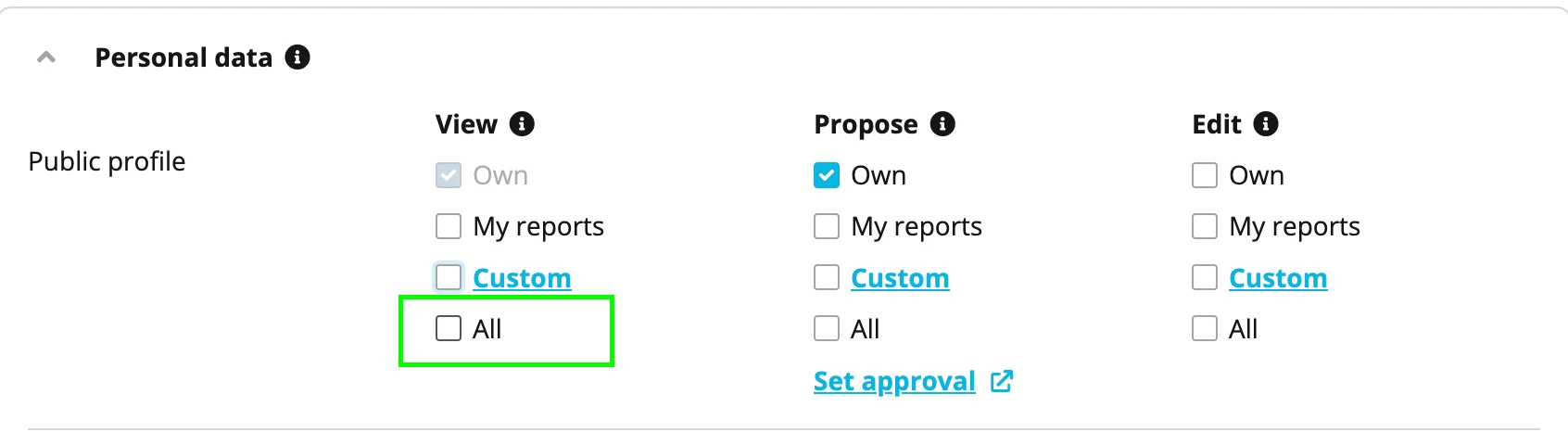
So first I would navigate to Settings > Employee Roles > All Employees role > Access rights > Personal data > Public profile. You will need to ensure that this All option for View has not been check-marked. If you have this switched on, it means every employee will be able to see the employee profile for all other employees. We want to only allow employees within one subcompany to view their own subcompany’s employee profiles I take it from your question.
Then I would recommend creating an employee role and adding all the employees from this subcompany into this as members. Next you will navigate to Access rights within this employee role > Personal data > Public profile.
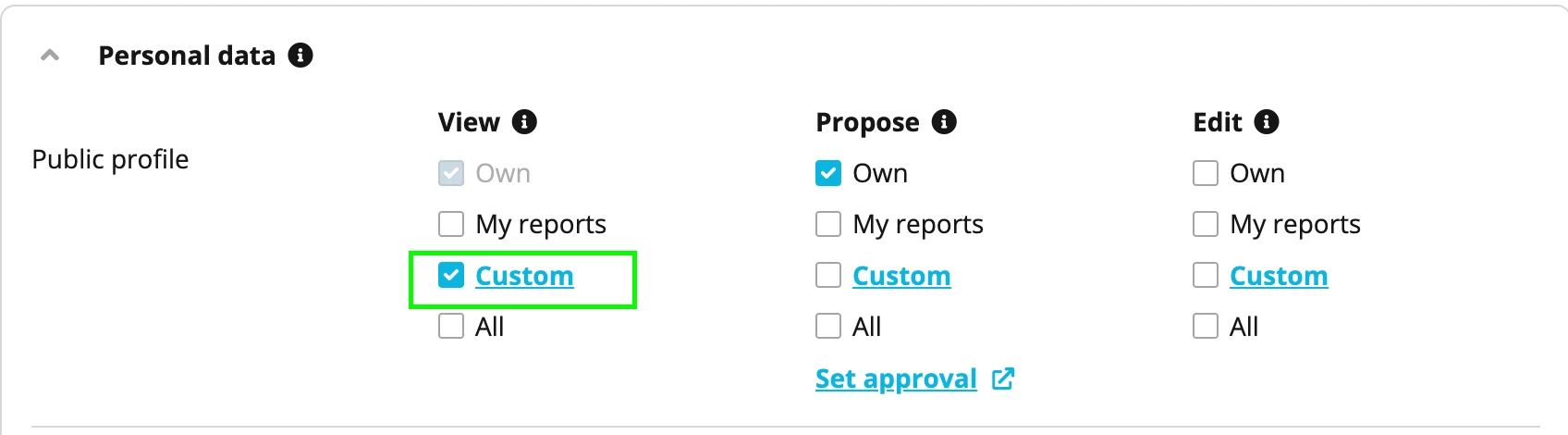
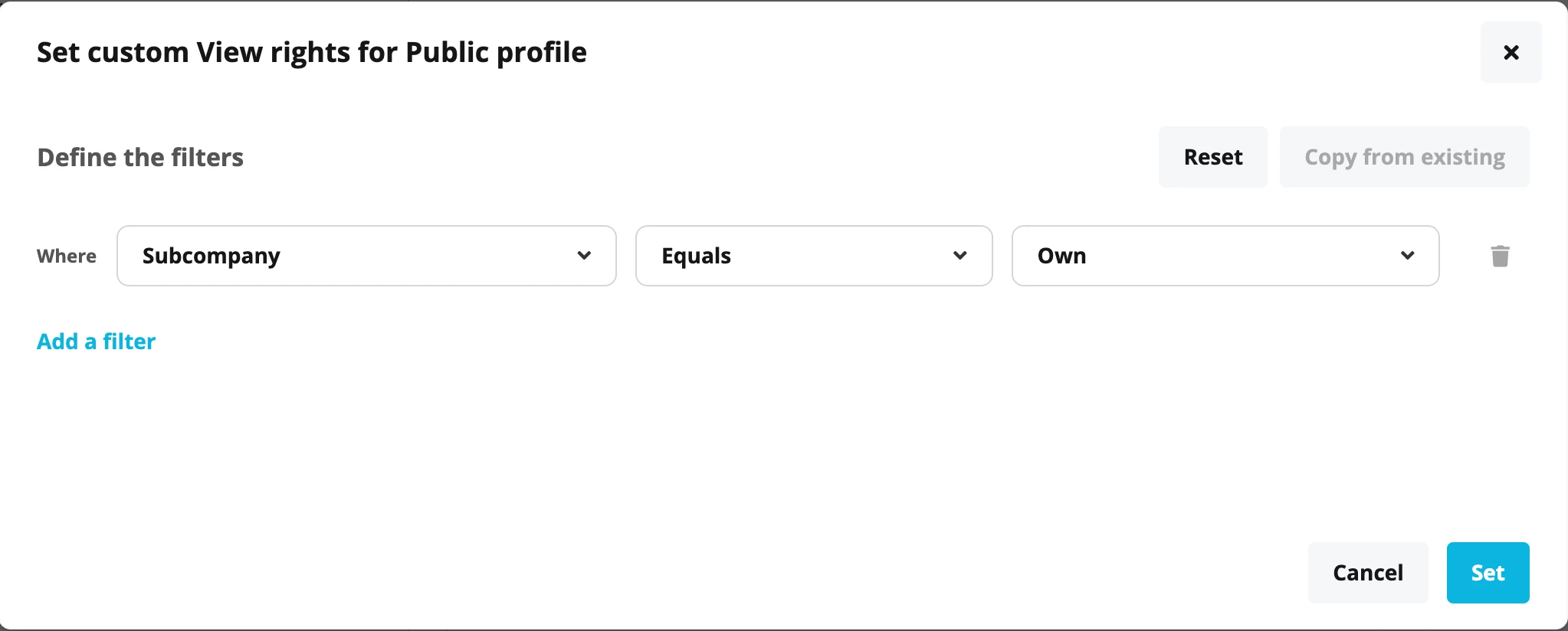
Within here you will choose the Custom option from the View option and set up the filter Subcompany equals Own. What this will do is only allow these employees to view other employees profiles, that are within their own subcompany.
As we have turned off the View All option for the Public Profile within the All Employees role, we will need to repeat the step above for employees within the main company. Again I would create an employee role, add the other remaining employees from the main company as members. Navigate to the Public Profile access right once again and grant them whichever view access you desire.
This should now mean that the main company employees have had their access rights re-instated within this employee role and should now able to view other employee profiles as set up.
I will be happy to assist you further on this, if you run into any difficulties.
So first I would navigate to Settings > Employee Roles > All Employees role > Access rights > Personal data > Public profile. You will need to ensure that this All option for View has not been check-marked. If you have this switched on, it means every employee will be able to see the employee profile for all other employees. We want to only allow employees within one subcompany to view their own subcompany’s employee profiles I take it from your question.
Then I would recommend creating an employee role and adding all the employees from this subcompany into this as members. Next you will navigate to Access rights within this employee role > Personal data > Public profile.
Within here you will choose the Custom option from the View option and set up the filter Subcompany equals Own. What this will do is only allow these employees to view other employees profiles, that are within their own subcompany.
As we have turned off the View All option for the Public Profile within the All Employees role, we will need to repeat the step above for employees within the main company. Again I would create an employee role, add the other remaining employees from the main company as members. Navigate to the Public Profile access right once again and grant them whichever view access you desire.
This should now mean that the main company employees have had their access rights re-instated within this employee role and should now able to view other employee profiles as set up.
I will be happy to assist you further on this, if you run into any difficulties.
Dieses Thema wurde vor mehr als erstellt. Unser Produkt entwickelt sich schnell weiter — stelle gerne eine neue Frage, um die aktuellsten Infos zu bekommen.
Werde Teil der Personio Voyager Community!
Bitte benutze für die Registrierung die gleiche E-Mail-Adresse, die Du auch zum Login in Deinem Personio Account benutzt. Dies erleichtert es uns, Dir effektiv und effizient zu helfen, wenn wir z.B. etwas in Deinem Account überprüfen müssen. Bereits registriert? > Anmelden
Achtung: Dein öffentlicher Benutzername darf keine persönlichen Informationen wie E-Mail oder andere private Daten enthalten!
Herzlich willkommen in der Personio Voyager Community.
Die Service und Networking Community für alle Personio Kund*innen und HRler*innen. Solltest Du Dich noch nicht registriert haben, klicke bitte unten auf "Benutzerkonto erstellen". Benutzerkonto erstellen
Enter your E-mail address. We'll send you an e-mail with instructions to reset your password.