

Hi, on the employee profile when you terminate employment you click the three dots in the corner, and a box pops up with fields to populate - however i cant find where these fields are updated from? Its not in offboarding - any help would be great!

Answered
Terminate employment
 +1
+1- Follower
Beste Antwort von International Support Team
Hi
The information that you find by clicking on the 3 dots inTerminate employment are updated there, also if you need to do an edit it’s also there.
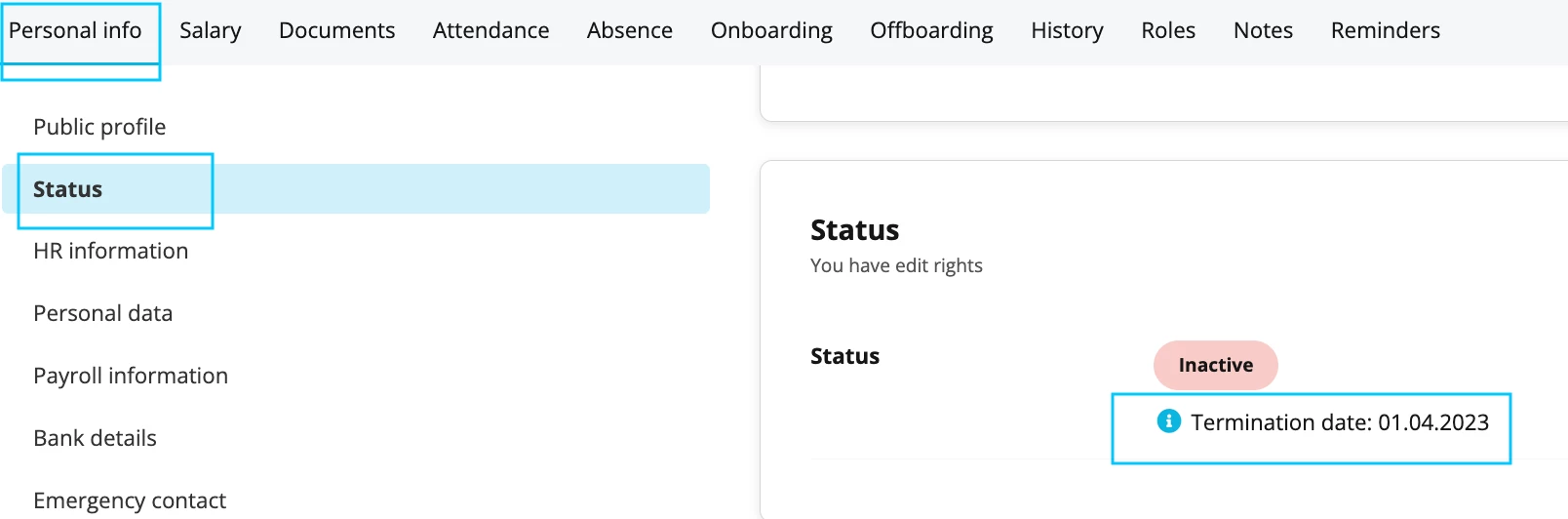
The termination date that you fill in by clicking on the 3 dots in Terminate employment will populate the Status information in the employee profile.
Relevant profile > Personal info > Relevant section > Status.
Here you will find more information regarding: Manage terminations of employment.
Hope you have a lovely day.
Best,
Sofia






Werde Teil der Personio Voyager Community!
Bitte benutze für die Registrierung die gleiche E-Mail-Adresse, die Du auch zum Login in Deinem Personio Account benutzt. Dies erleichtert es uns, Dir effektiv und effizient zu helfen, wenn wir z.B. etwas in Deinem Account überprüfen müssen. Bereits registriert? > Anmelden
Achtung: Dein öffentlicher Benutzername darf keine persönlichen Informationen wie E-Mail oder andere private Daten enthalten!
Herzlich willkommen in der Personio Voyager Community.
Die Service und Networking Community für alle Personio Kund*innen und HRler*innen. Solltest Du Dich noch nicht registriert haben, klicke bitte unten auf "Benutzerkonto erstellen". Benutzerkonto erstellen
Enter your E-mail address. We'll send you an e-mail with instructions to reset your password.