I have an employee who was historically assigned the wrong working hours model. I have tried to remove it from the employee profile as it is causing the full-time employee to show as a part-time employee.
Unfortunately, I am unable to do this and would appreciate some help in getting this resolved.
Many thanks!
Regards,
Linda
Beste Antwort von Zulema T
Hi @Agne Ignotiene,
Indeed, there was an update about Departments to better reflect the complexity of your company's organisational structure. You can find this release note in the following Help Center article, under the category Employee Management: Personio Product Updates - May 2024.
Basically, we added a new Preset attribute called Full-time hours and now you can fill the information by navigating to the Employee profile > Personal info > HR information > Weekly hours and when you click on Edit, you will see the Full-time hours, as follows. Please be aware that when a new employee is created the hours will be set by default to 40 hours, then you can manually edit this data depending on the employee’s full-time hours.
I hope you are doing great! Nice to read from you in our community 😊.
In order to correct a certain attribute historically such as the weekly hours of an employee, you need to go to the employees history tab > detailed view and change the application date of the correct weekly hours. in the following article we show you how to undertake this process:
Thanks for the input. I have the issue that in the history details there is only one weekly hour schedule assigned and it is correct.
However, when we started using Personio the employee (in Croatia) was automatically assigned the German weekly hour schedule (from hire date). This was changed in Personio (assigned under the attendance tab) to reflect the Croatian schedule. The weekly hour schedule showing in the employee’s attendance tab is correct. The issue however is that the German schedule (40 hours instead of 37.5 hours for Croatia) which is still visible in the attendance details tab is causing Personio to mark this employee as part time. I have tried to remove the German schedule under the attendance tab but the remove button is grey and I cannot remove it. I am hesitant to make any changes to the current schedule in case I inadvertently make changes to over time hours etc.
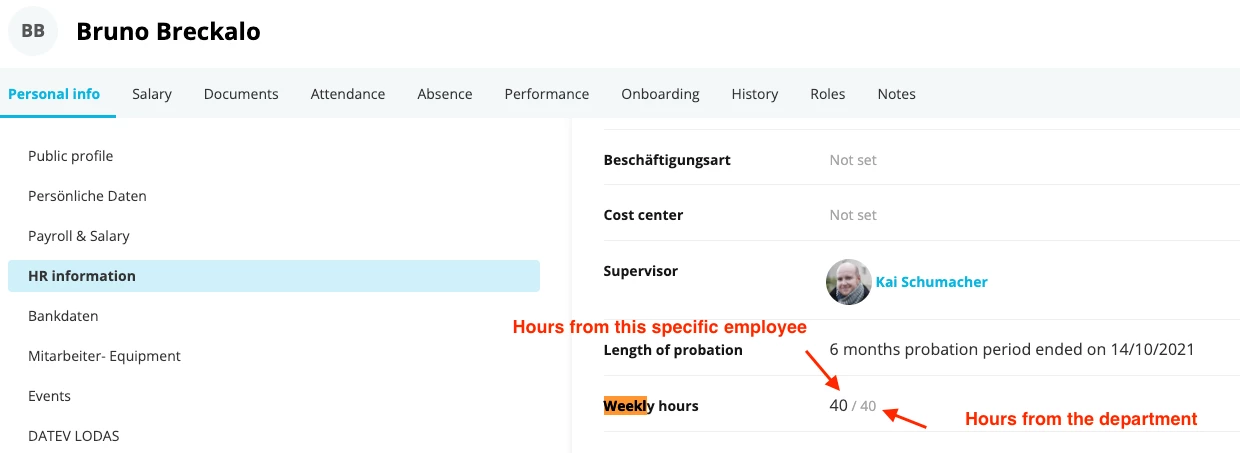
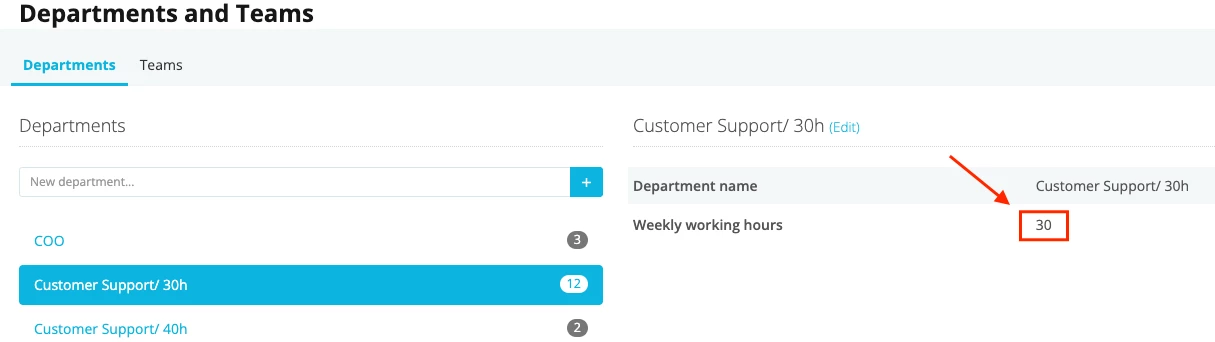
The system recognizes an employee as part-time due to the relation between your employees’ weekly hours, saved within the employee profile, and the weekly hours saved in the department assigned to them:
In the above displayed screenshot, for example, the employee is considered a full time employee, since his weekly hours match with those of the department he was assigned to.
The weekly hours of departments are saved under settings > company > departments and teams:
The work schedule on the attendance tab does not influence the system regarding if someone is recognized as part-time. The German work scheduleis probably saved as standard, which is why you cannot remove it from your employees’ profiles. Nevertheless, the work schedule from Croatia is the valid one, if it was set up from your employee’s hire date.
My suggestion would be to check your employee’s attribute for weekly hours (not the work schedule in the attendance tab) under Employee profile > Personal Info > Weekly hours (See first screenshot). If the department weekly hours match with the employee’s weekly hours, then please check your employee’s history. You can find it in the employee profile > history tab > detailed view. Here, check if they have the same weekly hours as their department since the hire date.
I hope this information helped further to clarify this inquiry.
Please let me know if you need further advice from me.
Thanks so much! The problem was that we had set up a department called “Management” and included this employee in the group. The Management team are mainly in Germany, with a 40 hour week. I have removed this employee and set up a department “Management Croatia” and now all is good.
Really appreciate your assistance on this. All fixed now!
I hope you have a great weekend - hopefully a long one too! It’s supposed to be sunny 🌝
I am glad to read you could figure this out 🙌🏽. As a last tip, I would recommend looking at the salary of this employee just to make sure if you don’t need to correct their history. It can be that the employee is considered as full time employee from today on, since you changed the department. Nevertheless, if the department needs to be changed historically, you will need to undertake the correction of their history as described in my first response.
I am super happy to hear that we will have a sunny weekend 🤩. I hope you can enjoy it!
Indeed, there was an update about Departments to better reflect the complexity of your company's organisational structure. You can find this release note in the following Help Center article, under the category Employee Management: Personio Product Updates - May 2024.
Basically, we added a new Preset attribute called Full-time hours and now you can fill the information by navigating to the Employee profile > Personal info > HR information > Weekly hours and when you click on Edit, you will see the Full-time hours, as follows. Please be aware that when a new employee is created the hours will be set by default to 40 hours, then you can manually edit this data depending on the employee’s full-time hours.
I hope this is clear! Please let me know if you have further questions! 😃
Wishing you a lovely afternoon! 🙌🏼
Best,
Zulema
⚠️Achtung! Dieses Thema könnte veraltet sein
Dieses Thema wurde vor mehr als erstellt. Unser Produkt entwickelt sich schnell weiter — stelle gerne eine neue Frage, um die aktuellsten Infos zu bekommen.
Werde Teil der Personio Voyager Community!
Bitte benutze für die Registrierung die gleiche E-Mail-Adresse, die Du auch zum Login in Deinem Personio Account benutzt. Dies erleichtert es uns, Dir effektiv und effizient zu helfen, wenn wir z.B. etwas in Deinem Account überprüfen müssen. Bereits registriert? > Anmelden
Achtung: Dein öffentlicher Benutzername darf keine persönlichen Informationen wie E-Mail oder andere private Daten enthalten!
Herzlich willkommen in der Personio Voyager Community.
Die Service und Networking Community für alle Personio Kund*innen und HRler*innen. Solltest Du Dich noch nicht registriert haben, klicke bitte unten auf "Benutzerkonto erstellen". Benutzerkonto erstellen
Enter your E-mail address. We'll send you an e-mail with instructions to reset your password.