
Answered

Workflow: Time tracking Approval

  • April 10, 2025
  • 6 Antworten
  • 0 Aufrufe

Forum|alt.badge.img

Dear Community,

I’m experiencing issues with time tracking approvals since the process was moved to workflows. Unfortunately, the approval settings didn’t migrate automatically, so I had to create the workflow manually.

I followed the setup exactly as described in this guide: 🔗 Set up attendance approvals in Automations

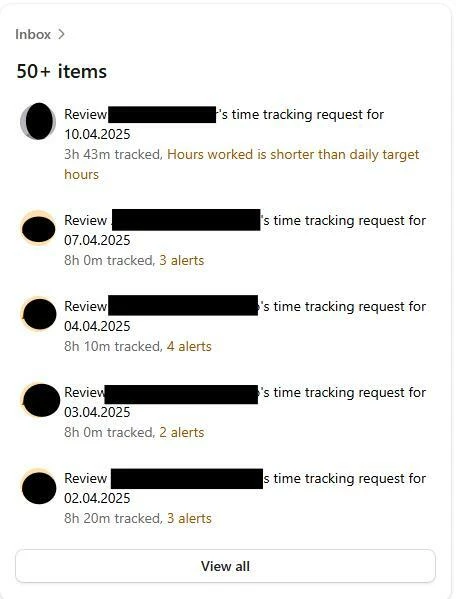
However, the system is still showing violations for the team manager. I’ve double-checked the work schedule and the employee’s time entries — everything seems to comply with our internal policy.

What’s also confusing is that when I click on the alerts, it doesn’t show me what kind of violations or issues they are. So I’m not sure what exactly needs to be fixed.

Is there something I might be missing? Any help would be greatly appreciated!

Best regards,

Yildiz
Beste Antwort von Michael H.

Hi ​@YHilal,

the issue with your leaders sound a bit weird indeed. For that, we’d need to know how your workflows are specifically set up. Maybe there are some mailing loops or sth. integrated. If you cannot really explain where it is coming from, it might be a good idea to choose an example lead that gets all the notifications over and over again and send this case to our support team, so that we can have a look specifically in your account environment.


Best

Michael

6 Antworten

Mohamed A
Community Moderator Alumni
Forum|alt.badge.img+11
  • Community Moderator Alumni
  • April 22, 2025

Hi ​@YHilal !

Just tagging ​@SabbuSchreiber and ​@LegoMD as they might be able to share some insight here! 


SabbuSchreiber
Community Superstar
Forum|alt.badge.img+15
  • Community Superstar
  • April 22, 2025

Hi ​@YHilal,

Unfortunately I don’t have any answer for you but I’m curious as to what others might say. We currently work with automated approvals but I am looking into setting up a workflow for time entry violations so the answer to that will for sure be helpful for me too. ☺️ Thanks for raising the question!


Mohamed A
Community Moderator Alumni
Forum|alt.badge.img+11
  • Community Moderator Alumni
  • June 23, 2025

Just tagging ​@Nathan Jolly , ​@Edda van der Ende , ​@berat can  and ​@Laure.vanpelt for some extra help!


Forum|alt.badge.img
  • Autor*in
  • First Steps
  • July 10, 2025

Hi, Thank you all. With one update all the problems above fixed.

Now I have another problem. Out team leaders says, even after approval they are getting same notification again and again. What can be the reason for this? 


Thank you so much in advance. 

Yildiz


Michael H.
Community Moderator
Forum|alt.badge.img+9
  • Community Moderator
  • Antwort
  • July 30, 2025

Hi ​@YHilal,

the issue with your leaders sound a bit weird indeed. For that, we’d need to know how your workflows are specifically set up. Maybe there are some mailing loops or sth. integrated. If you cannot really explain where it is coming from, it might be a good idea to choose an example lead that gets all the notifications over and over again and send this case to our support team, so that we can have a look specifically in your account environment.


Best

Michael


Forum|alt.badge.img
  • Autor*in
  • First Steps
  • July 31, 2025

Hello ​@Michael H. , thank you for your suggestion.