How can I add different updates on different slack-channels? I would like to add absent on the channel "personio-updates" and I would like add something new on my other slach-channel. Is this possible?

How can I add different updates on different slack-channels? I would like to add absent on the channel "personio-updates" and I would like add something new on my other slach-channel. Is this possible?
Beste Antwort von mruscito
Hi
When you set up the integration for Slack, there is no way to pick and choose different updates for specific channels. As you can see below, you need to select which types of notification you want to be sent, and to which channels. The updates selected will be sent to all Slack channels listed in Step 3 of the integration’s Settings. ⬇
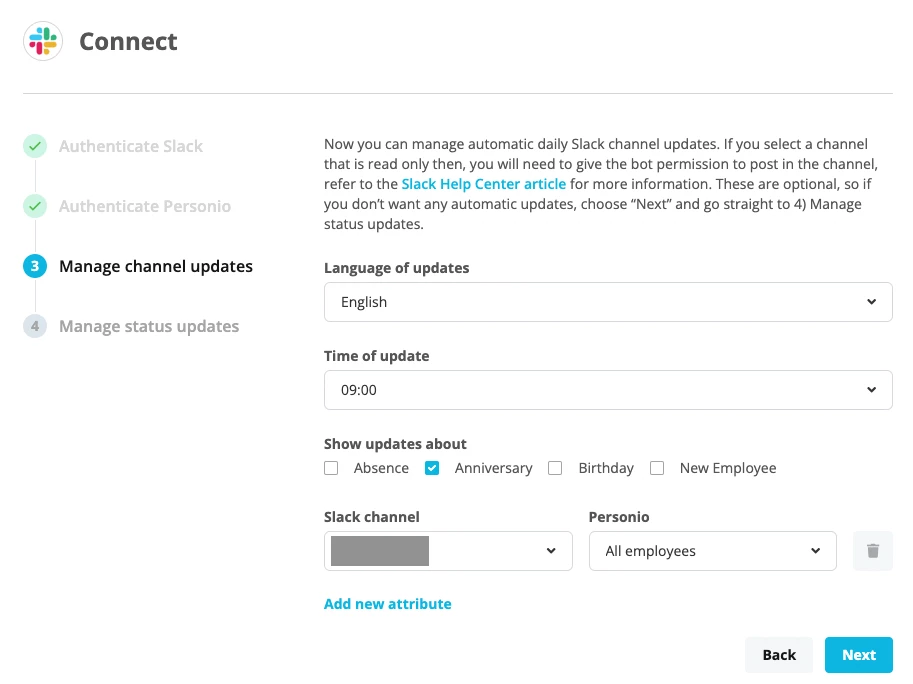
However, your question would make a great Feature Insight! I encourage you to post your idea in the Community’s Ideation section. That way, others can comment & vote on it. Our Product Team regularly reviews Ideation, to see what features are most sought after by our customers.
Take care!
Megan
Bitte benutze für die Registrierung die gleiche E-Mail-Adresse, die Du auch zum Login in Deinem Personio Account benutzt. Dies erleichtert es uns, Dir effektiv und effizient zu helfen, wenn wir z.B. etwas in Deinem Account überprüfen müssen. Bereits registriert? > Anmelden
Achtung: Dein öffentlicher Benutzername darf keine persönlichen Informationen wie E-Mail oder andere private Daten enthalten!
Die Service und Networking Community für alle Personio Kund*innen und HRler*innen. Solltest Du Dich noch nicht registriert haben, klicke bitte unten auf "Benutzerkonto erstellen". Benutzerkonto erstellen
Enter your E-mail address. We'll send you an e-mail with instructions to reset your password.