


Dear Community,
Is there any option for setting up the Automatic absence request approval? Meaning can we add absences without the approval process, so once an employee requests the absence, it will be approved automatically?
Thank you!
Kasia

Dear Community,
Is there any option for setting up the Automatic absence request approval? Meaning can we add absences without the approval process, so once an employee requests the absence, it will be approved automatically?
Thank you!
Kasia
Beste Antwort von International Support Team
Hi
Welcome to the Personio Community, we are thrilled to see you here 
 . I am happy to support you with your inquiry.
Yes, it is possible to get the absence requests approved in Personio at the time the employee is requesting them. Assuming you want all employees in your company not to have an approval workflow for absences, the approval workflow should be removed. For that, you have to navigate to Settings > Workflows > Approvals and remove any default or ruleset that is in there by clicking in the red ‘x’, as it is shown in the following screenshot from my test account.

After that, you should make sure the employees have access rights to be able to see and request the absences by navigating to Settings > People > Employee Roles > All employees and under the Access Rights tab, you can grant the View and Propose rights for their ‘Own’, as you can see in the screenshot from my test account.
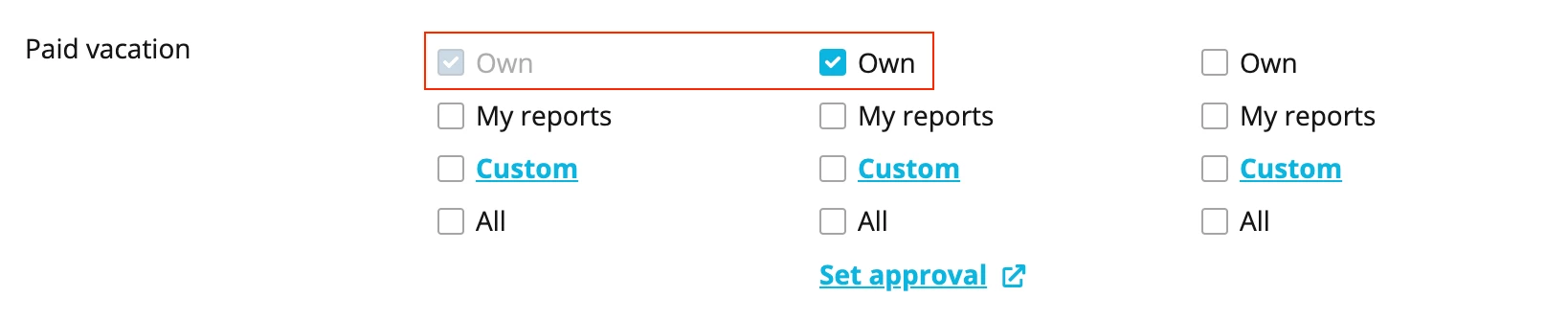
For more information about this topic, you can visit our Helpcenter article: Access rights.
If you want the absence requests to be approved under an approval workflow for some employees but not for others, you can set the approval workflow for some employee roles, for example, by creating filters. For that, you can find a very complete explanation in the following Helpcenter article: Set up approval workflows.
You might require help with your specific account set up, an Account Owner can always reach out to our Support team via Find Answers. My colleagues will be able to log in into your account and check the settings together with you.
If there is anything else I can help you with, please let me know.
Best,
Zulema
Bitte benutze für die Registrierung die gleiche E-Mail-Adresse, die Du auch zum Login in Deinem Personio Account benutzt. Dies erleichtert es uns, Dir effektiv und effizient zu helfen, wenn wir z.B. etwas in Deinem Account überprüfen müssen. Bereits registriert? > Anmelden
Achtung: Dein öffentlicher Benutzername darf keine persönlichen Informationen wie E-Mail oder andere private Daten enthalten!
Die Service und Networking Community für alle Personio Kund*innen und HRler*innen. Solltest Du Dich noch nicht registriert haben, klicke bitte unten auf "Benutzerkonto erstellen". Benutzerkonto erstellen
Enter your E-mail address. We'll send you an e-mail with instructions to reset your password.


